6
Answer/End/Reject call
Most phones send their own call signal to the headset. If not, 7 varying tones indicate an incoming call.
1.
2.
3.
The headsets has a built-in speech microphone for telephonephone communication (A10). For enhanced speech intelligibility in
noise, use the boom microphone (B5), available as an accessory.
Voice dial from headset via connected phone
See the user instruction for your phone if it supports voice dial.
1.
2. Speak your voice dial command.
Most phones that support voice-controlled dialling will send an acknowledgment signal when to speak your voice dial command.
Adjusting the volume during a call
1. Increase the volume by pressing the Volume UP button (A13)
2. Decrease the volume by pressing the Volume DOWN button (A12)
Broken Bluetooth® link
If the Bluetooth® link is broken due to exceeding the range (more than 10 meters) 3 tones will be heard in the headset and
Level Dependent “Active Listening” function (available on Xstream LD 48100-001 and 48101-001)
If your model features level dependent microphones (A7), follow the operating instructions below.
The volume is adjustable in 5 levels. Adjust the volume by pressing the LD button (A15) until you reach your desired volume
level. When you reach level 5 an audio signal indicates that you have reached the maximum level. Press the LD button again to
go back to volume level 1.
Press and hold the LD button (A15) to switch the Active Listening function OFF.
The headset remembers your last volume setting the next time you switch ON the active listening function.
• This hearing protector is provided with level-dependent attenuation. The wearer should check correct operation before use. If
disortion or failure is deteced, the wearer should refer to the manufacturers advice for maintenance and charging of the battery.
• Warning! The output of the level-dependent circuit of this hearing protector may exceed the external sound level.
Low battery warning
When the battery power is decreasing and approximately one hour remains of the maximum run time, an audio signal of 3 tones
is drained.
Charging the battery
Charge the headset
The headset will charge when connected to a USB power supply.
Use the USB charge cable supplied with the headset (B:4). Check that the charge cable is correctly connected to the headset´s
charging socket (A8) and a USB power supply (i.e. a USB port on a PC or in a car, or your mobile phone USB charge adapter).
Make sure the power supply is of the LPS type and approved according to local directives for electronic devices.
When the battery is fully charged, the LED changes to solid green.
Disconnect the charger cable when headset is fully charged.
A full charge takes approximately 3 hours.
The battery run time is approximately 50 hours with an active Bluetooth® link (A2DP and/or HFP, HSP).
The stand-by time is 100 hours with no active Bluetooth® link.
Important!
• Never leave the headset unattended when charging.
• Do not use the headset when the battery is charging.
•
• Only charge the headset at room temperature (10-25°C, (50-77°F)).
• This product contains a built-in Li-ion battery and it may only be replaced by authorised service personnel.
• Do not attempt to open the battery compartment in any way, and do not disassemble, crush or expose the battery to extreme
• Operational temperature range for the electronic functions: -20°C (-4°F) to +55°C (+120°F).
• If these instructions are followed, the product is unlikely to present any hazards within the meaning of EN 60950-1.
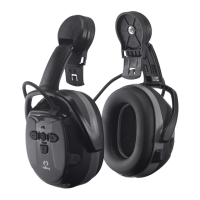
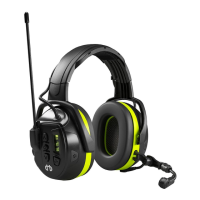
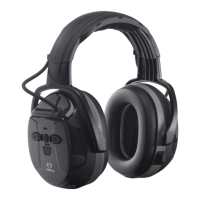
Parts (pic. A)
A1: Thermoplastic headband
A2: Thermoplastic helmet/cap attachment
A3: Replacable foam liner
A6: Cover for microphone attachment
A7: Level Dependent microphones (only on Xstream LD)
A8: Charging socket
A9: Socket for accessory boom-microphone
A10: Speech microphone
A11: LED
A12: Volume DOWN and previous track


 To Next Page