10
CAUTION: MAKE SURE THE SILCONE GASKT HAS NO CRACKS OR IS IN ANYWAY DAMAGED.
1. Remove Inner Lid from the Pressure Cooker
- Rotate counter clockwise, this will detach the inner lid.
- With one hand holding the inner lid down, gently pull the Silicone Gasket up.
2. Installing the Silicone Gasket
- Line up the Silicone Gasket on top of the metal ring.
- Gently push the Silicone Gasket making sure you see the metal ring is inside the Silicone
Gasket’s grove. Continue pushing the Silicone Gasket all around.
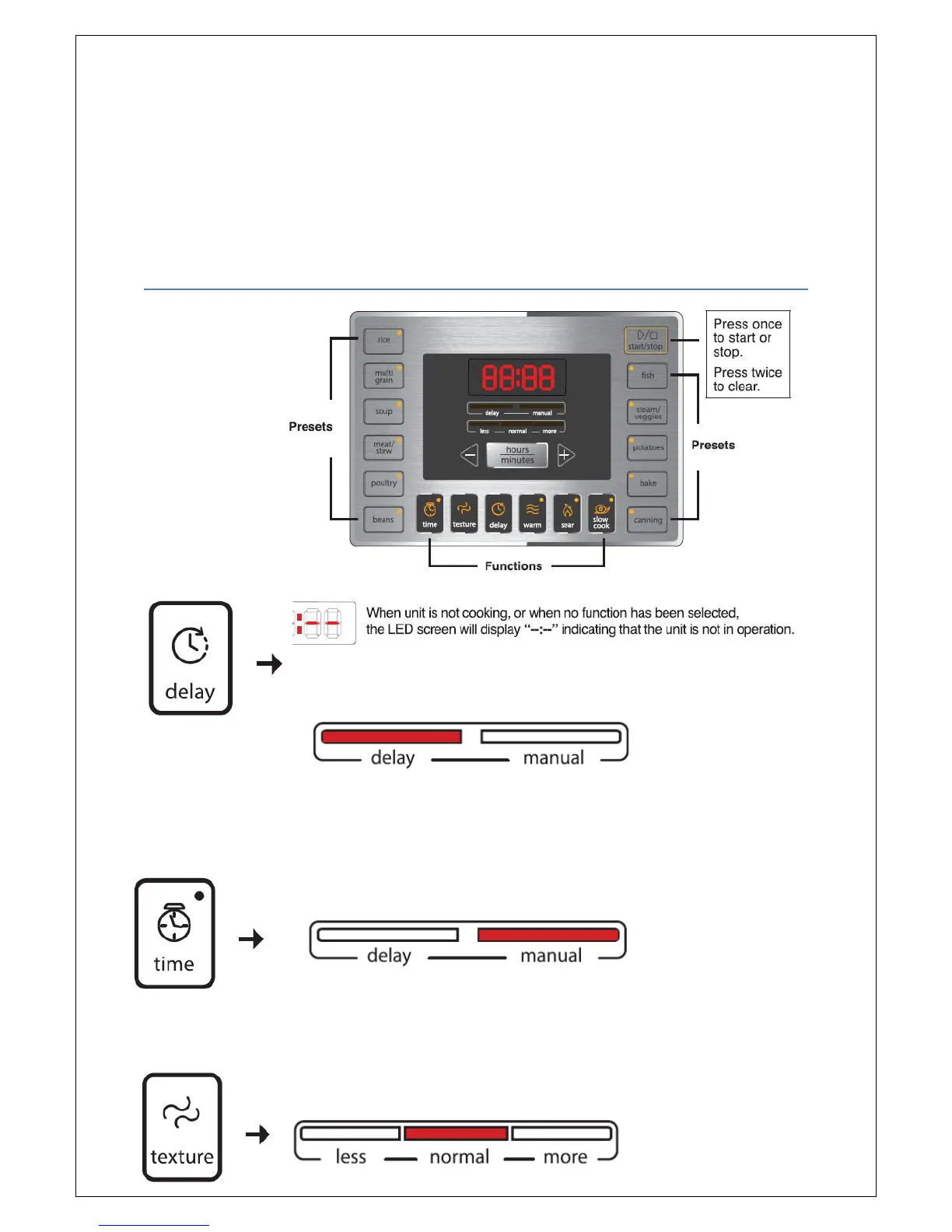
CONTROL PANEL
Main
Display
Interface
The “delay” bar will light up once the delay button has been pressed. This function will allow you to
delay the start time of each preset function.
The “manual” bar will light up only when the time button has been pressed or when the cooking time
has been changed manually. This will allow you to manually set your time for each function.


 To Next Page