16
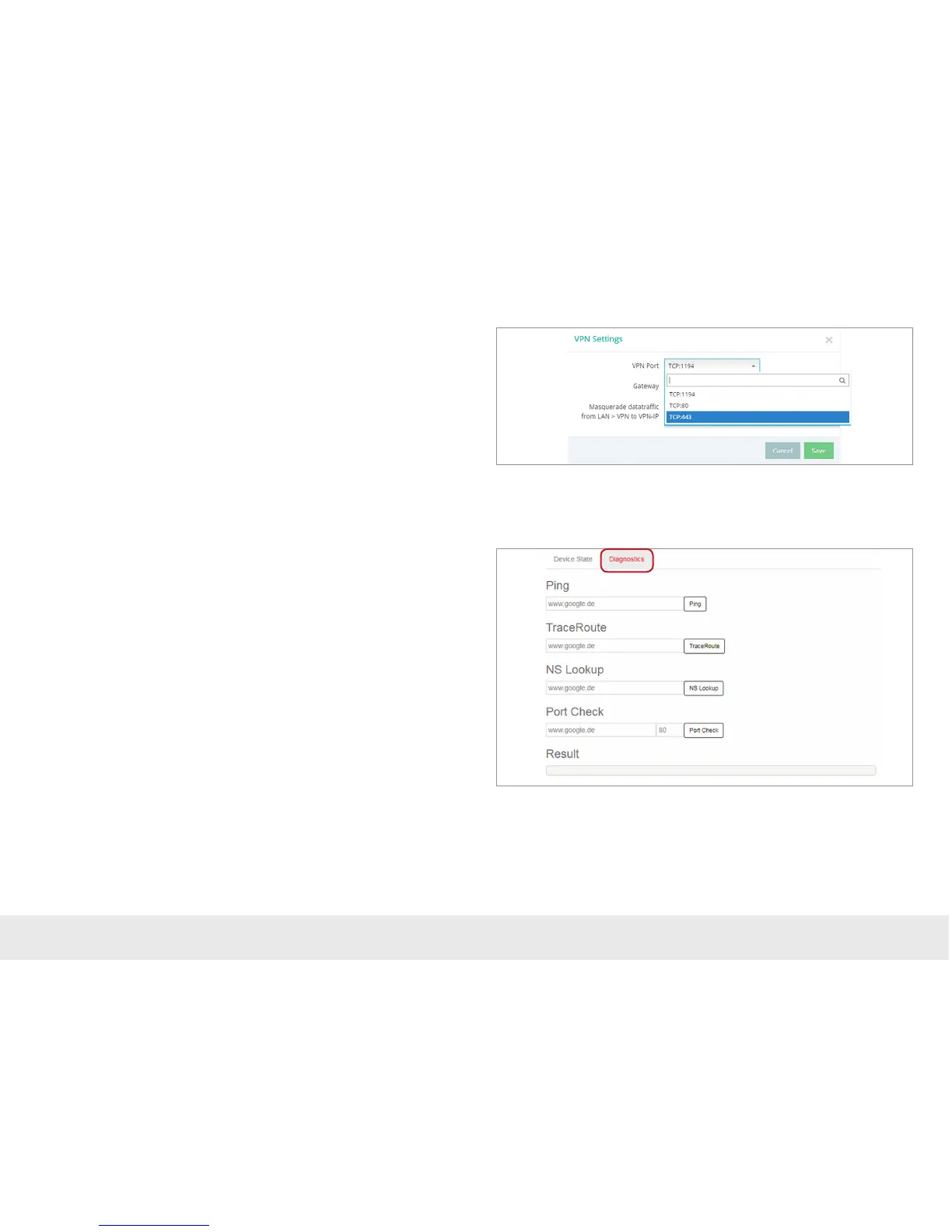
7.1.2 VPN port
- The REX 100 establish an outbound TCP connection with the address VPN-V2.
myrex24.net (5.39.123.21). This communication takes place via the port 1194 as a
standard.
- In order to be able to establish a secure connection to the myREX24 V2 server, at
least one of the following TCP ports (80, 443, or 1194) for the VPN tunnel must be
open.
Please clarify which setting is required in advance with the responsible IT department
on site. You can adjust the port correspondingly in the VPN settings of the REX 100.
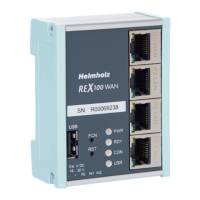
7.1.3 Diagnostics page
In the event of irregularities or interruptions when establishing the connection, the
diagnostics page supports you with troubleshooting. In the event of an error, the
technical support of Helmholz requires the respective result from the individual and
autonomous test functions.
7.1.4 Enabling the MAC address of the REX 100
It may be necessary to approve the MAC address of the REX 100 in the higher level
DSL modem or the rewall. If it should not be possible to establish a connection,
please ask your network administrator whether a MAC address lter has been acti-
vated.


 To Next Page