V103/113 Vector User Guide Chapter 3 - Operation Page 35 of 35
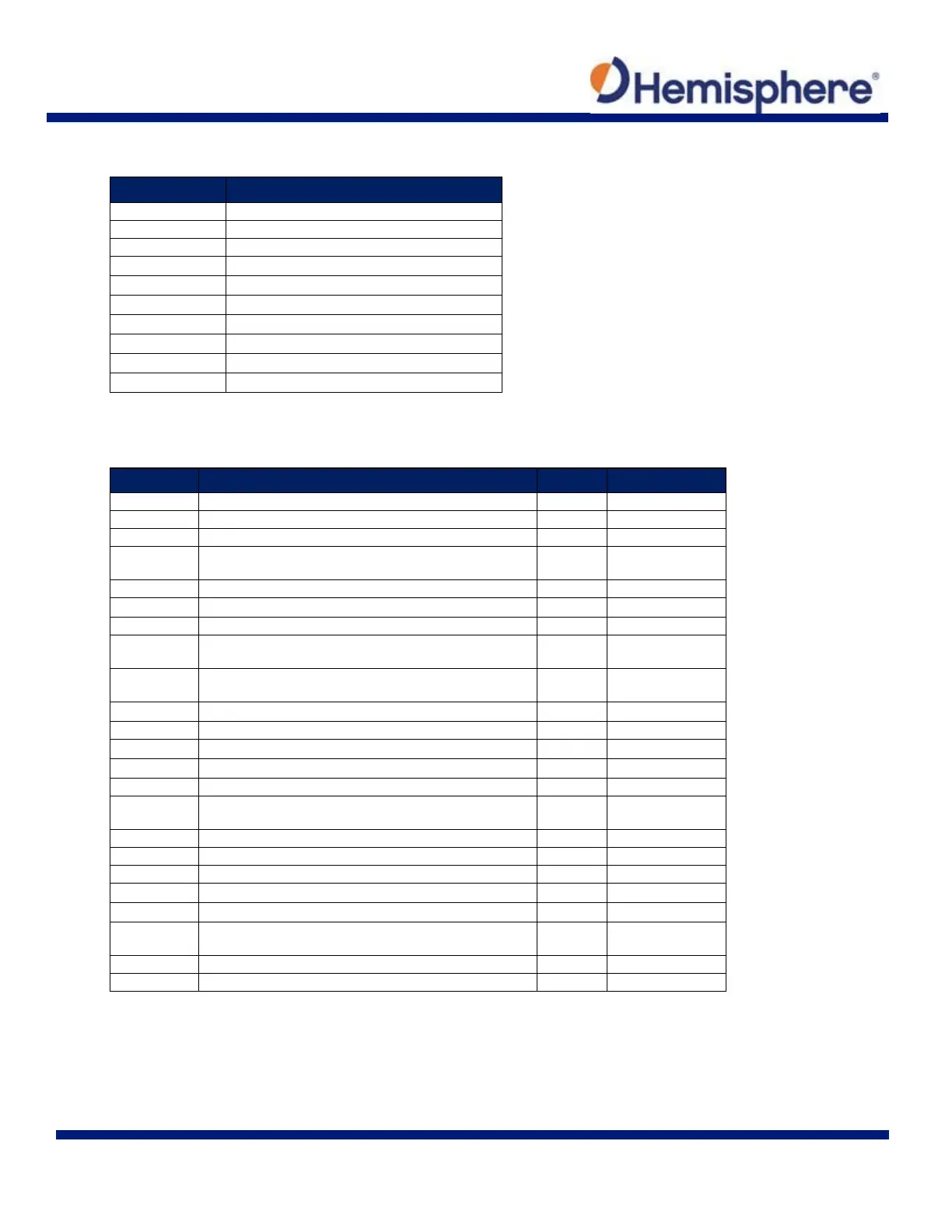
Table 3-4: Binary Messages
$JBIN Message Description
1
GPS position
2
GPS DOPs
80 SBAS
93 SBAS ephemeris data
94 Ionosphere and UTC conversion parameters
95 Satellite ephemeris data
96 Code and carrier phase
97 Processor statistics
98 Satellites and almanac
99 GPS diagnostics
Table 3-5: Parameters Specific to the $JATT Command
Parameter Description Query Specify
BALERT Enables Bridge Alert Management Functionality
X X
COGTAU Set/query COG time constant (0.0 to 3600.0 sec)
X
X
CSEP Query antenna separation
X
EXACT
Enable/disable internal filter reliance on the entered
antenna separation
X
X
FLIPBRD Turn the flip feature on/off
X
X
GYROAID Enable/disable gyro
X
X
HBIAS Set/query heading bias (-180.0º to 180.0º)
X
X
HELP Show the available commands for GPS heading operation
and status
X
HIGHMP
Set/query the high multipath setting for use in poor GPS
environments
X
X
HRTAU Set/query ROT time constant (0.0 to 3600.0 sec)
X
X
HTAU Set/query heading time constant (0.0 to 3600.0 sec)
X
X
LEVEL Enable/disable level operation
X
X
MSEP Manually set or query antenna separation
X
X
NEGTILT Enable/disable negative tilt
X
X
NMEAHE
Change the HDG, HDM, HDT, and ROT message headers
between GP and HE
X
X
PBIAS Set/query pitch/roll bias (-15.0º to 15.0º)
X
X
PTAU Set/query pitch time constant (0.0 to 3600.0 sec)
X
X
ROLL Configure for roll or pitch GPS orientation
X
X
SEARCH Force a new GPS heading search
X
SPDTAU Set/query speed time constant (0.0 to 3600.0 sec)
X
X
SUMMARY Display a summary of the current Crescent Vector settings
X
TILTAID Enable/disable accelerometer, pre-calibrated
X
X
TILTCAL Calibrate accelerometers
X


 To Next Page