6
NL
6
EN
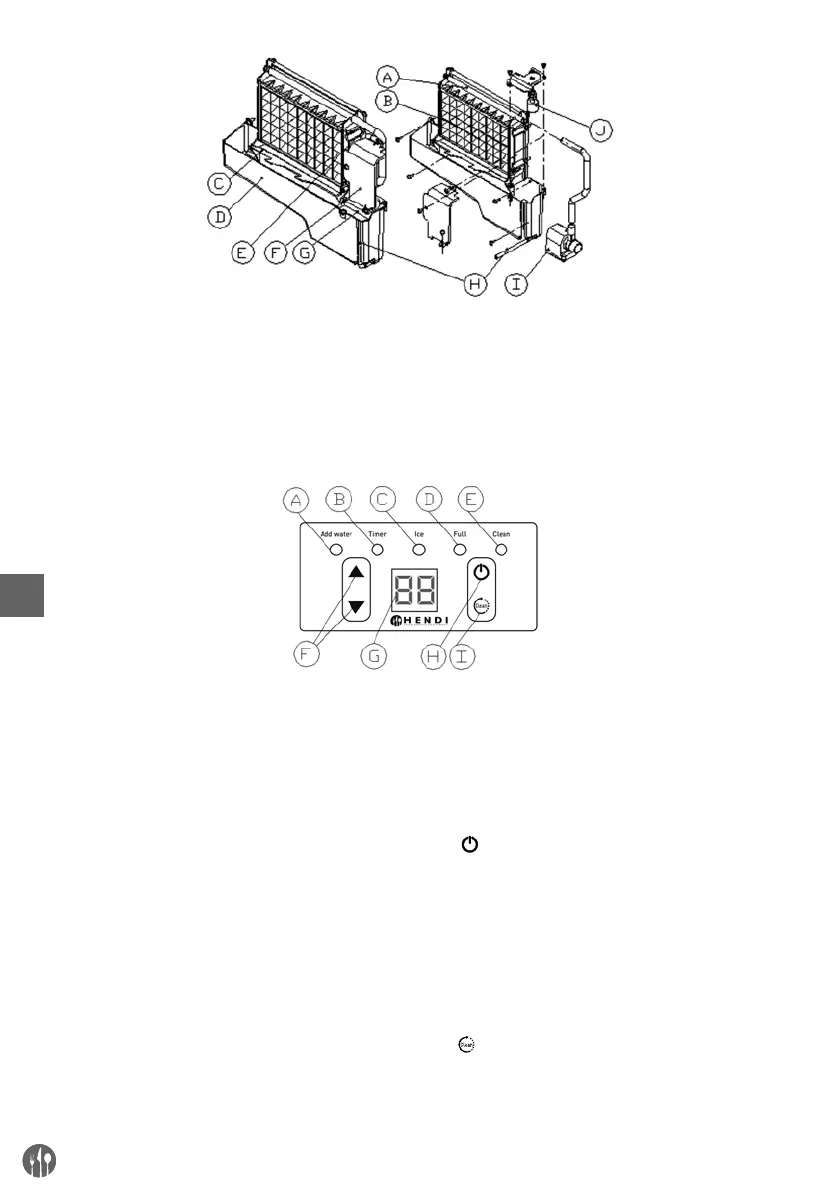
2) Operation panel
A. Water dividing pipe: with nine little holes, water
will flow out from these little holes.
B. Evaporator (ice-making module)
C. Ice full detecting board.
D. Water tank.
E. Water supplying pipe.
F. Cover board on the right side of the evaporator.
G. Water level switch installing plate.
H. Water drain pipe of the water tank.
I. Water pump.
J. Water level detecting switch.
A. ”Add water” light: When the light flashes, it
means the water is supplied to slow; and when
the light is on always, it means absence of water
in unit.
B. ”Timer” light: When this light is on, it means the
TIMER is set. Timer can be set on or off with the
clean/timer button.
C. ”Ice” light: If the light is on, means the unit is
making ice; And if the light flashes, means the
unit is during the ice-harvest process.
D. “Full” light: When the unit is full of the ice cube,
the light will be on.
E. “Clean” light: When this light is on, water pump
cleaning start. When the light flashes, water
pump cleaning stop.
F. “▲” &“▼” button: Use to adjust the ice-mak-
ing process duration period length, the default
setting is zero, 1 minute adding or decreasing
per each pressing of “▲” or “▼” button. Also
to adjust the delay time of the timer, the default
setting is zero, 1 hour adding or decreasing per
each pressing of “▲” or “▼” button.
G. LED Display: At normal condition, the number in
the window is always on, it displays the ambient
temperature; And if the number flashes, it will
display the time left in minutes of each process,
like ice-making cycle, self-cleaning program,
etc.
H. “ ” (“On/Off”) button: When the unit is off, press
this button to turn on the unit; And during the
Self-cleaning program, or normal ice-making
state, press this button to turn off the unit at
once; And also if the unit is set with the Timer,
press this button to cancel the Timer setting.
When the unit is making the ice cube, press this
button for more than 5 seconds, the unit will
switch to ice harvest process by force.
I. “ ” (“Timer clean”) button: Quickly press this
button once, to enter the Timer setting program;
And press this button for more than 5 seconds, to
enter the Cleaning program.


 To Next Page
 Loading...