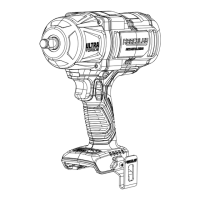
The Hercules 20V 1/2" Brushless Ultra Torque Impact Wrench (Model HCB85B2) is a powerful cordless tool designed for various fastening applications. It is part of the Hercules 20V Li-Ion battery system, with the battery pack (57373) and charger (56559) sold separately.
Function Description:
This impact wrench is engineered to deliver high torque for tightening and loosening fasteners. Its brushless motor design contributes to increased efficiency, longer motor life, and more power compared to brushed motors. The tool features an anvil for attaching impact-rated sockets, a work light to illuminate the work area, a direction switch for forward (clockwise) and reverse (counter-clockwise) rotation, and a trigger for speed control. A mode indicator/speed selector button allows users to adjust the tool's performance based on the task at hand. It also includes a belt clip for convenient carrying.
Important Technical Specifications:
- Battery Type: Hercules 20V Li-Ion (57373, sold separately)
- Charger Type: Hercules 20V Li-Ion (56559, sold separately)
- Speed (no): 0-1600 revolutions per minute (RPM)
- Blows per minute: 2100 BPM
- Anvil Size: 1/2 inch
Usage Features:
The impact wrench is designed for ease of use and versatility.
- Cordless Operation: Being battery-operated, it offers portability and freedom from power cords.
- Brushless Motor: Provides enhanced power, efficiency, and durability.
- Variable Speed Trigger: Allows for precise control over the tool's speed, with light pressure resulting in low speed and increased pressure leading to higher speed.
- Direction Switch: A three-position switch controls the direction of rotation (forward for tightening, reverse for loosening) and locks the trigger in the center position for safety during setup, accessory changes, or when idle. It is crucial not to change the direction of rotation while the anvil is rotating; wait until it comes to a complete stop.
- Multiple Modes: The tool offers four different modes, which adjust the RPM and BPM range. Mode 1 is the slowest, and Mode 3 is the fastest. The current mode can be viewed by pulling and releasing the trigger to activate the mode indicator light. The Speed Selector Button cycles through these modes.
- Mode 4 (Forward): Runs the tool and automatically shuts off once the desired torque is reached, preventing over-tightening.
- Mode 4 (Reverse): Runs the tool at full RPM until the nut breaks free, then slows down to aid in controlled removal.
- Work Light: Integrated work light illuminates the fastening area, improving visibility in dimly lit conditions.
- Belt Clip: Can be attached to either side of the handle using the supplied screw, providing convenient storage and access while working.
- Impact-Rated Accessories: It is critical to use only impact-rated square drive sockets with this tool to prevent shattering, chipping, or cracking of accessories during operation.
Maintenance Features:
Proper maintenance ensures the longevity and safe operation of the impact wrench.
- Pre-Use Inspection: Before each use, a thorough inspection of the tool is recommended. This includes checking for a leaking, swollen, or cracked battery pack, loose hardware, misalignment or binding of moving parts, cracked or broken parts, and any other condition that might affect safe operation.
- Post-Use Cleaning: After use, the external surfaces of the tool should be wiped with a clean cloth to remove dirt and debris.
- Battery Pack Care:
- Battery packs should be kept dry and not exposed to extreme temperatures (above 140°F).
- Avoid opening, dropping, short-circuiting, puncturing, or incinerating the battery pack.
- Charge battery packs only according to the charger's instructions and within the specified temperature range.
- Inspect the battery pack before every use and do not use or charge if damaged.
- Damaged battery packs should never be serviced by the user; service should only be performed by the manufacturer or authorized service providers.
- Li-Ion battery packs must be recycled or disposed of properly. Do not short, incinerate, or open the battery.
- Storage: Disconnect the battery pack and store the battery pack, charger, and tool in a dry, indoor area, out of reach of children, and away from metal objects (e.g., paperclips, coins) to prevent accidental shorting.
- Troubleshooting: The manual provides a troubleshooting guide for common issues such as the tool not starting, operating slowly, decreased performance, excessive noise, or overheating, along with likely solutions. For instance, if the tool overheats, it suggests allowing it to work at its own rate and clearing blocked motor housing vents using compressed air while wearing appropriate safety gear.
- Professional Service: Procedures not specifically explained in the manual must be performed only by a qualified technician. If abnormal noise or vibration occurs, the problem should be corrected before further use.
The manual emphasizes critical safety warnings, including the importance of reading and understanding the entire safety information section, wearing eye protection (ANSI-approved safety goggles with side shields), and preventing unintentional starting by ensuring the switch is in the off-position before connecting the battery pack or handling the tool. It also highlights lithium battery safety, warning that mistreated batteries can vent fire or explode due to the large amount of energy they store.


 To Next Page
 General