UNIVERSAL BLUETOOTH AMPLIFIED BOX
1) Make sure the power cables are correctly connected to DC 12V, and the power
switch is in power-on status.
2) The Herdio Bluetooth Box is waiting for being paired right after it is powered on.
3) Turn on the Bluetooth on your Bluetooth device, scan for the unit Bluetooth
Name “Herdio” , Click it to connect.
4) You will hear a con¿rmation tone to indicate that the connection is made
successfully. The Herdio Bluetooth Box then is ready to stream
music from your
device.
5) Please make sure the Bluetooth is turned on at your device. When the device is
in Bluetooth range, it will connect Bluetooth automatically, and will be disconnected
automatically when it is out of Bluetooth range.
· Built-in 2 Channel Ampli¿er
· 4.0 Bluetooth Wireless Music Streaming
· 3.5mm Auxiliary Input
BLUETOOTH OPERATIONS
SPECIFICATIONS
AMP-BTX01
IMPORTANT SAFETY PRECATIONS
Changes or modifications not expressly approved by the party responsible for compliance
could void the user’s authority to operate the equipment. This device complies with Part 15
of the FCC Rules. Operation is subject to the following two conditions:
(1) this device may not cause harmful interference, and
(2) this device must accept any interference received,including interference that may cause
undesired operation.
Note: This equipment has been tested and found to comply with the limits for a Class B
digital device, pursuant to Part 15 of the FCC Rules. These limits are designed to provide
reasonable protection against harmful interference in a residential installation. This
equipment generates, uses, and can radiate radio frequency energy, and if not installed
and used in accordance with the instructions, may cause harmful interference to radio
communications. However, there is no guarantee that interference will not occur in a
particular installation. If this equipment does cause harmful interference to radio or
television reception, which can be determined by turning the equipment off and on, the user
is encouraged to try to correct the interference by one or more of the following measures:
– Reorient or relocate the receiving antenna.
– Increase the separation between the equipment and receiver.
– Connect the equipment into an outlet on a circuit different from that to which the receiver
is connected.
– Consult the dealer or an experienced radio/TV technician for help.
This equipment complies with FCC radiation exposure limits set forth for an uncontrolled
environment. This equipment should be installed and operated with a minimum distance of
20cm between the radiator & your body. This transmitter must not be co-located or
operating in conjunction with any other antenna or transmitter.

 Need help?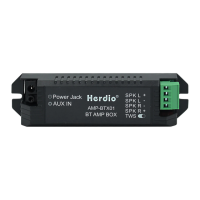

 To Next Page
 General