EasyManua.ls Logo

Heta Scan Line 16 - Changing to Back Smoke Outlet; Procedure for Back Outlet Conversion

Default Icon
9 pages
Print Icon
To Next Page IconTo Next Page
To Previous Page IconTo Previous Page
Loading...
8
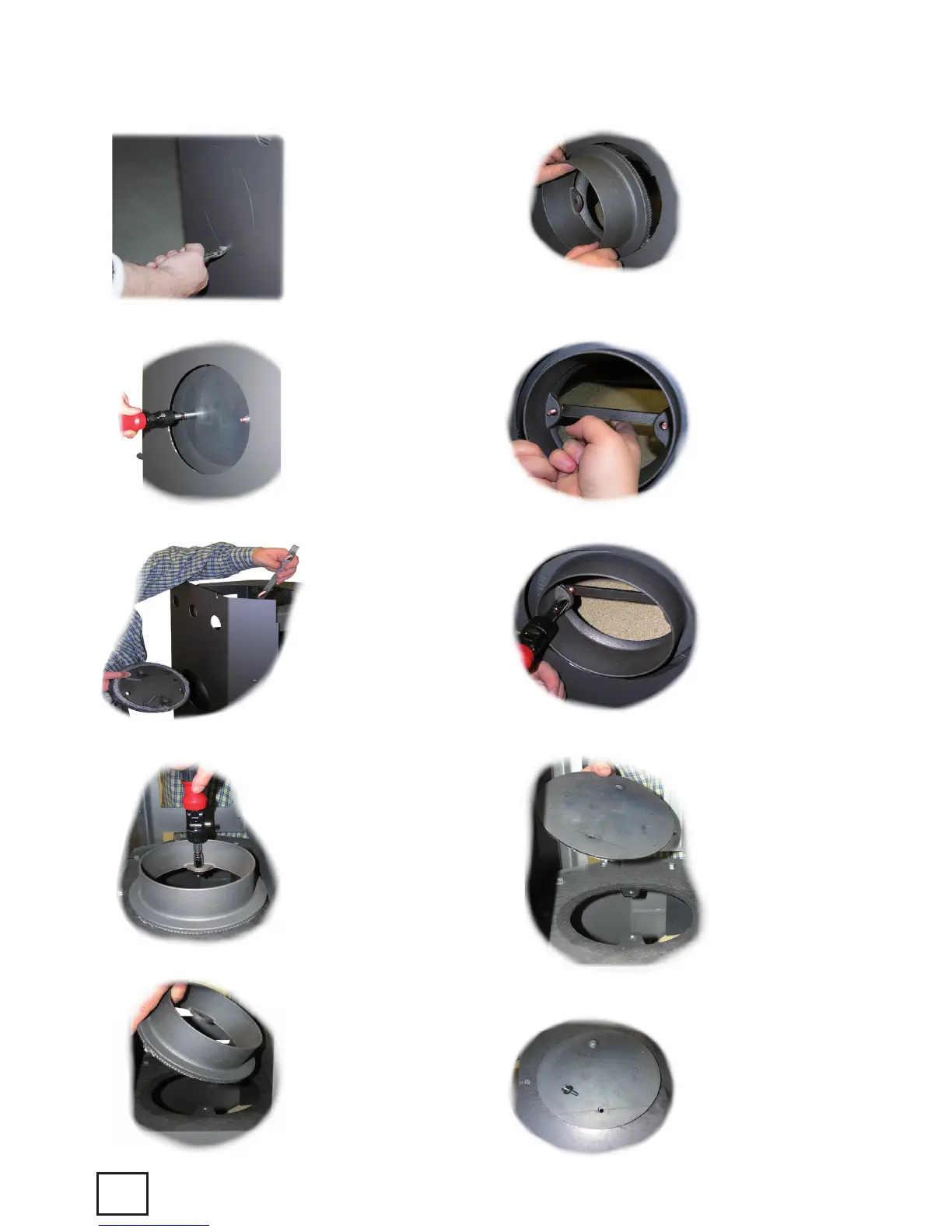
Changing to back smoke outlet
Fig. 2-11
Figure 2
Cut the little piece
of metal which con-
nects the cover to
the back panel with
a side-cutting nip-
pers. After that twist
off the cover.
Figure 4
Remove the cover
from the back out-
let and remove the
holder through the
top outlet, (if the
stove has a holder).
Figure 3
Loosen the two
screws which
tighten the cover
towards the stove.
Figure 6
Lift the flue gas
spigot out about
of the stove
Figure 5
Loosen the bolts in
the flue gas spigot
out above.
Figure 10
Place the cover
from the back
outlet on top of
the stove.
Figure 9
Make sure that
the flue gas
spigot it placed
centred and after
that tighten the
bolts.
Figure 8
Tighten the flue
gas spigot on the
back of the stove
with the holder or
the bolts.
Figure 7
Place the flue gas
spigot through
the back panel
and towards the
burning chamber.
Figure 11
Tighten the cover
with the bolts
belonging to it.

Related product manuals