OPERATION GUIDE
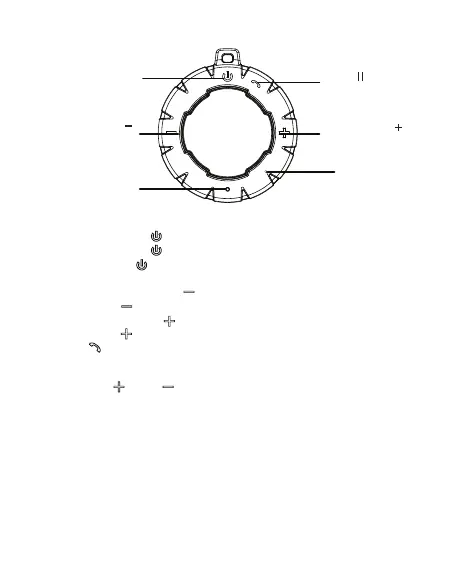
Power ON/OFF
Stereo Pairing
Indicator Light
Pause
Handsfree Call
Volume Up
Previous Track
Volume Down
Next Track
Built-in Mic
1. Power ON/OFF
Press and hold the “ ” for power on
Press and hold the “ ” again for power off
Short Press the “ ” while the power is on to enable the True
Wireless Stereo pairing.
2. Previous: Press and hold “ ” to access the previous track in playlist.
Short Press “ ” to lower the volume.
3. Next: Press and hold “ ” to access the next track in playlist.
Short Press “ ” to increase the volume.
4. Press “ ” to play or pause a track.
You can also press this button to pick up the call.
5.Light Button
Long press " “and“ ” to cycle light mode.
6. Please stay close to the microphone jack when speaking, preferably
less than 0.5m away.


 To Next Page