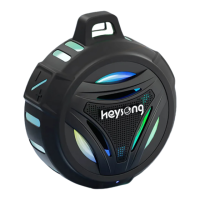
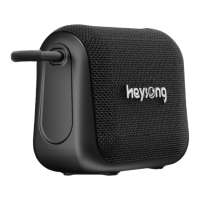
The Heysong Bubble Speaker is a portable Bluetooth speaker designed to provide a fun and high-quality audio experience. It aims to be a world-class brand, offering good sound at an accessible price. The speaker is designed for ease of use and portability, making it suitable for various environments.
Function Description
The primary function of the Heysong Bubble Speaker is to play audio wirelessly via Bluetooth. It connects to your Bluetooth-enabled devices, such as smartphones, tablets, or computers, to stream music, podcasts, or other audio content. The speaker features intuitive controls for managing playback, volume, and calls.
A notable feature of the Heysong Bubble Speaker is its True Wireless Stereo (TWS) pairing capability. If you own two Heysong Bubble Speakers, you can pair them together to create a stereo sound experience, enhancing the audio immersion. This allows for a wider soundstage and more dynamic audio output, making it ideal for parties, gatherings, or simply enjoying music with greater depth.
The speaker also includes a built-in microphone, enabling hands-free calling. When connected to your phone, you can answer and end calls directly through the speaker, making it convenient for communication without needing to pick up your device.
Usage Features
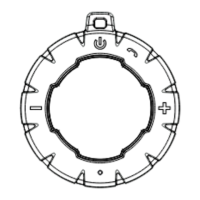
- Power On/Off and Stereo Pairing: To power on the speaker, press and hold the power button. To power it off, press and hold the same button again. When the speaker is on, a short press of the power button enables True Wireless Stereo pairing, allowing two Heysong Bubble Speakers to connect for a stereo sound experience.
- Volume and Track Control: The speaker features dedicated buttons for volume control and track navigation. Press and hold the "-" button to access the previous track in your playlist, and short press it to lower the volume. Similarly, press and hold the "+" button to access the next track, and short press it to increase the volume.
- Play/Pause and Call Management: A dedicated play/pause button allows you to start or stop audio playback. This button also serves as the call management button; you can press it to pick up an incoming call.
- Light Button: The speaker includes a light button. A long press of this button, combined with the "-" and "+" buttons, cycles through different light modes, adding a visual element to your audio experience.
- Microphone Usage: For optimal performance during calls, it is recommended to stay close to the microphone jack, preferably less than 0.5 meters away, to ensure clear voice pickup.
- Bluetooth Pairing: To connect the speaker to your Bluetooth device for the first time, ensure your device is within three meters of the speaker. Turn on the speaker by pressing and holding the power button for 3 seconds; it will enter pairing mode, indicated by a flashing blue light. Then, activate Bluetooth on your device, search for "HEYSONG BUBBLE" in the list of available devices, and select it to pair.
- Automatic Reconnection: Once paired, the speaker will automatically connect to the last connected device when it is within range, simplifying subsequent uses.
- Auto-Off Feature: If no device is paired with the speaker for more than 10 minutes, it will automatically turn off to conserve battery life.
- TWS Functionality: To use the TWS function with two Heysong Bubble Speakers, power on both speakers and ensure neither is connected to another device. Press the power button on one of the speakers. The two speakers will connect automatically, indicated by an audible tone. One unit will show a quickly blinking blue LED, while the other will have a solid blue LED. Then, search for "HEYSONG BUBBLE" on your audio source and pair with it. Once successfully paired, the indicator light on both speakers will remain solid blue. To disconnect the TWS connection, long press the power button on one of the speakers. To disconnect Bluetooth from the device, long press the power button again on one of the speakers.
Maintenance Features
- Waterproof Design: The Heysong Bubble Speaker is rated IP67, which means it is highly resistant to water. It can withstand heavy splashes and can even be submerged in water up to one meter deep for 30 minutes. This makes it suitable for use in wet environments like bathrooms, by the pool, or outdoors in light rain. However, it is crucial to ensure that the silicone case cover is securely closed when using the speaker in wet conditions. If the speaker gets wet, it is advisable to dry it thoroughly before using it again.
- Charging: The speaker is equipped with an internal rechargeable battery. To charge it, connect one end of the included USB Charging Cable to the charging port on the speaker and the other end to a suitable USB port on a computer or a USB wall adapter. A red LED light will illuminate to indicate that the speaker is charging. The red light will turn off once the unit is fully charged.
- Battery Life and Charging Time: The internal battery takes approximately 2 to 3 hours to fully charge. When the battery is low, you will hear an audible "low battery" prompt, indicating that it needs to be recharged.
- Battery Durability: To protect the battery's lifespan and durability, it is recommended to fully charge the speaker if it will not be used for an extended period.
- Safety Precautions:
- Keep the product and its charging cable away from excessive heat to prevent damage.
- Always use the original charging cable provided in the package to charge the speaker. Do not use a damaged charging cable, as this could pose a safety risk or damage the device.
- Do not attempt to disassemble the device. Disassembly can void the warranty and potentially damage the internal components.
- Troubleshooting: The manual provides solutions for common issues, such as a "low battery" prompt (speaker needs charging), Bluetooth connection distance problems (signal blocked by obstacles, electromagnetic interference, or low battery), the speaker not powering on (needs charging), and issues with track/volume control (ensure the speaker is in Bluetooth mode for full control).

 To Next Page

 General