Need help?
Do you have a question about the HGLRC Zeus F722 and is the answer not in the manual?
Configures the SBUS receiver for serial communication.
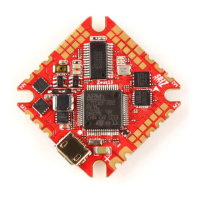
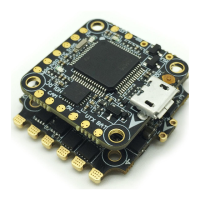
The HGLRC Zeus F722 mini Flight Control is a compact and versatile flight controller designed for use with 100mm-450mm frame kits, offering a comprehensive set of features for drone enthusiasts and builders. This manual provides a detailed guide for setting up, configuring, and troubleshooting the device, ensuring optimal performance and a smooth flying experience.
The Zeus F722 mini Flight Control serves as the central processing unit for your drone, managing various aspects of flight and communication. At its core, it utilizes an STM32F722 RET6 CPU and an MPU6000 gyroscope/accelerometer to provide precise flight stabilization and control. The flight controller supports a wide range of receivers, including SBUS, IBUS, DSMX, and R9MM, allowing for flexible integration with different remote control systems. It operates on a 3-6S Lipo input voltage and provides regulated 9V/1A and 5V/2A BEC outputs for powering other components. An 8M black box is integrated for flight data logging, which is crucial for analysis and troubleshooting.
The device's interface description highlights its connectivity options. It features dedicated ports for a camera, GPS, and various video transmitters (VTX), including TBS Unify Pro 5.8G and DJI Digital FPV Air Unit. Multiple UART serial ports are available for different functions: UART1 for the receiver, UART2 for GPS, UART3 for VTX image transmission, UART4 for DJI systems, and UART6 for ESC telemetry. This extensive connectivity allows for a highly customized and integrated drone build.
Setting up the Zeus F722 mini Flight Control involves several key steps, starting with driver installation and firmware flashing. The manual guides users through the process of connecting the flight controller to a computer, installing necessary drivers (such as ImpulseRC_Driver_Fixer), and flashing the appropriate Betaflight firmware. This ensures the flight controller is running the latest software and is ready for configuration.
Calibration is a critical initial step for accurate flight. The manual instructs users to place the aircraft horizontally and perform an accelerometer calibration by clicking "Reset Z axis" and then "Calibrate Accelerometer" in the Betaflight configurator. This ensures the flight controller accurately senses its orientation.
Configuring the UART serial ports is essential for connecting peripherals. The manual specifies which UART ports are designated for the receiver, GPS, VTX, DJI systems, and ESC telemetry. Users need to enable the corresponding serial port in the Betaflight configurator for each connected device. For example, to use ESC telemetry, UART6 must be enabled, and the TX line from the ESC needs to be connected to RX6 on the flight controller.
Selecting the aircraft model and ESC protocol is another important configuration step. Users can choose their aircraft model (e.g., Quad X) in the "Configuration" tab and verify motor steering in the "Motors" tab. The manual emphasizes the importance of removing propellers before testing motors and warns users to understand the risks involved. For ESC protocol, DSHOT600 is recommended as a universal option.
Voltage and current parameters can be set in the "Power & Battery" tab, allowing users to monitor battery health and consumption accurately. This includes configuring the voltage and current meter sources, minimum/maximum cell voltages, warning cell voltage, and battery capacity.
Receiver setup is detailed for various types, including SBUS and DSMX. Users are instructed to configure the serial port for the receiver (UART1) and select the appropriate serial receiver provider (e.g., SBUS or SPEKTRUM2048). After setup, checking the receiver signal in the "Receiver" tab ensures proper communication between the remote control and the flight controller.
GPS parameters setting involves connecting the GPS module to UART2 and enabling the GPS function in the "Ports" tab. Users can select the UBLOX protocol and configure auto-baud and auto-config settings for optimal GPS performance.
VTX serial port use is covered for both OSD smart audio and DJI FPV Air Unit. For OSD smart audio, the VTX is connected to UART3, and the VTX protocol is selected in the "Ports" tab. The manual also provides wiring diagrams for connecting the DJI FPV Air Unit to UART4. The Betaflight OSD is a powerful tool for adjusting VTX settings in the field, allowing users to change frequency band, channel, and power level directly from their goggles. The OSD menu, accessed via specific stick commands, also allows for adjusting PIDs, rates, and other tuning-related parameters.
LED settings can be configured in the "Configuration" tab by enabling LED support and then in the "LED Strip" tab, where users can set the wire ordering mode and customize LED functions and colors.
The manual includes a troubleshooting section to address common issues. It provides warnings about polarity, power connections, and the importance of removing propellers during testing. Key advice includes:
For "after sales questions," the manual outlines the warranty and repair policy. If a product is found to be defective upon receipt, free repair service is provided for quality problems. Damage due to improper operation may also be repaired, subject to inspection. Domestic customers are directed to after-sales service personnel, while overseas customers should contact the official website for support.
Common product daily problems are also addressed:
These maintenance and troubleshooting tips help users diagnose and resolve issues, ensuring the longevity and proper functioning of their Zeus F722 mini Flight Control.
 General
| Flight Controller | HGLRC Zeus F722 |
|---|---|
| Barometer | BMP280 |
| Input Voltage | 3-6S Lipo |
| Firmware | Betaflight |
| Dimensions | 36x36mm |
| Built-in OSD | Yes |
| Built-in PDB | Yes |
| Mounting Pattern | 30.5x30.5mm |
| Processor | STM32F722 |
| Mounting Hole | 30.5x30.5mm |
| Blackbox | 16MB |
| BEC Output | 5V 2A |


 To Next Page