39
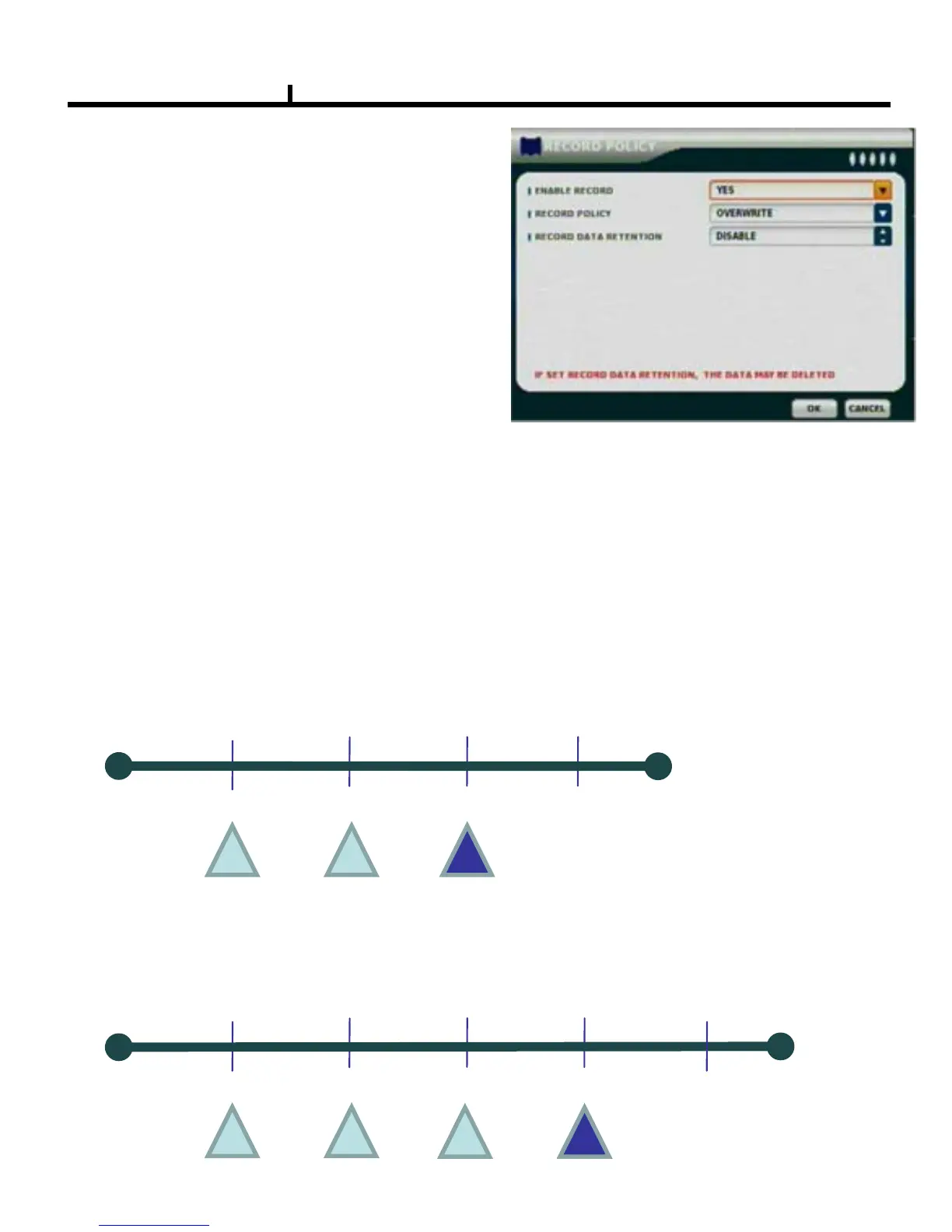
RECORD POLICY
Select RECORD types.
-Two types (Single Record, Overwrite)
-Default Record Policy is Overwrite
ENABLE RECORD
Select record status.
RECORD POLICY
Select record policy:Overwrite or Single record
If we change record policy from overwrite to single
when hard disk is full.
It won't stop record immediately. It would stop after
current record block is finished. It might be few
minutes later
RECORD DATA RETENTION
Select record data retention days that otherwise data may be deleted
Working Conditions
- Activate 1 time a day at 00:00.
- Once activated, it deletes data older than configured day from activation time.
- Actual data recording period will be ‘Number of configured days + @’
i.e) in case of 3days retention configuration
1
st
day 2
nd
day 3
rd
day
4
th
day
00:00
00:00
00:00
00:00
* Retention feature activates every 00:00. It doesn’t over than 3 days on last check point(red) and
it still hold 4
th
days data.
5th day
1
st
day 2
nd
day 3
rd
day
4
th
day
00:00
00:00
00:00
00:00
00:00
•1
st
days data will be lost at 4
th
check point(red). In case of data retention feature activation,
• actual recording data period will be ‘Number of configured days + @ (@ is less than 24 hours)



 To Next Page