
 Need help?
Do you have a question about the HiBy R2 II and is the answer not in the manual?
Details the 2.45" IPS multi-touch touchscreen with 480*360 resolution for user interaction.
Explains how to turn the device on/off and control the screen using the power button.
Details the LED colors and their corresponding meanings related to charging and sample rates.
Covers the external Micro SD slot for storage, card scanning, and computer card reader functionality.
Details the USB Type C port for data, charging, and coaxial digital output with a special cable.
Utilize R2 II as a Bluetooth sound card for wireless audio output to headphones or speakers.
Stream Bluetooth audio from a smartphone to R2 II for high-quality digital audio output.
Send music via WiFi using DLNA or AirPlay to R2 II for lossless digital audio source output.
Details WiFi support for music transfer, HiByLink, DLNA, Airplay, OTA updates, and streaming apps.
Covers Bluetooth 5.1 support for high-definition protocols like UAT, LDAC, and aptX.
Explains how to perform firmware updates wirelessly via OTA connection.
Details the process for manual firmware updates using the SD card and official website.
Provides essential warnings against repair, water damage, and safe charging practices.
Advises on avoiding headphone use in dangerous environments for external awareness.
Explains how to force a device restart by holding the power button for 30 seconds.
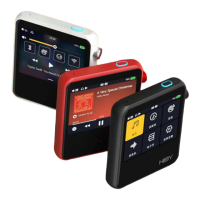
The HiBy R2 II is a portable digital audio player designed for high-fidelity music playback. It supports a wide array of lossless and lossy music formats, ensuring compatibility with most audio files. The device is equipped with a multi-touch IPS touchscreen for intuitive navigation and control, offering a visual interface for managing your music and settings.
The primary function of the HiBy R2 II is to play digital audio files with high performance and fidelity. It acts as a standalone music player, allowing users to store and access their music library on a Micro SD card. Beyond its core playback capabilities, the R2 II offers versatile connectivity options, enabling it to function in various roles within an audio setup.
It can serve as a USB DAC, converting digital audio signals from a computer into analog output for headphones or speakers. This feature allows the R2 II to enhance the audio quality of your computer's sound. When connected to a computer via the supplied USB cable, the device can also act as a card reader, facilitating the transfer of music files to and from the inserted Micro SD card.
The R2 II boasts extensive wireless capabilities. It supports WiFi (2.4GHz/5GHz) for music transmission, online updates (OTA), internet radio, and streaming apps like TIDAL and Qobuz. This allows users to access a vast library of online music and keep their device's software up to date. The HiByLink feature, when used with the HiBy Music app, enables remote control of the R2 II via a mobile phone's Bluetooth connection, allowing users to change tracks, select songs, and manage their music library from a distance.
Furthermore, the R2 II supports Bluetooth 5.1, including high-definition Bluetooth protocols such as UAT, LDAC (two-way), and aptX. This allows for high-quality wireless audio streaming to Bluetooth headphones or speakers. The device can also function as a Bluetooth sound card, receiving audio from a computer via USB and transmitting it wirelessly to Bluetooth headphones.
The R2 II can act as a digital source from Bluetooth input, receiving audio from a smartphone via Bluetooth and outputting it as high-quality digital audio via coaxial or USB Audio output. Similarly, it can function as a digital source from WiFi input, receiving music via DLNA or AirPlay from Android or iOS devices, and then outputting it as lossless quality digital audio through coaxial or USB Audio.
 General
| DAC | ES9219C |
|---|---|
| Operating System | HiBy OS |
| SoC | Ingenic X1000E |
| USB | USB Type-C |
| Headphone Output | 3.5mm |
| Output Power | 70mW + 70mW @ 32Ω |
| Weight | 85g |
| Bluetooth Codec Support | SBC, AAC, LDAC |
| Display | 2.45 inch |
| Resolution | 480 x 360 |
| Storage | Supports up to 2TB Micro SD card |
| Battery Life | Up to 15 hours |
| Connectivity | Wi-Fi, Bluetooth |
| Audio Formats | APE |

 To Next Page
