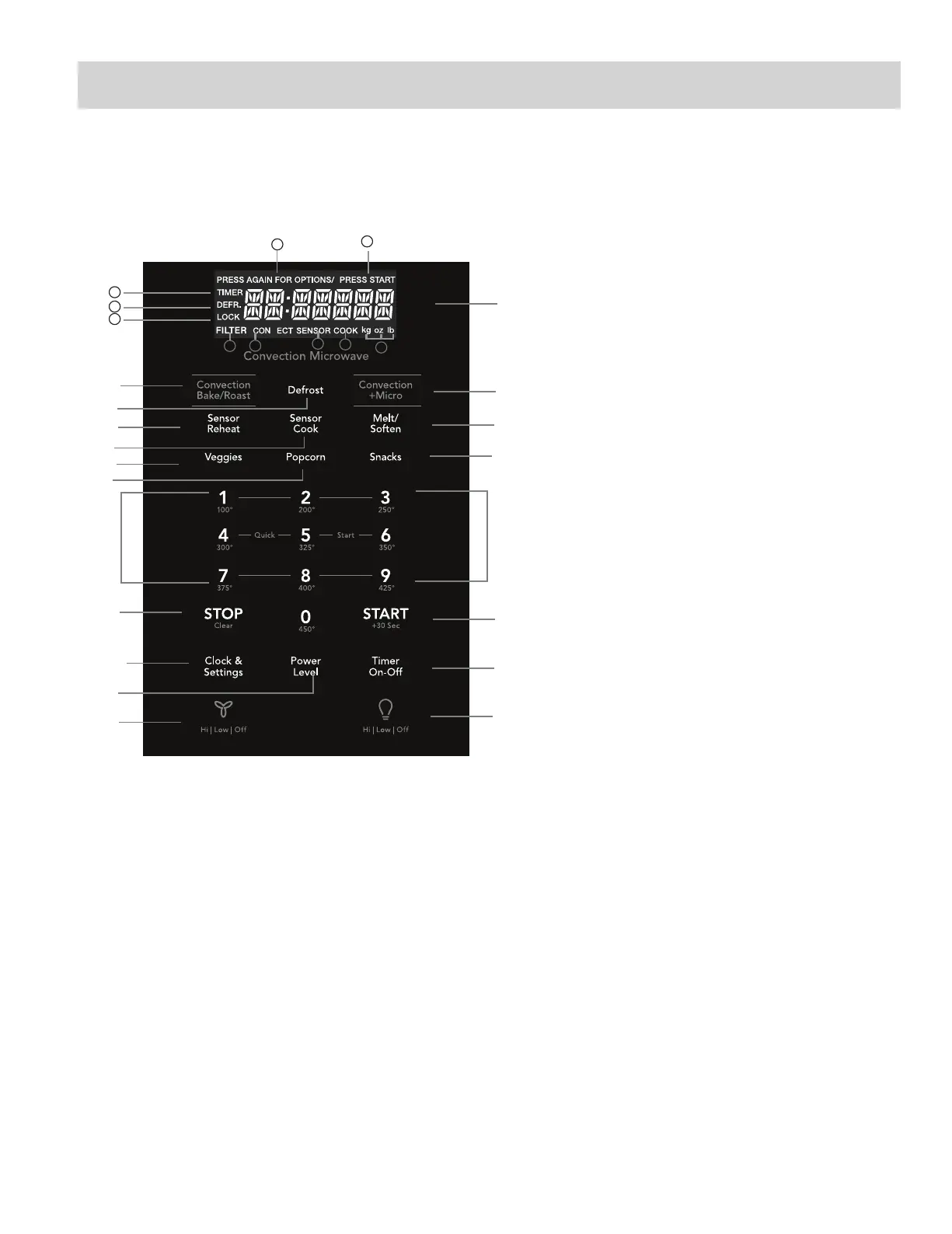
CONTROL PANEL
The 7-digit Interactive Display spells out operating steps
and shows cooking hints.
Note:For detailed information,please go to relative page listed above.
1 h . k g ''''`
Number next to the control panel key
illustration
indicates pages on which
there are featu
re
descriptions and usage
information.
The display includes a clock and indicators
time settings,
cook
powers, sensor, quantities, weights and cooking
functions selected.
1b. TIMER:
Icon displayed when timer is being set or running.
1c. COOK:
Icon displayed when starting microwave cooking.
1d. DEFR:
Icon displayed when defrosting food.
1e. LOCK:
Icon displayed control lock.
1g. PRESS START:
Icon displayed when a valid
function can be started.
1a. SENSOR:
Icon displayed when using sensor cook.
1f. PRESS AGAIN FOR OPTIONS:
in
when additional options are available.
Icon displayed
Icon displayed when choosing the weight.
1h. kg, oz, lb:
that
show the time of day, cooking
(15)
(9)
(2)
(7)
(3)
(5)
(11)
(14)
(10)
(18)
(13)
(12)
(17)
(19)
(6 )
(4)
(8)
(16)
(
1
) Display:
1i. CONVECT:
Icon displayed when choosing convect.
V
1b
1d
1e
1a
1c
1h
1i
1
1f
1g
2
3
4
5
6
7
11
12
14
15
17
8
9
10
13
16
18
Convection Bake/Roast
Defrost
Convection+Micro
(5 different settings) Sensor Reheat
Sensor Cook
Melt Soften
V ggies
e
Popcorn
Snacks
Numeric pads (0 thru 9)
Stop/Clear
START
+30 sec
Clock & Settings
Power Level (11power levels
available)
Timer (On-Off)
Exhaust (High/Low/Off) ~ Use
adjust fan speed.
to turn the
exhaust fan off, or to
Surface Light (High/Low/Off)
Press this pad
to adjust the
brightness of
surface lights.
19
(9 instant key settings)
Quick Start
1j. FILTER:
Icon displayed replace
Filter.
1j



 To Next Page