5
6. Verifying installation
Driver installation -macOS
1. Go to http://www.highpoint-tech.com/USA_new/series-
rs6661a-esata-download.htm and download the
manager and driver files
2. For the manager, run HighPointWebGUI.pkg and follow
the onscreen instructions
3. For the driver, run HighPointRR.pkg, follow the onscreen
instructions, and restart your system
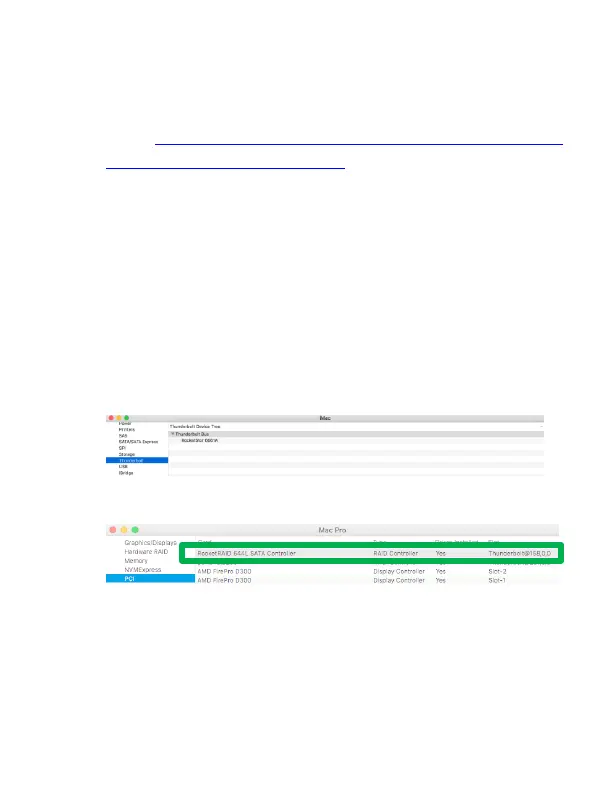
4. Click the Apple icon on top left of the screen, and select
About This Mac, and then select More Info. Next, select
System Report, and click Thunderbolt on left side of the
System Information panel. The RocketStor 6661A device
should be listed under Thunderbolt Bus.
5. Next, click PCI on left side of the System Information
panel. ‘RocketRAID 644L SATA Controller’ should be listed.
Verify the installation -Windows
Please install the Thunderbolt Software from the system
motherboard provider first.
After connecting the RocketStor 6661A-eSATA to the system, a
pop-up window should be displayed asking you approve or reject
the Thunderbolt Device connection.



 To Next Page