10
REACTIVE FORCE CONTROL
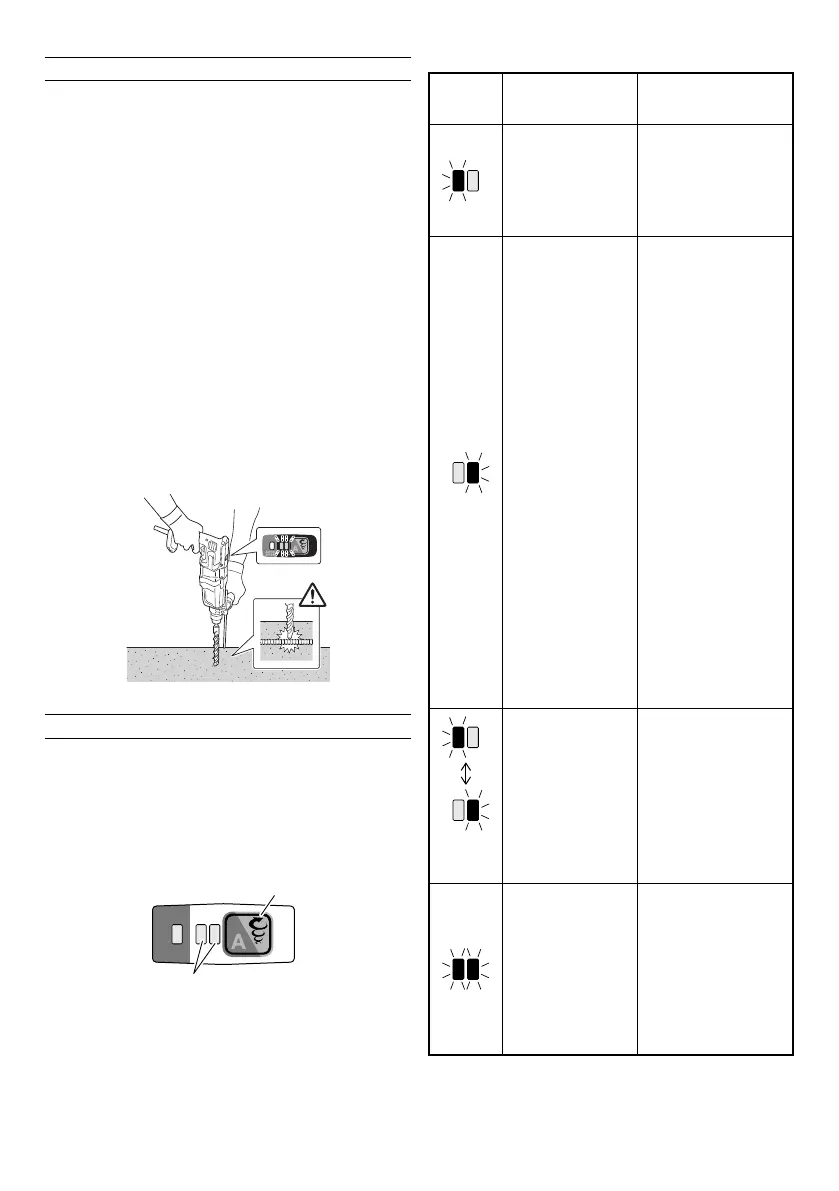
This product is equipped with a Reactive Force Control
(RFC) feature that reduces jerking of the tool body.
If the tool bit is suddenly overburdened, any jerking of the
tool body is reduced by activation of the slip clutch or by
stopping of the motor by the sensor built into the tool body.
When the RFC is activated, the two LEDs fl ash red in
a synchronized manner. (Table 1) During the fl ashing,
the motor will be off . Press the changeover switch to
recommence operation.
Because the RFC feature may not activate or its performance
may be insuffi cient depending on the working environment
and conditions, be careful not to suddenly overburden the
tool bit while operating.
● Possible causes of sudden overburdening
1 Tool bit biting into material
2 Impact against nails, metal or other hard objects
3 Tasks involving prying or any excess application of
pressure, etc.
Also, other causes include any combination of the
aforementioned.
● When the reactive force control (RFC) is triggered
When the RFC is triggered and the motor stops, turn
off the tool’s switch and remove the cause of the
overburdening before continuing operation.
Fig. 24
ABOUT THE PROTECTION FUNCTION
This tool has a built-in protection circuit for preventing
damage to the unit in the event of an abnormality.
Depending on the following, the display lamp will fl ash, and
the unit will cease to operate. Verify the problem indicated
by the fl ashing and take the necessary steps to correct the
problem.
When pressing the changeover switch, do so when the
switch is not being pulled.
Changeover switch
Display lamp
Fig. 25
Table 1
Display
lamp
fl ashing
Cause Solution
Operation has
ceased because the
internal temperature
has exceeded the
temperature limit.
(High temperature
protection function)
Allow the unit to cool
for 15 to 30 minutes.
When the temperature
goes down, press the
changeover switch to
recover operation.
1 Excessive
pressure
applied to the
tool has resulted
in an overload
that shut off the
motor.
(Overload
protection
function)
2 Tool fails to
operate or shuts
down due to
the unit being
connected to
a high or low
voltage power
source.
3 Tool has shut
down due to a
voltage signal
read error that
occurred from
the unit’s power
cord being
plugged in and
out at short
intervals.
(Circuit
protection
function)
1 Press the
changeover switch
to recover. Switch
to low mode and
avoid excess
pressure when
operating the tool.
2 Connect the unit
to a power supply
matching the input
voltage specifi ed
on the nameplate.
Press the
changeover switch
to recover.
3 Allow for an interval
of 3 seconds
or more when
plugging the power
cord in and out.
Press the
changeover switch
to recover.
Alternately
switch on
and off
Unit fails to activate
or ceases to
operate due to a
sensor signal read
error.
(Control monitoring
function)
Press the changeover
switch to recover.
Repair may be
required if this error
continuously occurs.
Sudden
overburdening of
the tool bit has
activated the RFC,
stopping further
operation of the
tool.
RFC (See page 10
“REACTIVE
FORCE
CONTROL”)
Press the changeover
switch to recover.
Before continuing
operation, remove
the cause of the
overburden.
NOTE
Despite taking steps to correct a problem, the display
lamp may continue to blink. Should this be the case, the
unit may require repair. If so, please contact the outlet
from which this product was purchased for repairs.
00BookDH28PEC.indb1000BookDH28PEC.indb10 2019/01/259:41:012019/01/259:41:01


 To Next Page
 Loading...