18
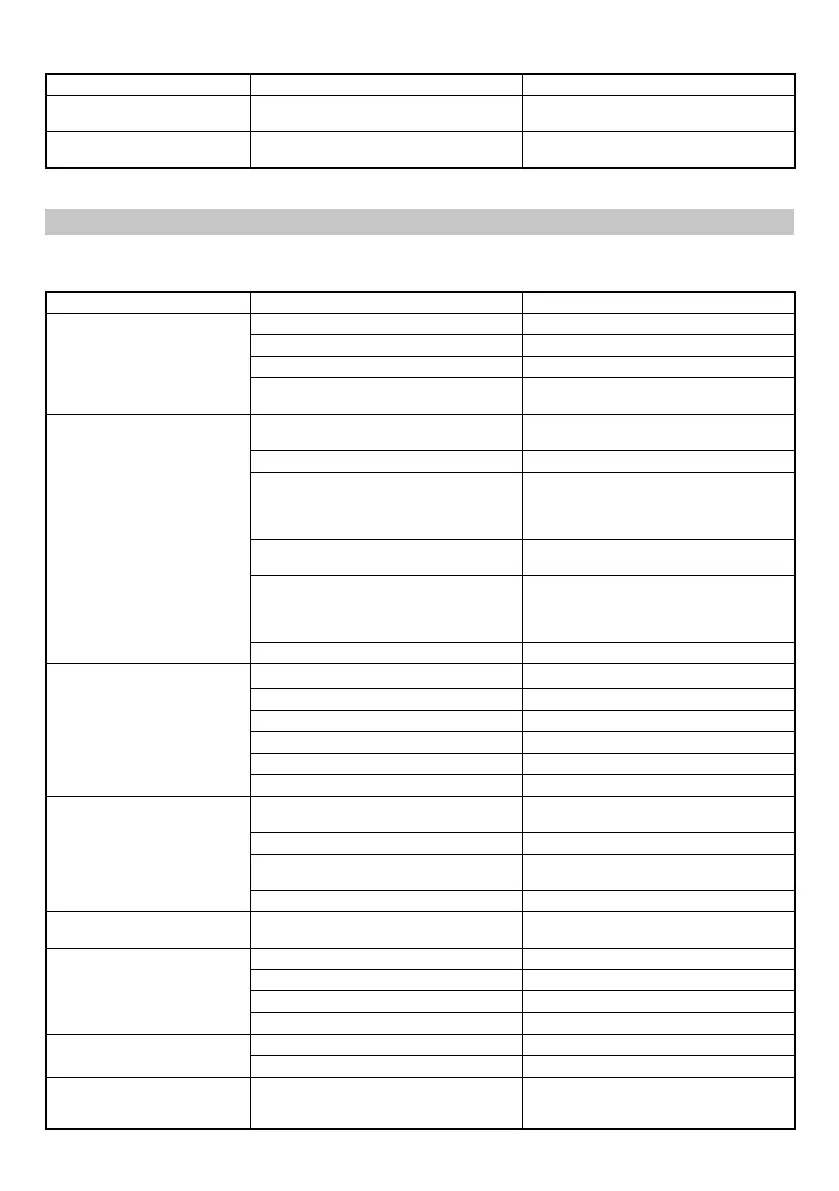
Maintenance chart
ACTION WHY HOW
Clean magazine and feeder
mechanism.
Prevent a jam. Blow clean daily.
Keep push lever working
properly.
Promote operator safety and effi cient
Nailer operation.
Blow clean daily.
TROUBLESHOOTING
Use the inspections in the table below if the tool does not operate normally. If this does not remedy the problem, consult your
dealer or the HiKOKI Authorized Service Center.
PROBLEM CHECK METHOD CORRECTION
Power switch doesn’t turn on.
Turn on once, but turn off
automatically.
Low battery charge. Charge the battery.
Damaged internal electronics. Contact HiKOKI for replacement.
Push lever and/or trigger is ON state ? Keep push lever and trigger in OFF state.
Keep no operation over 30 minutes ?
(Auto-power off function)
Push and hold power switch more than
1 second to switch “ON”
Nailer doesn’t operate
(Power switch ON).
Nailer not enough pressed against
workpiece.
Hold nailer fi rmly and press to the
workpiece completely.
Trigger not enough pulled. Pull the trigger fi rmly.
More than 4 seconds pass from push lever
ON to trigger ON (or more than 2 seconds
pass from trigger ON to push lever ON).
Make sure that less than 4 seconds pass
between push lever ON and trigger ON (or
make sure that less than 2 seconds pass
between trigger ON and push lever ON).
Switch lock lever (Trigger lock function) is
“ON” position.
Set Switch lock lever to “OFF” position.
(Refer to Fig. 8)
Machine is too cold (below -5°C) or
too hot. (LED light blinks at regular
intervals, and power switch goes off after
10 seconds.) (Refer to page 14)
Allow the nailer to cool or warm-up
throughly in adequate condition.
Damaged internal electronics. Contact HiKOKI for replacement.
Nailer operates, but no nail is
driven.
Magazine is dirty. Blow and wipe clean the magazine.
Check for a jam.
Clear a jam (refer to Fig. 18, 19).
Driver blade worn or damaged? Contact HiKOKI for replacement.
Feed spring weakened or damaged? Replace feed spring.
Nail feeder damaged? Replace nail feeder.
Check for proper nails. Use only recommended nails.
Weak drive.
Slow to cycle.
Check position of nailing depth adjustment
adjuster.
Readjust according to Fig. 14, 15.
Driver blade worn? Contact HiKOKI for replacement.
Compressed air pressure has become
low.
Contact HiKOKI for replacement.
Damaged internal electronics. Contact HiKOKI for replacement.
Drives too deep. Check position of nailing depth adjustment
adjuster.
Readjust according to Fig. 14, 15.
Skipping nails.
Intermittent feed.
Check for proper nails. Use only recommended nails.
Nail feeder damaged? Replace nail feeder.
Feed spring weakened or damaged? Replace feed spring.
Driver blade worn or damaged? Contact HiKOKI for replacement.
Nails jam.
Driven nail is bent.
Check for proper nails. Use only recommended nails.
Driver blade worn or damaged? Contact HiKOKI for replacement.
Remaining battery indicator on
the machine doesn’t match to
battery
—
Refer to the indicator lamp on the
machine. (Refer to page 13)
0000BookNT1850DF.indb180000BookNT1850DF.indb18 2022/09/0710:41:562022/09/0710:41:56


 To Next Page
 Loading...