4
English
When the battery becomes fully recharged, the pilot
lamp will blink in red (At 1-second intervals). (See
Table 1)
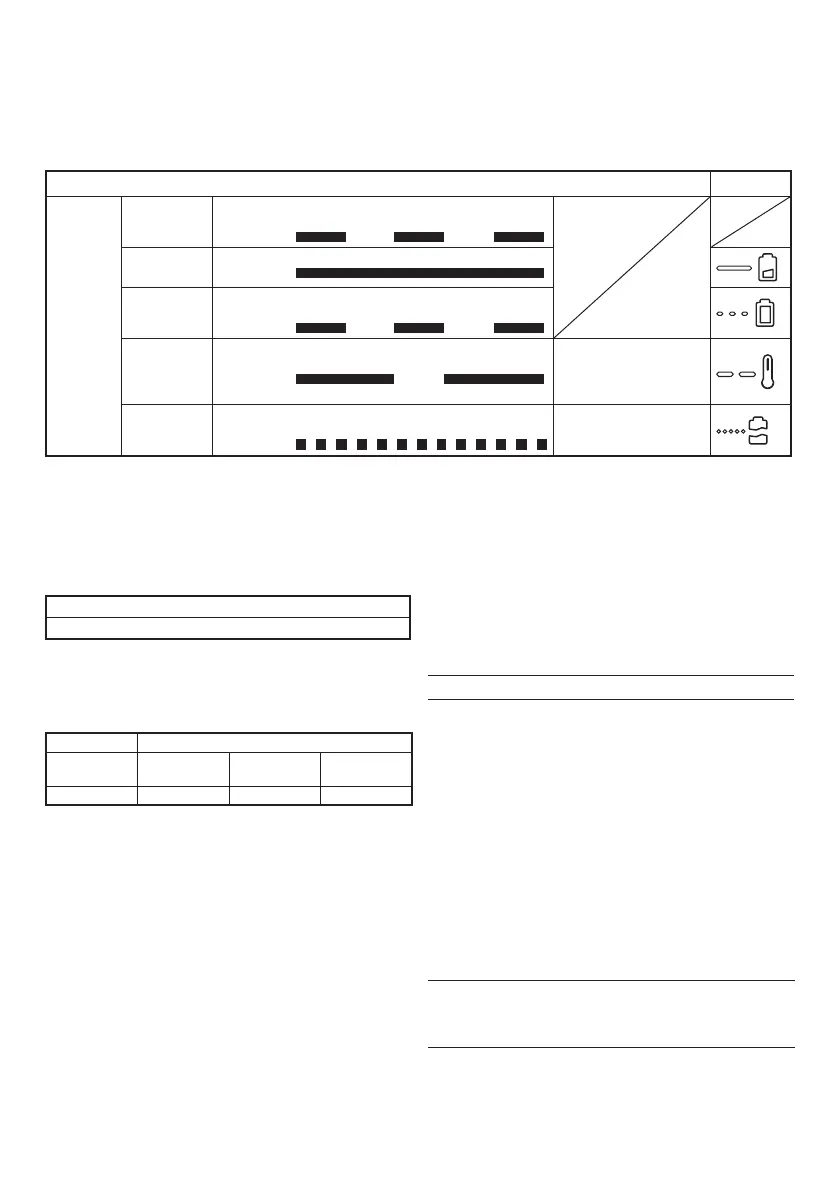
Table 1
Indications of the pilot lamp
Symbol mark
Pilot lamp
(red)
Before
charging
Blinks
Lights for 0.5 seconds. Does not light
for 0.5 seconds. (off for 0.5 seconds)
While
charging
Lights
Lights continuously
Charging
complete
Blinks
Lights for 0.5 seconds. Does not light
for 0.5 seconds. (off for 0.5 seconds)
Overheat
standby
Blinks
Lights for 1 second. Does not light
for 0.5 seconds. (off for 0.5 seconds)
Battery overheated.
Unable to charge.
(Charging will commence
when battery cools)
Charging
impossible
Flickers
Lights for 0.1 seconds. Does not light
for 0.1 seconds. (off for 0.1 seconds)
Malfunction in the battery
or the charger
○ When the pilot lamp fl ickers (at 0.2-second intervals),
check for and take out any foreign objects in the
charger’s battery connector. If there are no foreign
objects, it is probable that the battery or charger is
malfunctioning. Take it to your authorized Service
Center.
○ Since the built-in micro computer takes about
3 seconds to confi rm that the battery being charged
with UC10SL2 is taken out, wait for a minimum of
3 seconds before reinserting it to continue charging. If
the battery is reinserted within 3 seconds, the battery
may not be properly charged.
MAINTENANCE AND INSPECTION
1. Inspecting the mounting screws
Regularly inspect all mounting screws and ensure that
they are properly tightened. Should any of the screws
be loose, retighten them immediately. Failure to do so
could result in serious hazard.
2. Cleaning of the charger
When the charger is stained, wipe with a soft dry cloth
or a cloth moistened with soapy water. Do not use
chloric solvents, gasoline or paint thinner, for they melt
plastics.
3. Store idle charger
When not in use, the charger should be stored in dry,
high or locked-up place — out of reach of children.
CAUTION
In the operation and maintenance of power tools, the
safety regulations and standards prescribed in each
country must be observed.
NOTE
Due to HiKOKI’s continuing program of research and
development, the specifi cations herein are subject to
change without prior notice.
(1) Pilot lamp indication
The indications of the pilot lamp will be as shown in
Table 1, according to the condition of the charger or
the rechargeable battery.
(2) Regarding the temperature of the rechargeable
battery.
The temperatures for rechargeable batteries are
as shown in the Table 2, and batteries that have
become hot should be cooled for a while before being
recharged.
Table 2
Temperatures at which the battery can be recharged
0°C – 50°C
(3) Regarding recharging time
Table 3 shows the recharging time required
according to the type of battery.
Table 3 Recharging time (approx. min.) at 20°C
Battery capacity (Li-ion)
Battery
Voltage
1.3 Ah
(3 cells)
1.5 Ah
(3 cells)
3.0 Ah
(6 cells)
10.8 V 25 min. 30 min. 60 min.
NOTE
The recharging time may vary according to the
ambient temperature.
4. Disconnect the charger’s power cord from the
receptacle.
5. Hold the charger fi rmly and pull out the battery.
NOTE
Be sure to pull out the battery from the charger after
use, and then keep it.
CAUTION
○ If the battery is charged while it is heated because it
has been left for a long time in a location subject to
direct sunlight or because the battery has just been
used, the pilot lamp of the charger lights for 1 second,
does not light for 0.5 seconds (off for 0.5 seconds).
In such a case, fi rst let the battery cool, then start
charging.
000BookUC10SL2SA.indb4000BookUC10SL2SA.indb4 2018/02/169:40:312018/02/169:40:31


 To Next Page
 Loading...