
 Need help?
Do you have a question about the HIKVISION DS-2XC6245G0-L and is the answer not in the manual?
This document is a Quick Start Guide for the Hikvision Underwater Network Camera, providing essential information for its setup, operation, and maintenance. The camera is designed for underwater surveillance, offering robust features for various aquatic environments.
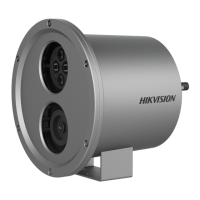
The Hikvision Underwater Network Camera is a specialized device engineered for capturing video in underwater settings. It features a camera lens for image acquisition and a white light supplement, which acts as an underwater light source to enhance visibility in low-light conditions or deep water. The camera is encased in a stainless steel shell, ensuring its waterproof integrity and durability in aquatic environments. The device is powered by a 36V DC power cable and connects to a network via an RJ45 10M/100M Ethernet port, allowing for remote access and management of the camera's feed.
The camera offers flexible mounting options to suit different underwater scenarios. For shallow water environments, pole mounting is recommended, providing a stable installation method. For deep water applications, tripod mounting is available, allowing the camera to be securely placed using a rope. Additionally, PT joint mounting is supported, which enables precise adjustment of the camera's viewing angle. This PT joint allows for both tilting and panning adjustments. The tilt function can be adjusted from 0° to +45° and from -45° to 0° by loosening specific screws, while the pan function can be adjusted from -45° to +45° by loosening a dedicated pan adjusting screw. These adjustments ensure that the camera can be positioned optimally to capture the desired underwater scenes.
Before installation, users are advised to ensure that all assembly parts are present and that the power supply matches the camera's requirements (36V DC). All related equipment should be powered off during installation. It is crucial to connect the cables and ensure the insulation performance of the power cable before installing the camera underwater. After physical installation, the camera needs to be powered on, and network configuration should be performed to verify the image quality and adjust the viewing angle as needed.
The white light supplement of the camera is classified as Risk Group 2 (RG2), indicating that possibly hazardous optical radiation can be emitted. Users are cautioned not to stare at the operating light source, as it may be harmful to the eyes. Appropriate eye protection should be worn, or the white light should be turned off when assembling, installing, or maintaining the camera. The product should be positioned such that prolonged staring into its white light source at a distance closer than 1 meter is not expected.
Proper maintenance is essential for the longevity and optimal performance of the underwater camera. Users are advised to ensure the power supply voltage is correct before use and to avoid dropping the camera or subjecting it to physical shock. The sensor modules should not be touched with fingers. If cleaning is necessary, a clean cloth with a bit of ethanol should be used to wipe it gently. For extended periods of non-use, the lens cap should be replaced to protect the sensor from dirt. It is also important not to aim the camera at the sun or other extremely bright places, as this can cause blooming or smearing and affect the sensor's endurance.
The camera should not be placed in extremely hot, cold, dusty, or damp locations, and it should not be exposed to high electromagnetic radiation. Good ventilation is required to avoid heat accumulation. The operating temperature range is specified as -30 °C to 60 °C (-22 °F to 140 °F) for models with an "H" in their suffix. The sensor can be damaged by laser beams, so care must be taken to ensure the sensor surface is not exposed to laser equipment.
Regular part replacement, particularly for components like electrolytic capacitors, is recommended due to their average enduring time. This time varies based on the operating environment and usage history, so users should regularly check and contact their dealer for details. Improper use or replacement of the battery can lead to an explosion hazard. Batteries should only be replaced with the same or equivalent type, and used batteries must be disposed of according to the manufacturer's instructions. It is critical not to dispose of batteries in fire or hot ovens, mechanically crush or cut them, or expose them to extremely high or low air pressure, as these actions can cause explosions or leakage of flammable liquid or gas.
In case of smoke, odor, or noise from the device, the power should be turned off immediately, the power cable unplugged, and the service center contacted. Users are explicitly warned not to attempt to disassemble the camera themselves, as unauthorized repair or maintenance will void responsibility for any resulting problems. The manual emphasizes that proper configuration of all passwords and other security settings is the responsibility of the installer and/or end-user. Strict compliance with electrical safety regulations of the nation and region is required during product use.
 General
| Brand | HIKVISION |
|---|---|
| Model | DS-2XC6245G0-L |
| Category | Security Camera |
| Language | English |



 To Next Page