The DS-K1F820-F Fingerprint Recorder is a device designed for living fingerprint registration and identification, offering a comprehensive solution for access control systems. This user manual provides detailed instructions on its operation, technical specifications, and important considerations for optimal performance and longevity.
Function Description
The primary function of the DS-K1F820-F is to facilitate the registration and identification of fingerprints. It allows for the upload and download of fingerprint characteristic data and images to a connected controller or module. A key feature is its ability to check the completeness of registered fingerprint templates, ensuring high accuracy and reliability in identification processes. This recorder is an integral part of an access control system, enabling secure and efficient user authentication based on biometric data.
Important Technical Specifications
- Resolution: The device boasts a 508 dpi high-definition optical fingerprint sensor, which ensures clear and detailed capture of fingerprint images. This high resolution is crucial for accurate matching and identification.
- Connectivity: It supports USB 2.0 communication standard for data transmission, allowing for easy and fast connection to a PC. This "plug and play" (PnP) functionality simplifies installation and setup.
- Sensor Material: The optical fingerprint sensor is designed with scratch-resistant material, enhancing its durability and ensuring consistent performance over time, even with frequent use.
- Compatibility: The device is designed to work with the iVMS-4200 Control Client software, which needs to be installed on a PC for managing fingerprint collection and access control settings.
- Power Consumption: Users are advised to use a power adapter provided by a reputable company, ensuring that the power consumption is not less than the required value to prevent overheating or fire hazards.
- Environmental Conditions: The scanner should be operated in environments free from direct high light, high temperature, humid conditions, and rain. Extreme conditions can affect its performance and longevity.
Usage Features
- Fingerprint Collection Process: The manual outlines a clear step-by-step process for fingerprint collection. This involves connecting the fingerprint recorder to a PC via USB, logging into the iVMS-4200 Control Client, navigating to the access control panel, and selecting the "Fingerprint" tab.
- Organization and User Management: Before collecting fingerprints, users must add organizations and persons within the iVMS-4200 client. This hierarchical structure allows for efficient management of users and their associated biometric data. Up to 10 levels of organizations can be created.
- Local and Remote Collection Modes: The device supports both local and remote collection modes, providing flexibility in how fingerprints are registered.
- Fingerprint Machine Selection: Users can select "DS-K1F820-F" as the device type within the software and save these settings. There's also an option to restore default settings if needed.
- Scanning Technique: Proper placement of the finger on the sensor is emphasized. The finger should be pressed horizontally, with its center aligned with the scanner center, to ensure maximum information content and a higher pass rate. Thumb, forefinger, and middle finger are recommended for better identification rates.
- Retry Mechanism: If a collected fingerprint picture is not clear, users can retry the collection process up to four times to obtain a high-quality image.
- Troubleshooting for Dry Fingers: If the scanner fails to recognize a fingerprint due to dryness, users are advised to blow on their finger and scan again after drying it.
- Alternative Authentication: For individuals with shallow fingerprints or difficulty scanning, the manual suggests using other authentication methods, indicating the device's integration within a broader security system.
Maintenance Features
- Protection of Sensor: The fingerprint sensor is a critical component and must be protected from physical damage, such as crashes with hard objects, as this can directly impact image quality.
- Cleanliness of Fingers: Users are advised to ensure their fingers are clean before scanning. If fingers are wet or sweaty, they should be wiped dry with paper or a towel. If too dry, blowing on the finger can help.
- Cleaning the Sensor Surface: The surface of the fingerprint sensor should be kept clean. A soft paper or towel can be used to wipe it. Alkaline detergents should not be used for cleaning.
- Choosing a Quality Finger: To improve the success rate of fingerprint acquisition, it is recommended to choose a finger without melatonin skin, scars, or cracks. The thumb, forefinger, and middle finger are generally preferred.
- Water Exposure: In case of accidental water intake, the device should be immediately powered off. While retrying after drying might work, its function cannot be guaranteed.
- Proper Grounding: The power supply equipment must be well-grounded to prevent equipment damage or discomfort when touched.
- Environmental Control: Avoid placing the device in extremely hot, cold, dusty, or damp locations. Exposure to high electromagnetic radiation, direct sunlight, low ventilation, or heat sources like heaters or radiators is forbidden to prevent fire hazards.
- Handling and Storage: Do not drop the device or subject it to physical shock. Avoid installing it on vibrating surfaces. Keep all original wrappers for future use, especially for transportation back to the factory in case of failure, to prevent additional costs and damage.
- Battery Replacement: If applicable, improper use or replacement of the battery may result in an explosion hazard. Replace only with the same or equivalent type, and dispose of used batteries according to manufacturer instructions.
- Unauthorized Repair: Users are strongly advised not to disassemble the device themselves. Any issues should be reported to the dealer or service center, as unauthorized repairs will void responsibility for problems caused.

 Need help?
 General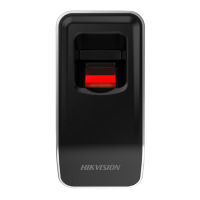

 To Next Page