Need help?
Do you have a question about the HIKVISION DS-K1T671 Series and is the answer not in the manual?
Details indoor/outdoor installation requirements and sealing for weather protection.
Instructions on template placement, power supply requirements, and initial setup.
Provides the physical dimensions of the face recognition terminal.
Guides through the initial device activation process, including password setup.
Outlines post-activation steps like language, password, and network settings.
Provides guidance on expression, attire, and hair for capturing quality face images.
Details correct and incorrect face positioning for optimal recognition accuracy.
The Hikvision DS-K1T671(B) Series Face Recognition Terminal is a versatile device designed for secure access control, supporting both indoor and outdoor installations. This quick start guide provides essential information for its setup, operation, and maintenance.
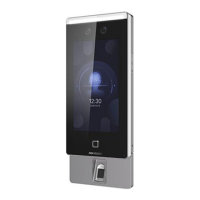
The DS-K1T671(B) is primarily a face recognition terminal that facilitates secure access by authenticating users through facial biometrics. It integrates various components such as an IR light, white light, camera, screen, card presenting area, and fingerprint scanner, offering multiple authentication methods. The device can be used as a standalone unit or integrated with a secure door control unit for enhanced security. It supports user management, allowing the addition and configuration of user parameters, including face and fingerprint information. The terminal also features alarm input and output capabilities, RS-485 communication for external devices like card readers, and Wiegand interface for connecting to access controllers or card readers. Network connectivity is provided for remote management and integration into existing security systems. The device is designed with data protection in mind, employing encryption for biometric data storage to ensure user privacy.
The device's dimensions are approximately 116.5 mm (width) x 290 mm (height) x 33 mm (depth). The recommended installation height is 1.4 meters from the ground, with a recommended face collection height between 1.43 m and 1.90 m. It requires an external power supply that fulfills LPS (Limited Power Source) requirements. Suggested external power supplies include models like C2000IC12.0-24P-DE, C2000IC12.0-24P-GB, and ADS-24S-12 1224GPG. For door locks, a 12 V, 1 A external power supply is suggested, and for Wiegand card readers, a 12 V, 1 A external power supply is also recommended. The device complies with FCC Part 15 regulations for Class B digital devices and CE directives (RE 2014/53/EU, EMC 2014/30/EU, RoHS 2011/65/EU). It operates within specified temperature ranges (refer to the device's full specification for details) and should be protected from extreme heat, cold, dust, dampness, and direct sunlight.
The terminal supports multiple authentication modes, including face recognition and fingerprint scanning (if equipped with a fingerprint module). Users can be added and managed through the device's interface, which is accessed by holding the screen for 3 seconds and sliding to enter the activation password. The device requires activation upon first power-on, involving the creation of a strong password. After activation, users can configure language settings, password change type, reserved questions, application mode, network parameters, Hik-Connect access, and administrator settings. For optimal face recognition performance, users are advised to maintain a natural expression, avoid hats, sunglasses, heavy makeup, or hairstyles that cover eyes or ears. Correct posture, with the face centered in the collecting window, is crucial for accurate face picture collection. The device provides visual feedback on face picture quality, indicating if the face is tilted, too close, too far, too high, or too low. It can be installed directly on a wall or with a gang box, and for outdoor use, silicone sealant should be applied around the cable wiring area to prevent water ingress.
To ensure longevity and proper functioning, several maintenance guidelines are provided. The device should be installed securely to a wall or floor to prevent injury. It should be protected from physical shock, high electromagnetism radiation, and vibrations. Cleaning the device's internal and external surfaces should be done with a soft, dry cloth, avoiding alkaline detergents. When opening the device cover, it is recommended to use provided gloves to prevent acidic sweat from fingers from eroding the surface coating. In case of a malfunction, the device should be returned to the factory in its original wrapper to prevent damage during transport. The battery, if replaceable, should only be replaced with the same or equivalent type, and used batteries must be disposed of according to manufacturer instructions. Regular password resets are recommended for enhanced security. The device's biometric recognition accuracy is dependent on the quality of collected pictures and environmental lighting, and users should be aware that biometric products may not be 100% applicable in anti-spoofing environments, suggesting the use of multiple authentication modes for higher security levels.
 General
| Brand | HIKVISION |
|---|---|
| Model | DS-K1T671 Series |
| Category | Wireless Access Point |
| Language | English |

 To Next Page