
 Need help?
Do you have a question about the HIKVISION DS-KIS204 and is the answer not in the manual?
Legal notice about brand ownership and usage rights.
Legal statement regarding warranty, liability, and user risk.
Contact information for obtaining assistance and asking questions.
Critical safeguards to prevent severe injury or death during operation.
Important precautions to prevent minor injury or equipment damage.
General description of the video door phone system and its primary application.
Highlights the key functionalities of the indoor and door station units.
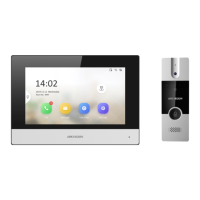
Visual breakdown and identification of indoor station components.
Visual breakdown and identification of door station components.
Details the physical connection points and their specific functions.
Illustrates different connection scenarios and cable requirements.
Step-by-step guide for wall mounting the indoor station unit.
Step-by-step guide for wall mounting the door station unit.
Initial setup and power-on procedures for the system.
Configuration options for indoor station settings like time and ring.
Process for starting and answering video calls.
Functionality for viewing real-time video feeds.
Methods for remotely unlocking the door.
How to take photos of visitors or events.
Procedure for changing the device's operating language.
The Hikvision Video Door Phone system, comprising a four-wire indoor station and a four-wire door station, is designed to enhance living security in buildings through convenient installation and easy operation. This system facilitates hands-free video intercom communication between residents and visitors, offering a robust solution for access control and monitoring.
The core function of the Video Door Phone system is to enable two-way video and audio communication between a visitor at the door station and a resident inside via the indoor station. When a visitor presses the call button on the door station, it initiates a video call to the indoor station(s). The indoor station automatically captures an image of the visitor upon receiving a call, providing a visual record. Residents can then answer the call, engage in a hands-free conversation, and remotely unlock the door if desired. The system supports up to two door stations and up to three indoor stations simultaneously within the intercom system, allowing for flexible configurations in various residential settings. Additionally, the indoor station can monitor the door station and external analog cameras, providing comprehensive surveillance capabilities. The door station features a pinhole camera with a resolution of 720 x 576 at 25 frames per second, ensuring clear video capture. It also includes self-adaptive IR supplement with a photoresistor for enhanced visibility in low-light conditions. The unlock controlling feature allows for integration with electric bolts, enabling secure remote access management.
The Video Door Phone system is designed for user-friendliness and convenience. For the indoor station, key features include a clear LCD display screen, a power supply indicator, and dedicated keys for call acceptance/declination, unlocking, live view, and image capture. A volume wheel allows for easy adjustment of audio levels, and a built-in microphone and loudspeaker facilitate hands-free communication. The live view function enables residents to view video feeds from the door station or connected analog cameras at any time, with the ability to switch between multiple door stations and cameras. This live view automatically stops after 60 seconds to conserve resources. The system also supports manual image capture during live view or an active call, in addition to the automatic image capture upon an incoming call. The indoor station provides a system configuration page, accessible by holding a specific button for 5 seconds, where users can adjust settings such as ringtones, date, time, and view model information. The maximum ring duration for an incoming call is 30 seconds, and the maximum speaking duration during an intercom session is 60 seconds, ensuring efficient communication. For optimal audio pickup, a recommended distance of 30 to 40 cm between the speaker/microphone of both stations is advised. The system supports multiple languages, including English, Turkish, French, Italian, Spanish, Portuguese, Russian, Arabic, Farsi, and Vietnamese, making it accessible to a diverse user base.
Maintenance of the Hikvision Video Door Phone system focuses on ensuring longevity and optimal performance. Users are advised to strictly comply with electrical safety and fire prevention regulations during installation and operation. It is crucial to use only the provided power adapter from a reputable company, ensuring that power consumption does not exceed the required value to prevent overload, overheating, or fire hazards. Connecting multiple devices to a single adapter is discouraged for the same reasons. Before wiring, installing, or dismantling any device, the power supply must be disconnected. When installing the product on a wall or ceiling, it must be firmly fixed to prevent accidental dislodgement. In case of smoke, unusual odors, or noise emanating from the device, the power should be immediately turned off, the power cable unplugged, and the service center contacted. Users are explicitly warned against attempting to disassemble the device themselves, as unauthorized repairs can void warranties and lead to further issues.
To protect the device, users should avoid dropping it, subjecting it to physical shock, or exposing it to high electromagnetic radiation. Installation on vibrating surfaces or places prone to shock should be avoided. The device should not be placed in extremely hot, cold, dusty, or damp locations. For indoor-use devices, protection from rain and moisture is essential. Direct sunlight, low ventilation, or proximity to heat sources like heaters or radiators should be avoided to prevent fire hazards and potential damage to the sensor, which could lead to blooming or smearing in the video feed. When opening the device cover, users should wear the provided gloves to prevent acidic sweat from fingers from eroding the surface coating. For cleaning, a soft and dry cloth should be used on both internal and external surfaces; alkaline detergents are not recommended. All original packaging should be retained for future use, as it is necessary for returning the device to the factory in case of failure, preventing damage during transport, and avoiding additional costs. Finally, improper use or replacement of the battery can result in an explosion hazard; only the same or equivalent type should be used, and used batteries must be disposed of according to the manufacturer's instructions.
 General
| Model | DS-KIS204 |
|---|---|
| Category | Intercom System |
| Display | LCD |
| Resolution | 1024 x 600 |
| Video Compression Standard | H.264 |
| Audio Input | Built-in microphone |
| Audio Output | Built-in speaker |
| Ethernet | 10/100 Mbps |
| Alarm Input | 1 channel |
| Power Supply | DC 12V |
| Operating Humidity | 10% to 90% (non-condensing) |
| Material | Plastic |
| Installation | Wall-mounted |
| Audio Compression Standard | G.711 |
| Connectivity | Wi-Fi, Ethernet |
| Operating Temperature | -10°C to +55°C |
| Supported Protocols | TCP/IP, UDP, DHCP |
| Video | 720p HD video |





 To Next Page