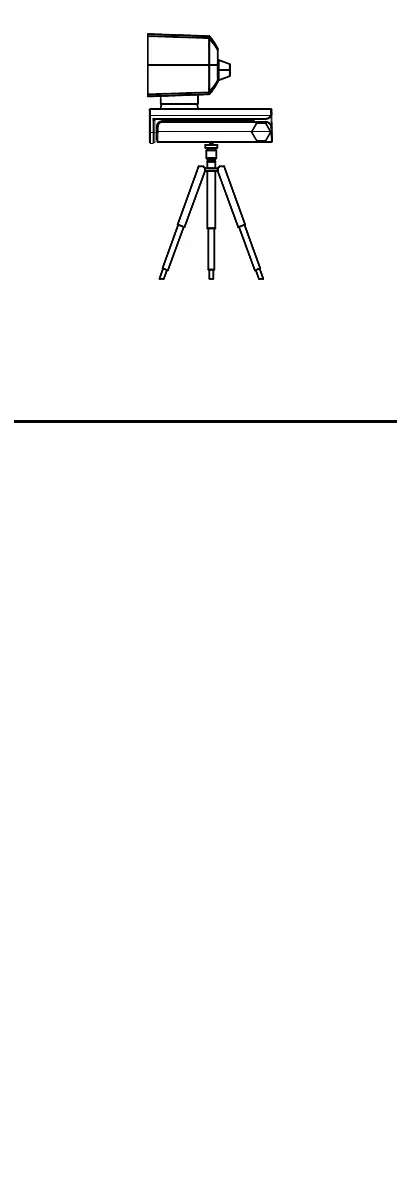
Figure 2-4 Install the Device to the Bracket
Note:
The bracket shall be purchased separately.
3 FAQ
Question: The device is plugged in but the preview
software (for example, AMCap 3.0.9) does not show
preview image.
Answer: Open Device Manager to check if the web
camera is recognized. If not, check whether the device
is turned on, or plug the camera in another USB port.
When the camera is recognized, open AMCap 3.0.9. Go
to the menu and check the device name under Devices
and Preview under Options.
Question: The device delivers 4K image in AMCap 3.0.9,
but the actual frame rate cannot reach 30 fps in spite of
setting the frame rate at 30 fps.
Answer: Uncheck Use Frame Rate in Capture-> Set
Frame Rate... in AMCap 3.0.9 menu.
Question: The device is plugged in but no audio out.
Answer: Check PC settings. Go to Control Panel ->
Sound -> Recording, and select the device. Click
Properties, and check Listen to this Device.
Question: The volume of recorded sound is low.
Answer: Check PC settings. Go to Control Panel ->
Sound -> Recording, and select the device. Click
Properties, and set the level of Microphone to 100.


 To Previous Page