This document describes the Hikvision Personal Private NAS (Network Attached Storage) device, model H90, designed for personal data storage and management. The device serves as a central hub for storing and accessing documents, media, and other files, offering features for data import, export, and remote management via a dedicated mobile application.
Function Description:
The Hikvision Personal Private NAS is a personal data storage solution that allows users to store, manage, and access their digital content. It connects to a home network via a router, enabling access from various devices such as set-top boxes, televisions, and mobile phones. The NAS supports the installation of a 2.5" SATA HDD or SSD for data storage. Users can import and export data using a USB flash drive connected to the device. Management and parameter settings are primarily handled through the HikBox mobile application, which connects to the NAS over the same local network. The device also features a TV port for displaying stored documents on compatible screens.
Important Technical Specifications:
- Model: H90
- Storage Type: Supports 2.5" SATA HDD or 2.5" SATA SSD.
- Maximum Storage Capacity: Up to 2 TB.
- HDD/SSD Thickness Requirements:
- 2.5" SATA HDD: Less than or equal to 9.5 mm.
- 2.5" SATA SSD: Less than or equal to 7 mm.
- Ports:
- Network Port (LAN) for connection to a router.
- USB Port for data import/export and NAS upgrades.
- TV Port for displaying stored documents on external screens.
- Power Port for power adapter connection.
- Reset Functionality: A Reset button allows restoring NAS parameters and password to factory defaults (data is preserved).
- Connectivity: Connects to the internet via a network cable to a router.
- Power: Requires a power adapter (included).
- Network Cable Length: 1 meter (included).
Usage Features:
- Easy Setup: The device is designed for straightforward installation. Users need to install an HDD (if not pre-installed), connect the NAS to a router via a network cable, and then connect it to a power source.
- Mobile App Management: The HikBox app (available for download via QR code on the cover page or in app stores) provides comprehensive control over the NAS. This includes setting parameters, managing data, and initiating data import/export.
- Data Import/Export: The USB port facilitates easy transfer of data to and from the NAS using a USB flash drive. This is also used for upgrading the NAS firmware.
- TV Connectivity: The TV port allows the NAS to connect to set-top boxes, televisions, or other display devices, enabling users to view stored documents directly on a larger screen.
- Network Access: Once connected to the router, the NAS can be accessed by multiple devices on the same network, providing a centralized storage solution for personal use.
- Bottom Panel Opening: The bottom panel is designed for easy access to the HDD slot. It can be opened by prying the marked gap with a slotted screwdriver.
- HDD Installation Guidance: The manual provides clear instructions for installing an HDD, including visual aids and specifications for compatible drives. It emphasizes aligning the HDD correctly and ensuring it sits flush with the bottom line of the device for proper installation.
- QR Code for Device Addition: A QR code printed at the bottom of the device is used with the HikBox app to add and configure the NAS.
Maintenance Features:
- Reset Function: A physical Reset button allows users to restore the NAS to its default factory settings (parameters and password) without losing stored data. This is useful for troubleshooting or reconfiguring the device. To perform a reset, press and hold the Reset button for 5 seconds using a thin insulating object while the device is running.
- HDD Replacement/Upgrade: The design allows for user-friendly installation and replacement of the HDD. The bottom panel can be disassembled with a screwdriver to access the HDD slot. The manual provides detailed steps for installing a new HDD, including proper alignment and ensuring compatibility with specified dimensions and capacity.
- Firmware Upgrades: The USB port can be used to upgrade the NAS firmware, ensuring the device remains up-to-date with the latest features and security enhancements.
- Troubleshooting: The manual implicitly supports basic troubleshooting by providing clear installation steps and a reset function. For more complex issues, users are directed to the company website for the latest information and professional guidance.
- Data Preservation: The reset function is designed to preserve data stored on the NAS, ensuring that user files are not lost during a factory reset of settings.

 Need help?
 General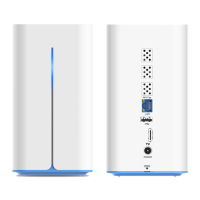

 To Next Page