EasyManua.ls Logo

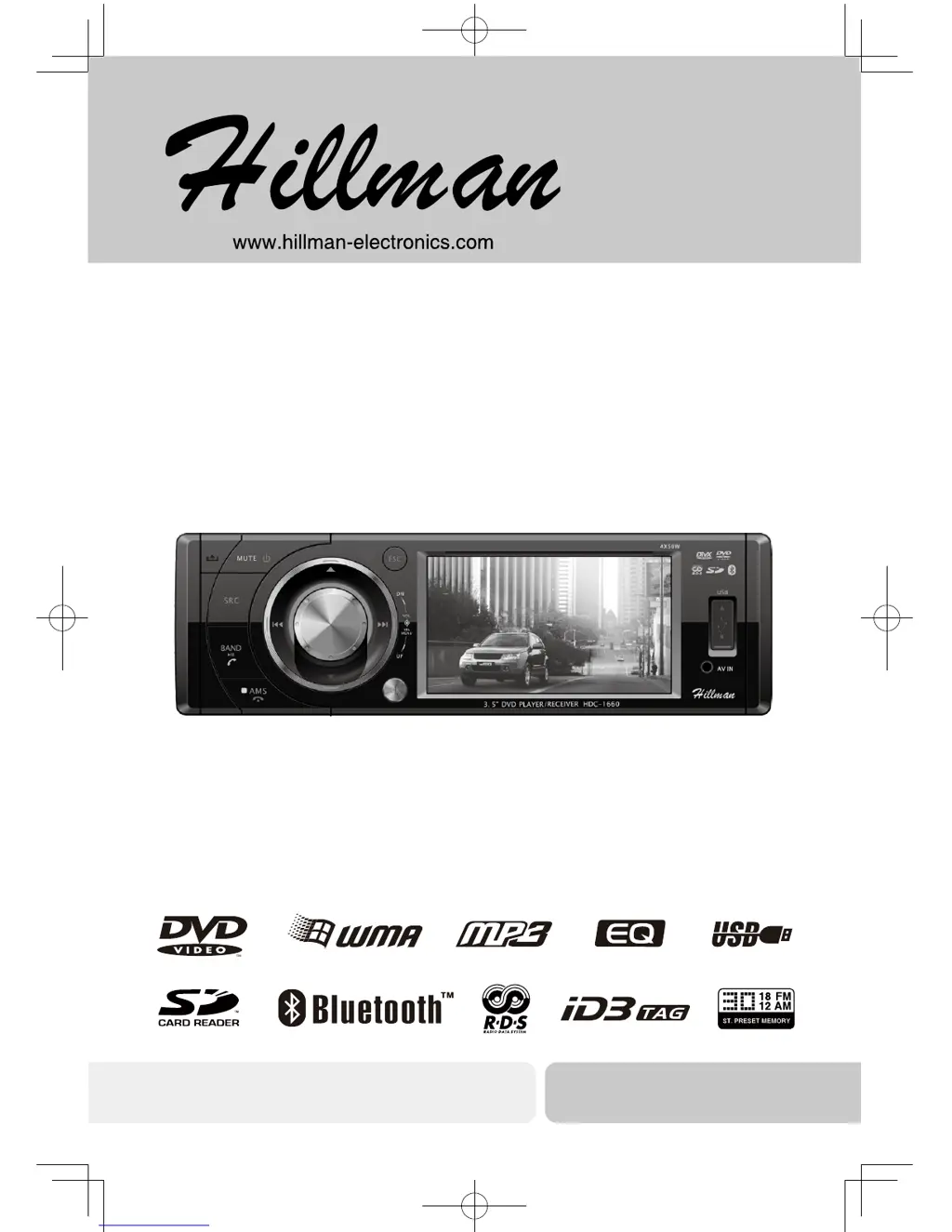
Hillman HDC-1660 - User Manual

Hillman HDC-1660
31 pages
Print Icon
To Next Page IconTo Next Page
Loading...
Operation Instructions
DVD/VCD/CD/MP3/USB/SD/MMC PLAYER
BLUETOOTH, WITH FM/MW TUNER
HDC-1660
DVD/VCD/CD/MP3/
USB/SD/MMC Player with FM/MW Tuner
Operating Instructions

Questions and Answers

Summary

Safety Precautions

Safety Information

Caution of Disc Using

Guidance on proper handling, insertion, and cleaning of discs for optimal playback.

Features

About MP3

Details licensing and usage rights for MP3 playback, including website for further information.

Button Operation Explanations

Explains the use of the rotary knob for navigation, selection, and confirmation in setting modes.

Panel Controls

Remote Controls

Remote Control Operating Range

Specifies the recommended distance for effective operation of the remote control.

Replacing the lithium battery

Step-by-step instructions for safely replacing the battery in the remote control unit.

USB;SD;MMC;MP3 Playback

Load SD;MMC Card

Instructions for inserting an SD/MMC card into the unit for music playback.

Take out SD;MMC Card

Procedure for safely removing an SD/MMC card from the unit.

Load USB Equipment

Steps for connecting and playing music from a USB storage device.

Take out USB Equipment

Procedure for safely disconnecting a USB storage device from the unit.

USB;SD;MMC Notes

Compatibility notes and limitations for USB and SD/MMC card usage, including file system support.

Basic Operations

Turn on;off the Power

Explains how to power the unit on and off using the front panel button.

Mute

Describes how to mute the audio output and how muting is released.

Adjust the Volume

Details how to control the audio volume using the panel knob or remote control.

Playing Source Selection

Methods for switching between different audio/video sources like Radio, Disc, USB, SD, AV, and BT.

When Parking Brake Applied

Explains the video display behavior and warning messages when the parking brake is engaged.

When Reverse Driving

Describes the automatic switch to camera source and return to original mode during reverse driving.

Rotary Knob Menu

Audio Setting

Allows adjustment of EQ, Bass, Middle, Treble, Balance/Fader, and related audio parameters.

Video Setting

Enables adjustment of Brightness, Contrast, and Saturation for video output.

General Setting

Covers system settings for BEEP, LOUDNESS, TIME MODE, TIME ADJUST, PARKING, and MIRROR functions.

Rotary Knob Menu

DVD Setting

Options for TV system, TV type, password, rating, DivX VOD registration, and default restore.

PASSWORD

Instructions for setting, confirming, and resetting the parental control password.

Rotary Knob Menu

LANGUAGE Setting

Allows selection of OSD, Audio, Subtitle, and Menu languages for DVD playback.

Radio Setting

Options for LOC/DX, STEREO/MONO, AF, TA, TA VOLUME, and REGIONAL broadcast settings.

Rotary Knob Menu

BT Setting

Settings for Bluetooth pairing, auto connect, auto answer, reset, and software version display.

Radio Mode

Accessing Radio Mode

How to switch the unit to the Radio source from other playback modes.

Selecting a Band

Procedure for selecting between FM1, FM2, FM3, MW1, and MW2 radio bands.

Selecting a Station

Methods for tuning to radio stations using auto seek or manual seek functions.

Storing Stations

Instructions for auto storing and manually storing preset radio stations (P1-P6).

Recalling a Station

How to select and play a previously stored radio station using preset buttons.

RDS (Radio Data System, optional)

RDS Basics

Explains AF (Alternative Frequency) and PS (Program Service name) functions for enhanced radio reception.

Traffic Announcements

Details TP, TA, and EON functions for receiving traffic information broadcasts.

PTY Reception (Program Type)

How to select and search for radio stations based on program type classification.

Disc Mode

Accessing Disc Mode

How to switch to the DISC source or play files from SD/USB media.

Insert a Disc

Steps for inserting a disc into the unit's slot for playback.

Eject the Disc

Procedure for safely removing a disc from the unit.

Disc Playback

Information on disc loading status, error messages, and playback icons displayed during operation.

File Type Supported

Lists supported audio, video, and picture file formats for playback from discs and media.

Disc Mode

Disc and File NOT Supported

Lists file formats and disc types that are not compatible with the unit for playback.

Audio;Picture;Video File Playback

Guidance on navigating and playing audio, picture, and video files from discs.

MP3;WMA Notes

Details on MP3/WMA file compression, supported media types, and software recommendations.

Entering ID3 Tag

Information on ID3 tag support and character code tables for naming MP3/WMA files.

Disc Mode

MP3 Playing Order

Explains how files and folders are accessed and how to influence playback order by naming.

Electronic Shock Protection

Details the shock protection buffer times for different disc types (CD-DA, MP3, WMA).

Stop Playback Temporarily

Instructions for pausing and resuming playback of discs or files.

Stop Playback Entirely

How to stop playback completely and resume from the beginning or saved location.

Select Desired Track

Methods for skipping to the next track or selecting a specific track number using buttons.

Fast Forward;Backward During Playback

How to use fast forward and rewind functions at various speeds during disc playback.

Repeat

Instructions for using the repeat function during playback to play tracks or entire discs multiple times.

Disc Mode

Playback Repeat and Control Functions

Details repeat playback options, VCD playback control, track selection, and program creation.

DVD and VCD Specific Options

Covers language selection for audio and subtitles, title/chapter selection, and camera angles for DVDs.

Image Viewing Adjustments

Explains how to mirror images and zoom in/out during picture playback.

Bluetooth Mode

Accessing Bluetooth Mode

How to switch the unit to the Bluetooth source for phone and audio connectivity.

Pairing

Step-by-step guide for establishing a Bluetooth connection between your mobile phone and the unit.

Stop Pairing

Instructions for stopping the Bluetooth pairing process or disconnecting an active connection.

Incoming Phone Waiting

Describes how the unit handles incoming calls while in communication or audio modes.

Voice Transfer

How to transfer audio between the unit and your mobile phone during calls.

BT Audio (if the mobile phone has the A2 DP & AVRCP functions)

How to stream music from your phone to the unit using Bluetooth A2DP and AVRCP profiles.

Bluetooth Mode

Call Log and Management

Accessing and managing call history, including making calls from missed, dialed, and received logs.

Bluetooth Audio Profiles

Explains A2DP for audio streaming and AVRCP for remote control of audio playback via Bluetooth.

Bluetooth Usage Notes

Provides important compatibility notes and troubleshooting tips for Bluetooth connectivity with various phones.

Bluetooth Mode

Device Connections

General Connection Notes

Provides essential precautions for avoiding short circuits and ensuring safe wiring during installation.

Parking Brake and Reverse Trigger Connections

Details the wiring for parking brake detection and reverse camera activation.

Device Connections

Wiring Diagram and Model-Specific Wiring

Illustrates complete wiring connections and specific modifications for certain car models (VW/Audi/Opel).

Installation Guide

Preparation

Steps to take before installation, including battery disconnection and transport screw removal.

Remove unit from sleeve

Instructions for detaching the unit from its protective sleeve.

Mounting Sleeve Installation

Guidance on fitting the mounting sleeve into the dashboard and checking for adequate space.

Installation Guide

Kit Installation

Instructions for using an optional installation kit to mount the unit securely.

ISO Installation

Guidance on using ISO connectors or factory brackets for dashboard mounting.

Installation Guide

Reset

How to reset the unit to default settings, erasing time and preset memories.

Fuse

Information on replacing the unit's fuse with the correct type and amperage.

Reconnect Battery

Final step of reconnecting the battery negative terminal after installation is complete.

Anti-Theft System

Remove the Panel

Steps for detaching the front panel of the unit to help deter theft.

Re-attach the Font Panel

Instructions for correctly reattaching the detachable front panel to the unit.

Troubleshooting

General Problems

Common issues like unit not switching on, no sound, or screen malfunction with solutions.

DVD mode

Troubleshooting for DVD playback issues, including discs not playing or sound skips due to vibration.

TUNER mode

Problems related to radio reception, station quality, and lost preset stations with solutions.

USB;SD;MMC mode

Troubleshooting for issues with USB/SD/MMC card insertion, file system, and reading compatibility.

Remote control

Solutions for the remote control not working or not functioning properly, typically due to battery issues.

Care and Maintenance

DVD Player

Guidelines for extending the life of the DVD player, including environmental considerations and disc removal.

CD-R and CD-RW Capability

Notes on compatibility and recommended recording/burning procedures for CD-R/RW media.

Disc Care and Handling

Proper techniques for cleaning and handling discs to prevent skips and ensure playback quality.

Specifications

General System Specifications

Details power supply, maximum output, dimensions, weight, and auxiliary inputs.

Display and Tuner Specifications

Specifications for the TFT LCD display and the FM/AM radio tuners.

Disc Player and Components

Technical details for the disc player system and a list of included accessories.

Hillman HDC-1660 Specifications

General IconGeneral
BrandHillman
ModelHDC-1660
CategoryCar Receiver
LanguageEnglish

Related product manuals