
 To Next Page


R
Ryan MaynardSep 23, 2025
Why WMS 100 not found by Hilti Power Tools Accessories?
- LLisa BrooksSep 23, 2025
If the WMS 100 was not found by the diamond core drilling machine, it means Bluetooth is deactivated.

Why WMS 100 not found by Hilti Power Tools Accessories?
If the WMS 100 was not found by the diamond core drilling machine, it means Bluetooth is deactivated.
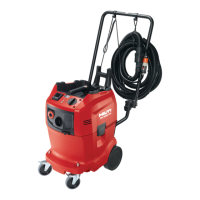
Why is there no suction or reduced suction in my Hilti DD-WMS 100 Water System?
If you're experiencing reduced suction performance with your Hilti Water System, the filter bag might be clogged. Try changing the filter bag to restore suction.
What to do if no water flows from my Hilti DD-WMS 100 Water System?
If no water or too little water flows from your Hilti Water System despite having enough water in the container, there might be a blockage. Here are a few things to check: * The prefilter could be blocked, so inspect and clean it. * The water hose connector nipple might be blocked; use a pin to clear the hole. * The mesh filter on the drilling machine water connection could be clogged; clean it with a brush.
Why does the MAX indicator light turn on on my Hilti DD-WMS 100 Water System?
If the MAX indicator light is on for your Hilti Water System, it means there's too much water in the water and waste material container. Switch to water supply mode until the MAX indicator goes out. Alternatively, the float may be stuck, so you should check the float level.
What to do if the MIN indicator lights and a warning tone is emitted on my Hilti Water System?
If the MIN indicator light is on and a warning tone is sounding on your Hilti Water System, it means there is too little water in the water and waste material container. Fill the water and waste material container.
Why is filter bag holder pulled up on Hilti Power Tools Accessories?
If the filter bag holder is pulled up when the top section of your Hilti Power Tools Accessories appliance is lifted, the internal water connector parts are likely dry and/or clogged.
What does Unknown error service indicator mean on Hilti Power Tools Accessories?
If the Unknown error service indicator lights up on your Hilti Power Tools Accessories, the diamond core drilling machine has received an unknown error code from the WMS 100. Check the WMS 100 for faults and consult its operating instructions for a solution.
Why another machine connects via Bluetooth to Hilti Power Tools Accessories?
If another diamond core drilling machine has automatically connected to the accessory used (e.g. water treatment system) via Bluetooth, it means several diamond core drilling machines are connected to the same accessory. Switch Bluetooth on the accessory off and then on again and connect the diamond core drilling machine to the accessory again.
What to do if MAX service indicator lights up on Hilti Power Tools Accessories?
If the MAX service indicator lights up on your Hilti Power Tools Accessories, it could be due to too much water in the water and waste material container. Switch to water supply mode until the MAX indicator goes out. Alternatively, the float might be stuck.
How to clean dirty flow indicator sight glass on Hilti Power Tools Accessories?
If the flow indicator sight glass of your Hilti Power Tools Accessories is dirty, it's likely due to dirt deposits. You can resolve this by unscrewing the flow indicator and cleaning it.
Guidance on reading and following operating instructions for safe product use.
Details on signal words (DANGER, WARNING, CAUTION) and documentation symbols.
Explains symbols used in the product illustrations for clarity.
Lists symbols specific to the product itself, like crane transport or Bluetooth.
Details about the product's type designation, serial number, and manufacturer.
Statement that the product complies with applicable directives and standards.
Critical warnings for safe operation and preventing shock, fire, or injury.
Key points to observe for safe handling, operation, and storage.
Guidelines for safe use of the power cord, plug, and outlets.
Advice on user alertness, protective gear, and workplace conditions.
Guidelines for proper operation, material handling, and disposal.
Restrictions and precautions for vacuuming different types of materials.
Instructions for safe operation, cleaning, maintenance, and handling.
Identifies and lists all components and features of the DD-WMS 100.
Specifies the applications and modes for which the appliance is designed.
Lists all components included with the DD-WMS 100.
Explains the function of each button on the control panel.
Describes the meaning of different Bluetooth LED light patterns.
Explains the function of MIN, MAX, and No Filter indicator lights.
Clarifies icons and messages on the multifunction display.
Details Bluetooth operation, connection, and troubleshooting.
Provides specifications like protection class, weight, temperature, and capacities.
Details frequency band and maximum transmission power for Bluetooth.
Preparatory steps before operating the appliance.
Step-by-step guide to filling the container correctly.
Instructions on how to install the filter bag for specific modes.
Steps for connecting suction and water supply hoses to the machine.
Procedures and warnings for starting the appliance.
Explains how to choose between Vacuum cleaner, Water supply, and Recycling modes.
Instructions on how to properly shut down the appliance.
Steps for safely removing and disposing of the used filter bag.
Guide for emptying and cleaning the waste container.
Routine checks and cleaning procedures for the appliance.
How to inspect and clean the prefilter for optimal performance.
Guidance on inspecting the float mechanism for proper function.
Instructions for cleaning and greasing the filter support seal.
Guidelines for transporting and storing the appliance safely.
Guidelines for storing the appliance safely in a secure location.
Lists common malfunctions, their causes, and corrective actions.
Information on recycling materials and proper disposal of the appliance.
 General
| Brand | Hilti |
|---|---|
| Model | DD-WMS 100 |
| Category | Water System |
| Language | English |