7
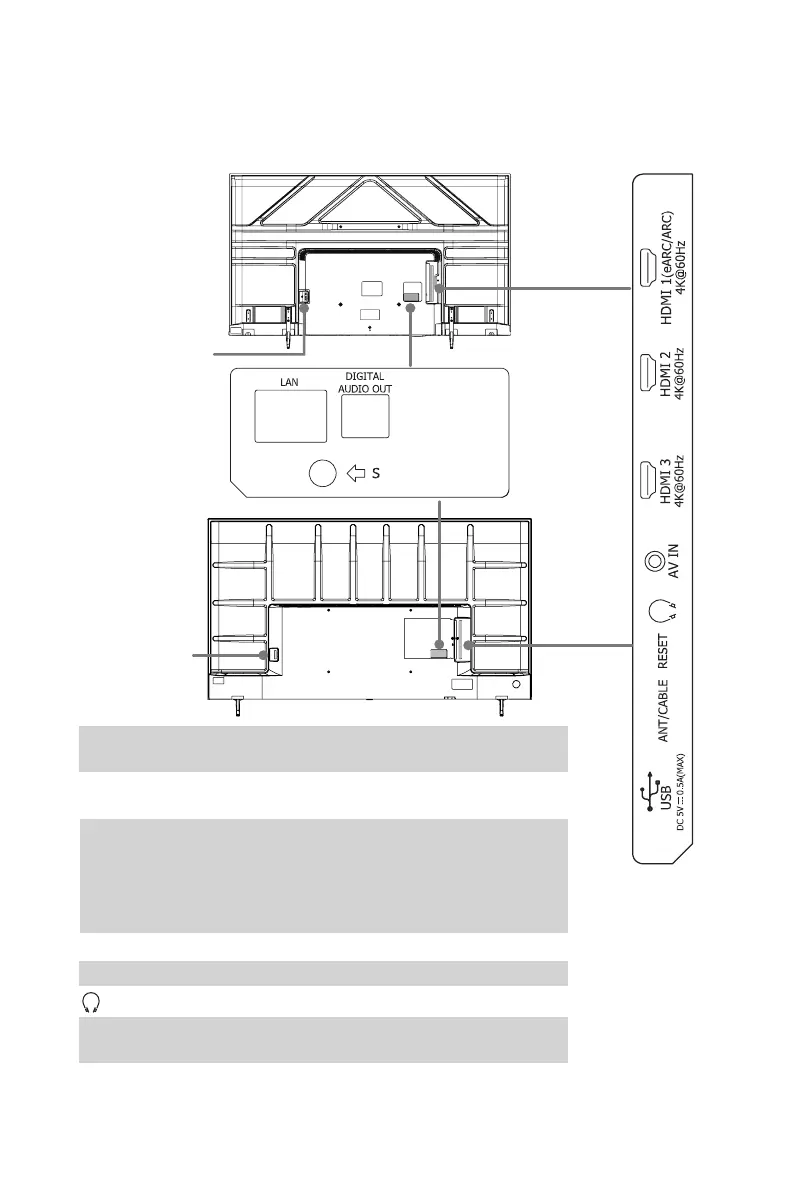
Back View of the TV
STEP 2. Connect devices to your TV
●
LAN
: Connect an Ethernet cable to access a network or the Internet.
The TV also has a wireless connectivity feature.
●
DIGITAL AUDIO OUT
:
Connect an optical cable from an external
digital audio system.
●
USB
:
Connect a USB memory stick to enjoy its photos, music, and
movies, or to enable Live TV Pause. Live TV Pause is only available
on the Antenna input of your Roku TV and requires a dedicated
USB2.0compatibleashdrivewithatleast16GBofstorage.Live
TV Pause requires connecting to the Roku service.
●
ANT/CABLE
:
Connect an outdoor VHF/UHF antenna.
●
RESET
:
Restart or factory reset your TV.
●
: Connect headphone (sold separately) for audio out of the TV.
●
AV IN
:
Connect a composite video cable and left-right audio cables
from an external AV device.
●
HDMI
:
ConnectaHighDenitionMultimediaInterface(HDMI)cable
from an external device.
Power Input
Power Input
70"
65"


 To Next Page