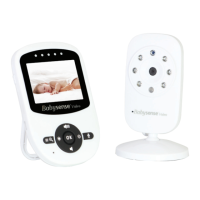
The Babysense Video monitor is a 720P HD digital video baby monitor designed to provide parents with added reassurance through sound and video transmission. It is available in two models: V65-1 (with one camera) and V65-2 (with two cameras). The second camera for model V65-2 is supplied separately. This device is intended as an aid for responsible adult supervision and should not be used as a substitute for direct child care.
Function Description
The core function of the Babysense Video monitor is to transmit live video and audio from a baby unit (camera) to a parent unit (monitor). The camera captures video and sound, while the monitor displays the video feed and plays the audio. The system operates wirelessly, allowing parents to monitor their baby from another room, provided they remain within hearing range of the monitor.
The camera unit features a night vision sensor and IR LEDs, enabling clear video monitoring even in low-light conditions or complete darkness. It also includes a microphone for picking up sounds from the baby's room and a speaker for two-way communication, allowing parents to talk to their baby through the monitor. A temperature sensor on the camera unit continuously monitors the room temperature, and the monitor can trigger an alarm if the temperature falls outside a user-defined range.
The parent unit is equipped with an HD LCD screen for displaying the video feed. It has a built-in microphone for the talk-back function and a speaker for playing audio from the baby's room. LEDs on the monitor indicate sound levels detected by the camera. The monitor is powered by an AC adapter and also has a rechargeable battery for portable use.
Usage Features
The Babysense Video monitor offers a range of features to enhance usability and monitoring capabilities:
- Power/Sleep Button: A long press turns the monitor on/off, while a short press turns the screen on/off, conserving battery life.
- Menu/Back Button: Provides access to the monitor's settings menu and functions as a "Back" button for navigation.
- Camera Switch: If multiple cameras are paired (with model V65-2), this button allows users to switch between camera feeds. Pressing and holding it for 3 seconds activates SCAN Mode, which automatically cycles through all paired cameras.
- Charging Indicator: A yellow light indicates when the monitor is actively charging.
- Navigation Buttons (Left, Up, Right, Down): These buttons are used to tilt the camera remotely (pan and tilt functionality) and to navigate through the monitor's menu options.
- Zoom/OK Button: Allows users to zoom in or out on the video feed and confirms selections within the menu.
- Talk Button: Activates the two-way talk function, enabling parents to speak to their baby through the camera's speaker.
- Sound Level LED: Provides a visual indication of the sound level detected by the camera, with low and high-level indicators.
- Volume/Brightness Control: Adjusts the monitor's audio volume and screen brightness.
- Automatic Pairing: The camera and monitor are pre-paired at the factory for immediate use.
- Additional Camera Pairing: Users can pair up to four cameras to a single monitor. The pairing process involves accessing the camera settings menu, selecting the pairing option, and pressing the PAIR button on the back of the camera.
- Deleting Paired Cameras: Individual cameras or all paired cameras can be deleted from the monitor's memory through the settings menu.
- Wake-Up Sensitivity (ECO Mode): This feature adjusts the sound sensitivity level required to reactivate the monitor's transmission and turn on the screen when in Sleep Mode. There are four levels: LOW, MED, and HIGH, allowing users to customize how responsive the monitor is to sounds.
- Temperature Alarm: The monitor can be set to trigger an alarm if the baby's room temperature goes below 15°C (59°F) or above 29°C (84°F). Users can manually adjust these high and low-temperature alert levels. The audio alarm can be temporarily silenced by pressing any button on the monitor.
- Language Selection: The monitor supports eight pre-loaded languages, which can be changed via the settings menu.
- Lullabies: Six pre-programmed lullabies can be played through the camera's speaker to soothe the baby to sleep. Users can select individual lullabies or play them all in a loop.
- Sleep Mode: This power-saving mode prolongs battery life by turning off the monitor screen when no sound is detected. The screen automatically reactivates if a sound or temperature alarm is triggered, or if sound is detected above the set Wake-Up Sensitivity level. Users can set a time duration for the monitor to enter Sleep Mode or turn it off completely.
- SCAN Mode: When two or more cameras are paired, SCAN Mode automatically switches between each camera feed, displaying each for 10 seconds. This mode is activated by pressing and holding the Camera Switch Button for 3 seconds and deactivated by a brief press.
- Feeding Reminder: This function allows parents to set reminders for their baby's feeding routine, with eight time options available, including an OFF setting to disable the reminder.
- Date/Time Setting: Users can set the current date and time on the monitor.
- On-Screen Display (OSD): This setting controls whether the date and time are displayed on the monitor's status bar.
- Factory Reset: The monitor can be restored to its default factory settings through the settings menu.
- System Information: Provides details about the monitor's software version.
Maintenance Features
To ensure optimal performance and longevity of the Babysense Video monitor, certain maintenance practices are recommended:
- Proof of Purchase: Always retain the proof of purchase for warranty service.
- AC Adapter Unplugging: It is advised to unplug the AC adapters when the device is not in use.
- Battery Safety:
- Dispose of batteries according to local regulations, never in household rubbish or fire.
- Do not dismantle, cut, open, crush, bend, puncture, or shred batteries.
- If a battery leaks, avoid contact with skin or eyes; immediately flush affected areas with water and seek medical assistance.
- Do not modify, remanufacture, insert foreign objects, or immerse batteries in water.
- Use only the supplied battery.
- If the battery is damaged, remove the product from the charger and stop using it; contact customer support.
- Product Disposal: Dispose of the product at the end of its life in accordance with local waste disposal requirements. Packaging materials should be recycled.
- Cleaning:
- Ensure the camera lens is free of dirt or smudges for clear video.
- Clean the lens surface using a microfiber cloth or lens tissue, wiping in a circular motion.
- Placement:
- Keep baby unit, parent unit, and adapter cables at least 6 feet (2 meters) away from the baby and young children to prevent strangulation hazards.
- Never place the baby unit or parent unit inside the baby's cot, bed, or playpen.
- Maintain a distance of at least 5 feet (1.5 meters) from other electronic equipment (e.g., Wi-Fi devices, microwave ovens) to prevent interference.
- Avoid covering the parent or baby units with clothes, towels, blankets, or other items.
- Never use or place the units in or near moisture or water.
- Battery Charging: The monitor takes up to 4 hours to fully charge, providing approximately 4 to 5 hours of battery life due to HD functionality. It is highly recommended to keep the monitor plugged in at night to prevent low battery warnings.
- Reset Hole: If the monitor needs to be reset, use a pin in the reset hole to force a shutdown. The battery compartment should not be opened without following official instructions.

 Need help?
 General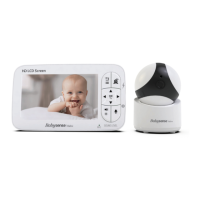

 To Next Page