- 15 -
Source menu
By pressing
_
/
button, select the sixth
icon. Source menu appears on the screen.
79
6285&(79
(;7
(;7
(;7
(;7
(;76
(;7
3&
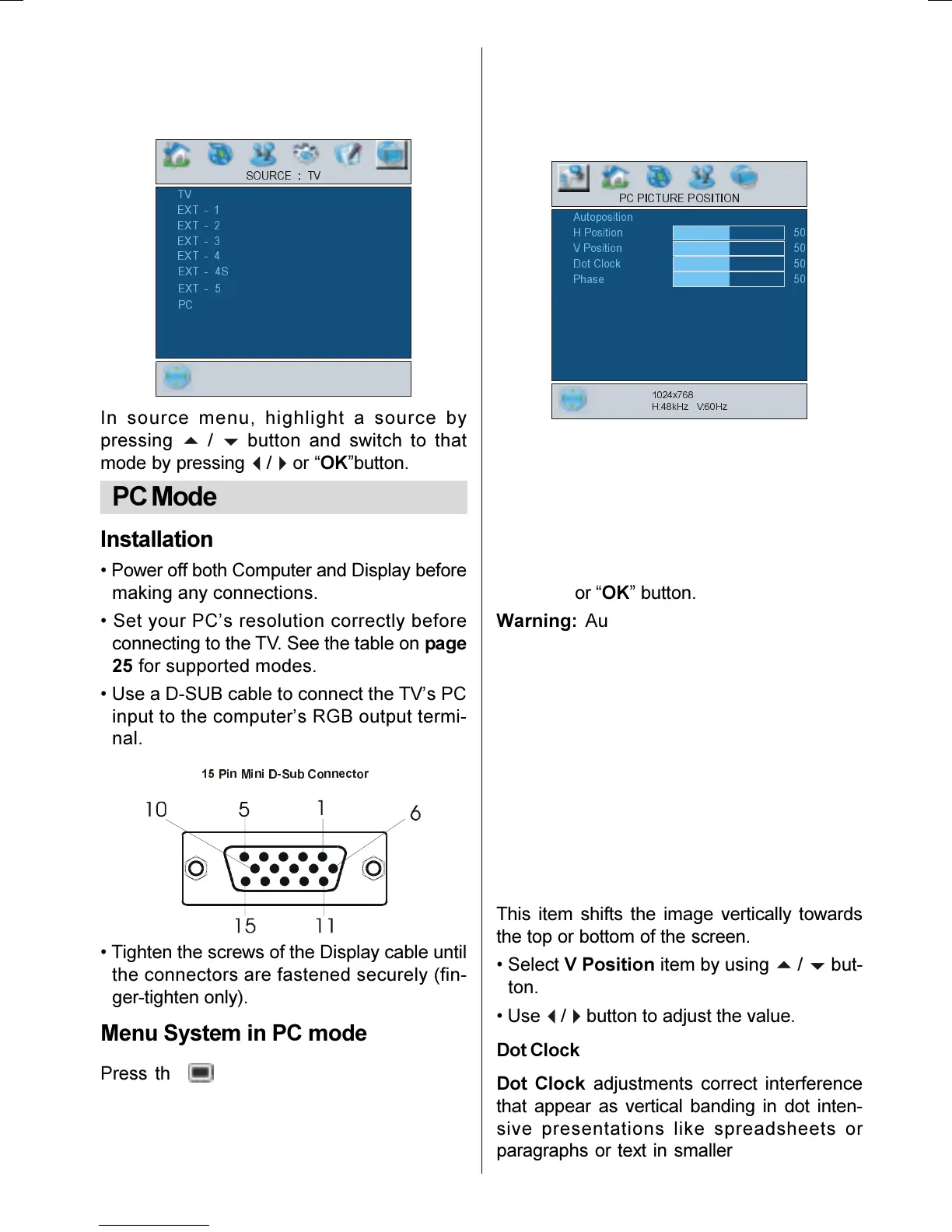
In source menu, highlight a source by
pressing
/
b
button and switch to that
mode by pressing
/
`
or OKbutton.
PC Mode
Installation
Power off both Computer and Display before
making any connections.
Set your PCs resolution correctly before
connecting to the TV. See the table on page
25 for supported modes.
Use a D-SUB cable to connect the TVs PC
input to the computers RGB output termi-
nal.
3LQ0LQL'6XE&RQQHFWRU
Tighten the screws of the Display cable until
the connectors are fastened securely (fin-
ger-tighten only).
Menu System in PC mode
Press the button. The menu will be dis-
played in the middle of the screen.
PC Picture Position Menu
By pressing
/
`
button, select the first icon.
PC Picture Position menu appears on the
screen.
3&3,&785(326,7,21
+3RVLWLRQ
[
+N+]9+]
93RVLWLRQ
'RW&ORFN
3KDVH
Autoposition
If you shift the picture horizontally or vertically
to an unwanted position, use this item to put
the picture into correct place automatically.
Select Autoposition item by using
/
b
buttons.
Press
`
or OK button.
Warning: Auto position adjustment recom-
mended to be done with the full screen im-
age for the proper adjustment.
H (Horizontal) Position
This item shifts the image horizontally to
right hand side or left hand side of the
screen.
Select H Position item by using
/
b
but-
ton.
Use
/
button to adjust the value.
V (Vertical) Position
This item shifts the image vertically towards
the top or bottom of the screen.
Select V Position item by using
/
b
but-
ton.
Use
/
button to adjust the value.
Dot Clock
Dot Clock adjustments correct interference
that appear as vertical banding in dot inten-
sive presentations like spreadsheets or
paragraphs or text in smaller fonts.
01-ENG-26705W-CLE967 UK-HITACHI 26 INCH TFT-TRIDENT-(LG)-50078117.p65 06.12.2005, 14:5715


 To Next Page
 Loading...