- 2 -
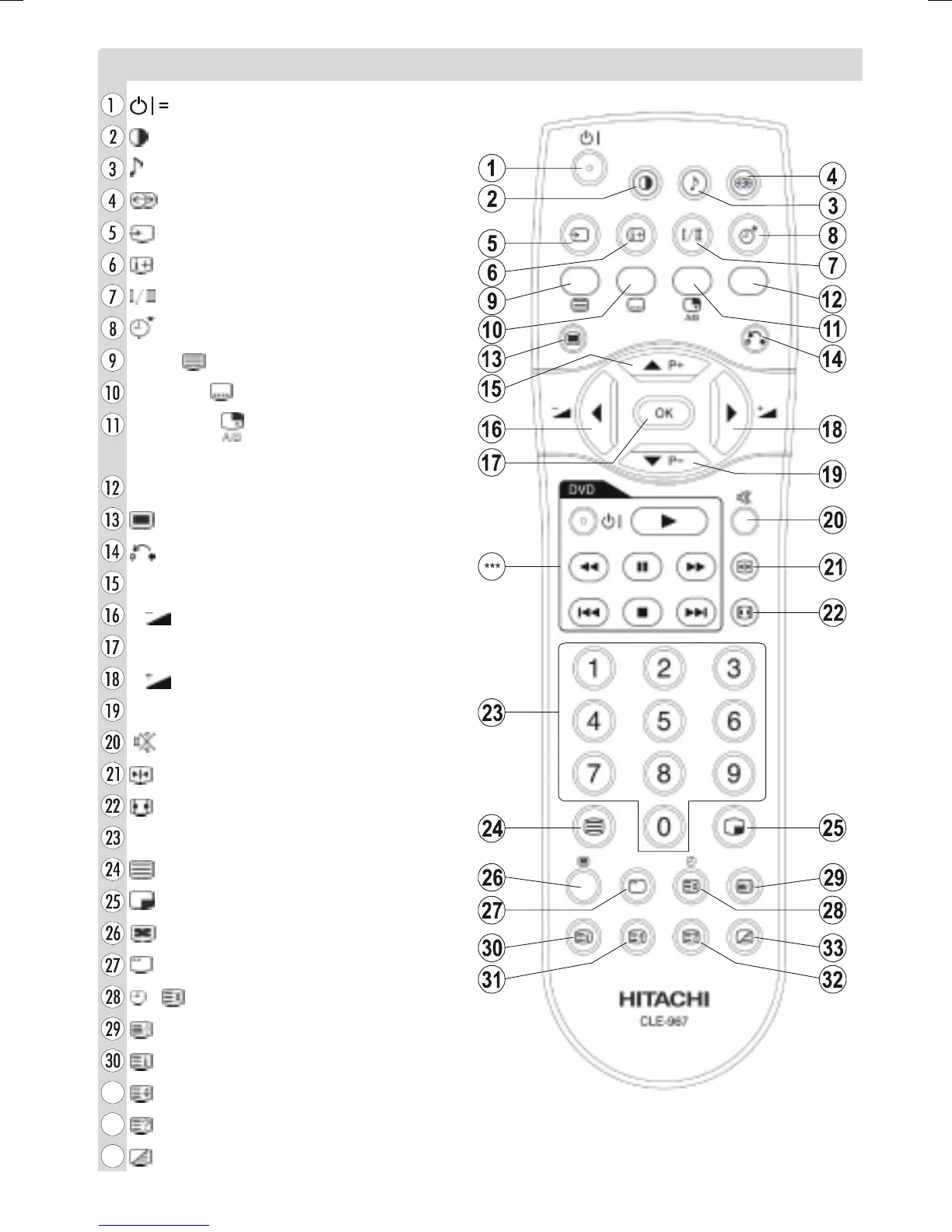
Remote Control Buttons
= Stand by On/Off
= Picture Mode
= Equalizer Sound Mode
= Surround Mode
= Input Source
= Program Information
= Sound Mode
= Sleep Timer
RED / = PAT (Picture and Text)
GREEN / = Subtitle page in TV mode
YELLOW / = Select active window
in PIP mode
BLUE = Only used in Teletext mode
= Menu On/Off
= Go back to previous menu
P+ = Programme Up / Cursor Up
= Volume Down / Cursor Left
OK = Enter
= Volume Up / Cursor Right
b
P- = Programme Down / Cursor Down
= Mute On/Off
= Freeze On/Off
= Aspect ratio
0 - 9 = Digit buttons
= Teletext On/Off
= PIP / PAP / TV
= PIP position
= Sub page
/ = Time / Update
= Hold
= Index Page
= Expand
= Reveal
= Mix
*** These buttons can control most Hitachi DVD Players
and Recorders. Please see P26 for details of how to
operate with other brands.
01-ENG-26705W-CLE967 UK-HITACHI 26 INCH TFT-TRIDENT-(LG)-50078117.p65 06.12.2005, 14:572



 To Next Page