10
DP45
BACK TO ADJUSTMENTS
O
I
L
NOTE: Setting to the center between purple and
crimson is optimum.
OPTICAL FOCUSING ADJUSTMENT RED
(6) In case of B lens. Set the position where the
chromatic aberration changes from purple to
green. As shown below, observe the vertical
bright line and adjust lens focus where the
pur
ple or green chromatic aberration slightly
appears inside and purple or green outside
(reference value : 1~3mm) at the point specified
in table below. Change the signal and fine-
adjust in the same way as the G lens.
O
I
L
NOTE: Setting the center between Red and crimson
is optimum.
(5) In case of R lens. Set the position where the
chromatic aberration changes from red to
crimson. As shown below, observe the vertical
bright line and adjust lens focus where the
crimson or red chromatic aberration slightly
appears inside, and crimson or red outside
(reference value : 1~3mm) at the point specified
in table below. Change the signal and fine-
adjust the same way as the G lens.
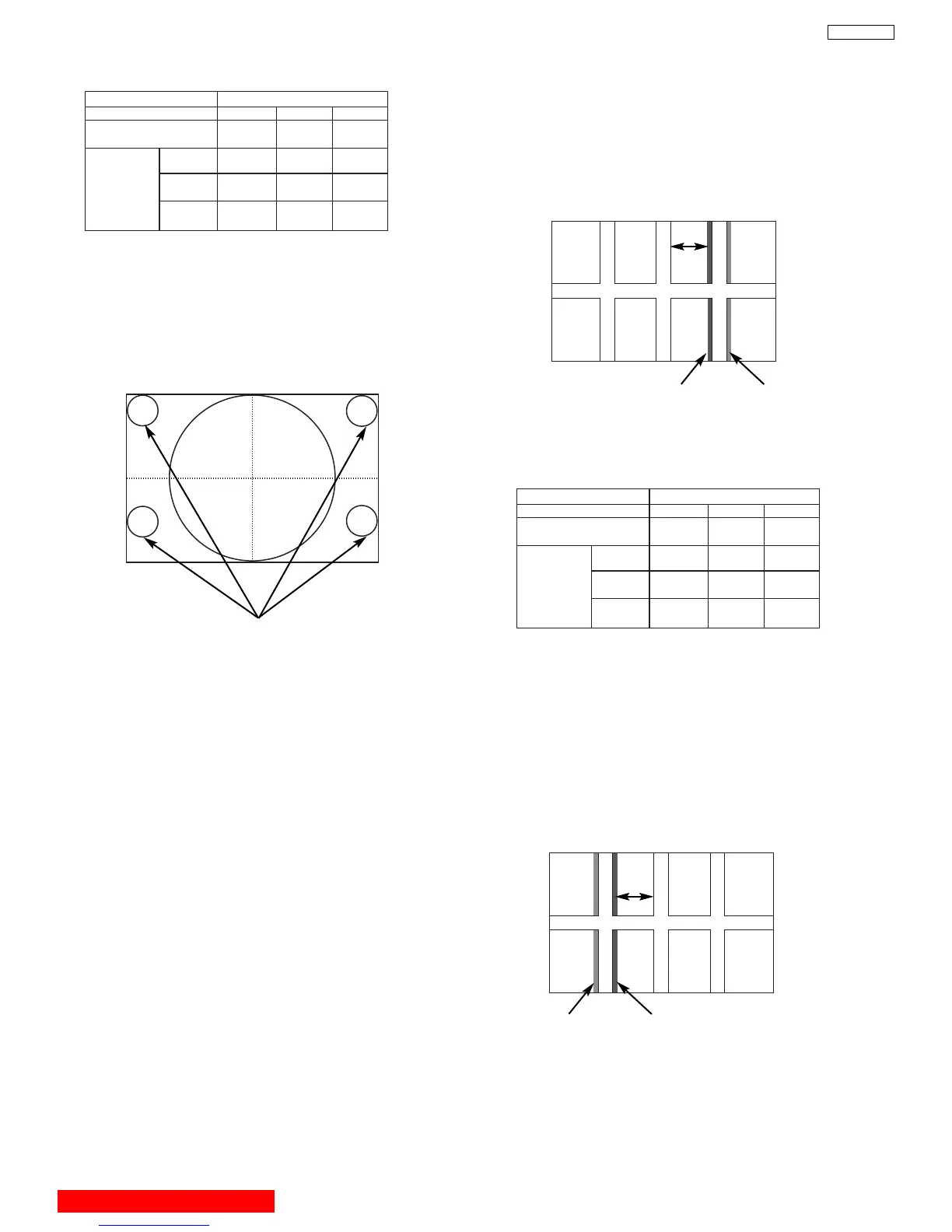
OPTICAL FOCUSING ADJUSTMENT GREEN
Change the signal to the circle pattern and fine
adjust. Observe the corner part of the screen,
especially observe number in the small circle
when adjusting. If the focus performance at the
screen center exceeds the lower limit, it is
acceptable.
CHASSIS DP45
SCREEN SIZE51” 57”
L1 and L2
(PITCHES from CENTER) 1.0 1.0
BETWEEN
L1&L2 * * *
COLOR ***
ABERR
ATION I 2.0mm MAX 3.0mm MAX
** *
O 2.0mm MAX 3.0mm MAX
65”
3.0
3.5m
m MAX
*
3.5mm MAX
(NOTE) * Slightly reddish or no color
** Slightly bluish or no color
Small circle of circle pattern
NOTES: 1. Since the G light is very important for
picture quality and performance, pay
special attention in its adjustment.
2. Be careful not to touch the lens with your
fingers when adjusting.
CHASSIS DP45
SCREEN SIZE51” 57”
L1 and L2
(PITCHES from CENTER) 3.0 3.0
65”
3.0
BETWEEN
L1&L2 * * *
COLOR ***
ABERRATION I 2.0mm MAX 3.0mm MAX
** *
O 2.0mm MAX 3.0mm MAX
3.5mm MAX
*
3.5mm MAX
(NOTE) * Slightly reddish or no color
** Slightly crimson or no color



 To Next Page