16
DP45
Convergence Errors.
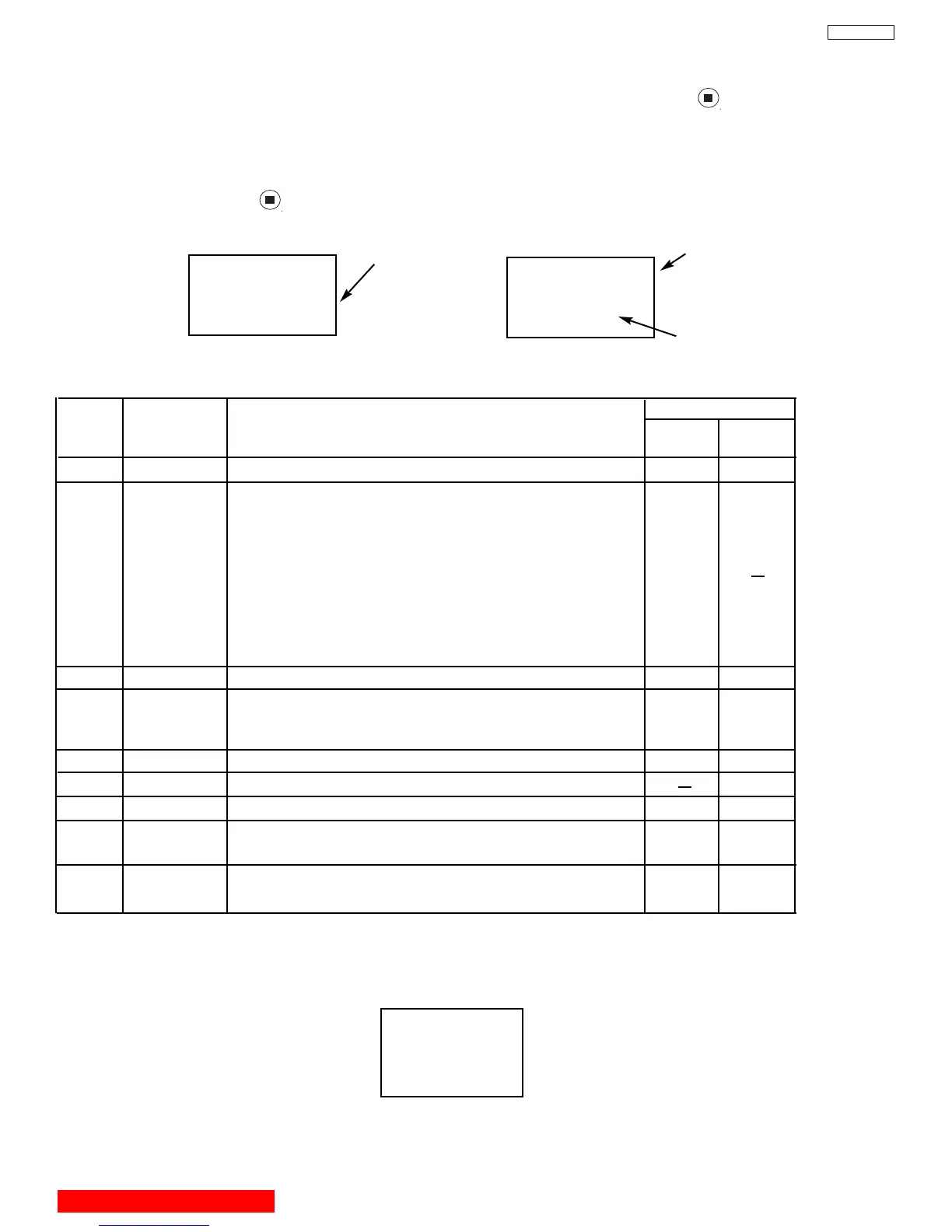
If an error message or code appears while performing MAGIC FOCUS or initialize (ASPECT , key in DCU
service mode) follow this confirmation and repair method.
1. Turn on power and receive any signal.
2. Press service switch on DEF./CONV. board.
3. Set R/C to DCAM mode (refer to page 47).
4. Press “DAY/NIGHT” then key on remote control.
5. Error code will be displayed in bottom right corner of screen. If there is no error, an “INITIAL OK” message will
appear on screen.
6. Follow repair table for errors.
ERROR!!
Error code
CONNECT 1!
Error message
Sensor position
X
No. 1 3
DCU REPAIR TABLE
Error
Code
Error
Display
Code
Countermeasure
Application
Initialize
Magic
Focus
1
2 Connect 1 1. Darken Outside Light
*2 2. Placing of sensor
3. Is pattern hitting sensor
4. Check connection and solder bridge of sensor
5. Replace sensor
6. Replace sensor P.W.B.
7. Sensor Connector check
8. Replace DCU
9. Adjustment check (H/V size, centering)
VF Error Replace DCU
3*2
4 Over Flow 1. Check the placement of sensor
2. Adjustment check (H/V size, centering)
3. Conv. amp. gain check *1 (check resistor values only)
A/D Level Same as Error Code 2
Convergence Same as Error Code 4
5
Operation Same as Error Code 4
7
Connect 2 Same as Error Code 2
9
Noise Input strong field signal
Chec
k the wir
ing of connector betw
een sensor and DCU
10
Sync Input strong field signal
Check the wiring of connetor between sensor and DCU
11
*1 -- RK 53, 54, 57, 58, 61, 62, 65, 66, 69, 70, 73 and 74 check these resistors.
*2 Sensor Position
0 1 2
73
654
(View from front side)
X
X
X
XX
X
X
X
X
X
XX
XX
XX
8 Sensors
BACK TO ADJUSTMENTS



 To Next Page