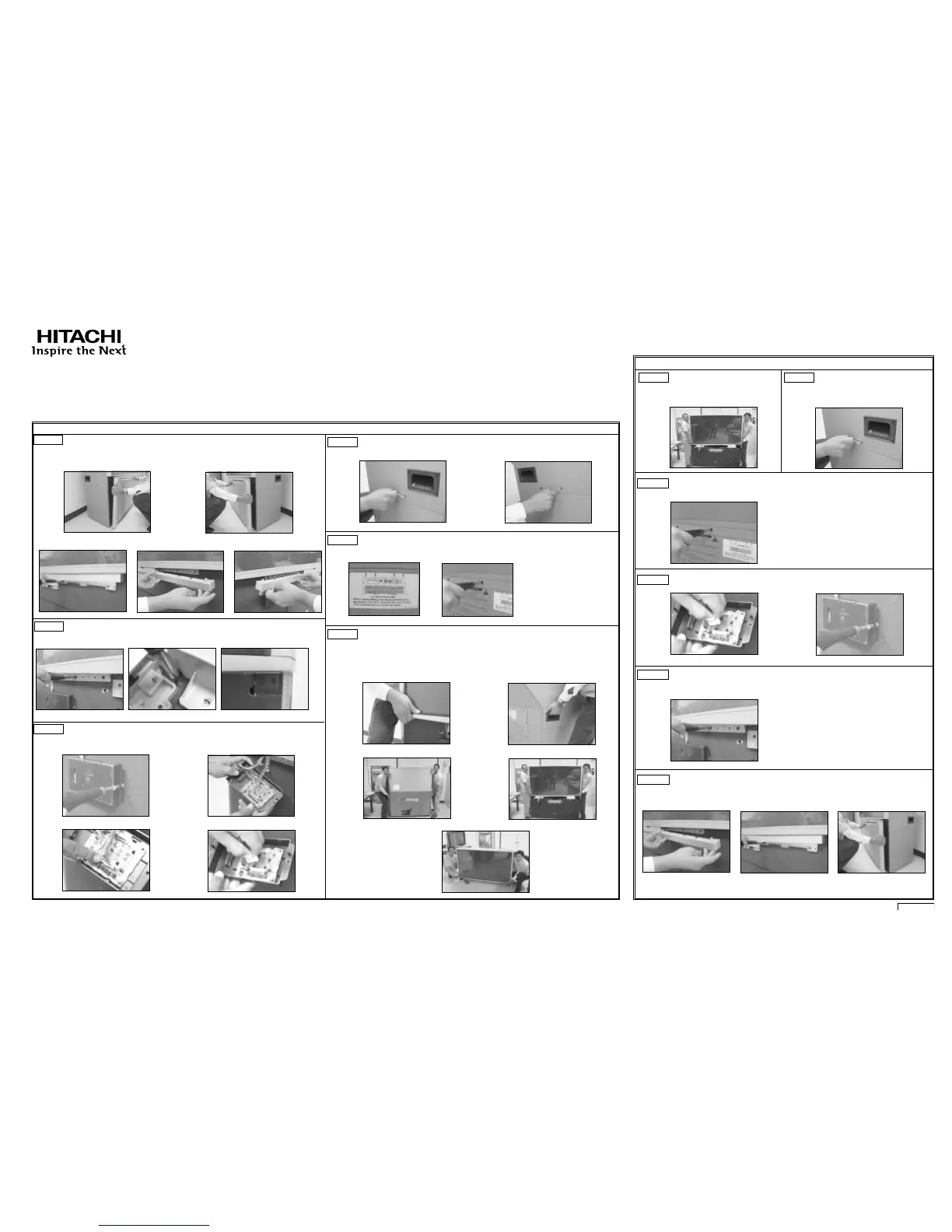
DISASSEMBLY / ASSEMBLY INSTRUCTIONS FOR HITACHI 65 INCH SPLIT PROJECTION TELEVISION
THESE INSTRUCTIONS MUST REMAIN ON UNIT
IMPORTANT POINTS:
(a) Do not attempt to perform this work by yourself.
(b) Request an installation specialist to install this unit.
(c) HITACHI assumes no responsibility or liability for injury/damage as a result of consumer installation and handling. Be advised that
improper consumer installation/handling is not covered by manufacturer’s warranty.
(d) This Projection Television weighs over 272.8 pounds and has many sensitive components.
1 - SEPARATION PROCEDURE (Note: read all instructions and understand how to properly and safely disassemble and assemble unit)
2 - RE-ASSEMBLY PROCEDURE
STEP 1
Before disassembling this projection TV set, you must first remove the speaker grille by
grabbing the sides and pulling left and right side see (a)(b). Remove the front decoration
panels by unscrewing the 2 screws from each panel, see (c), then remove from the original
position, see (d)(e).
STEP 3
Remove the sensor box by unscrewing the 2 screws located on both sides of the sensor box, see
(a). Rotate the sensor box and there are 4 low voltage connectors located on the sensor board,
see (b). Disconnect wires (PDSE), see (c) and (d). (Make sure to push the center lock on the
connector at the unplug time.)
(a) (b)
Caution: When the TV is separated, the top portion weighs 112 lbs. This task should be done by
two persons to carry top portion when separating this TV.
This assembly contains fragile parts, such as glass and the viewing screen. Avoid any type of
impact that could cause breakage of these components.
Remove top portion by grabbing the bottom corner of frame and the side of the TV, see (a)(b). Lift
upwards, see (c)(d), gently place the top portion on the the floor, see (e).
CAUTION: DISCONNECT UNIT FROM POWER SOURCE BEFORE DISASSEMBLY / ASSEMBLY
P# QL22488
(c)
(d)
(e)
STEP 2
Remove the 8 screws that hold the screen frame to the cabinet on the front side. DO NOT
remove the right and left edge screen frame screws (c).
(a)
(b)
(c)
(d)
STEP 4
Remove the joint connector bolts from each side of the TV set using the allen wrench that is
provided inside of the instruction bag, see (a) and (b).
(a)
(b)
STEP 5
Remove from the back side of the TV set only the top 4 screws of the lower rear cover, see (b), as
shown by the arrows on the rear cabinet label, see (a). Do not remove the rear cover board.
(b)
STEP 6
(a)
(b)
(c)
(d)
(e)
STEP 7
To re-assemble the set, lift the top portion
and align onto the bottom cabinet. Gently
lower the top portion until it sits flush on
the bottom.
STEP 8
Re-install the joint connector bolts (4 pcs.)
that were removed in step 4 of the
disassembly.
STEP 9
Re-install the top (4) four screws into the lower rear cover, see (a).
(a)
STEP 10
Re-connect the sensor connector to the sensor board, see (a).
Re-install the sensor box, see (b).
(a)
(b)
STEP 11
Re-install the 8 screws that hold the frame to the cabinet on the front side of the TV.
STEP 12
Re-install both of the front decoration panels, see (a) and (b) Re-install the speaker grille, aligning it
with the bottom cabinet, see (c). This completes the Disassembly and Assembly instructions.
(a)
(b)
(c)
(a)
(a)
(b)
(c)
37



 To Next Page