HMCS404AC--------------------------------------------------
__________________
_
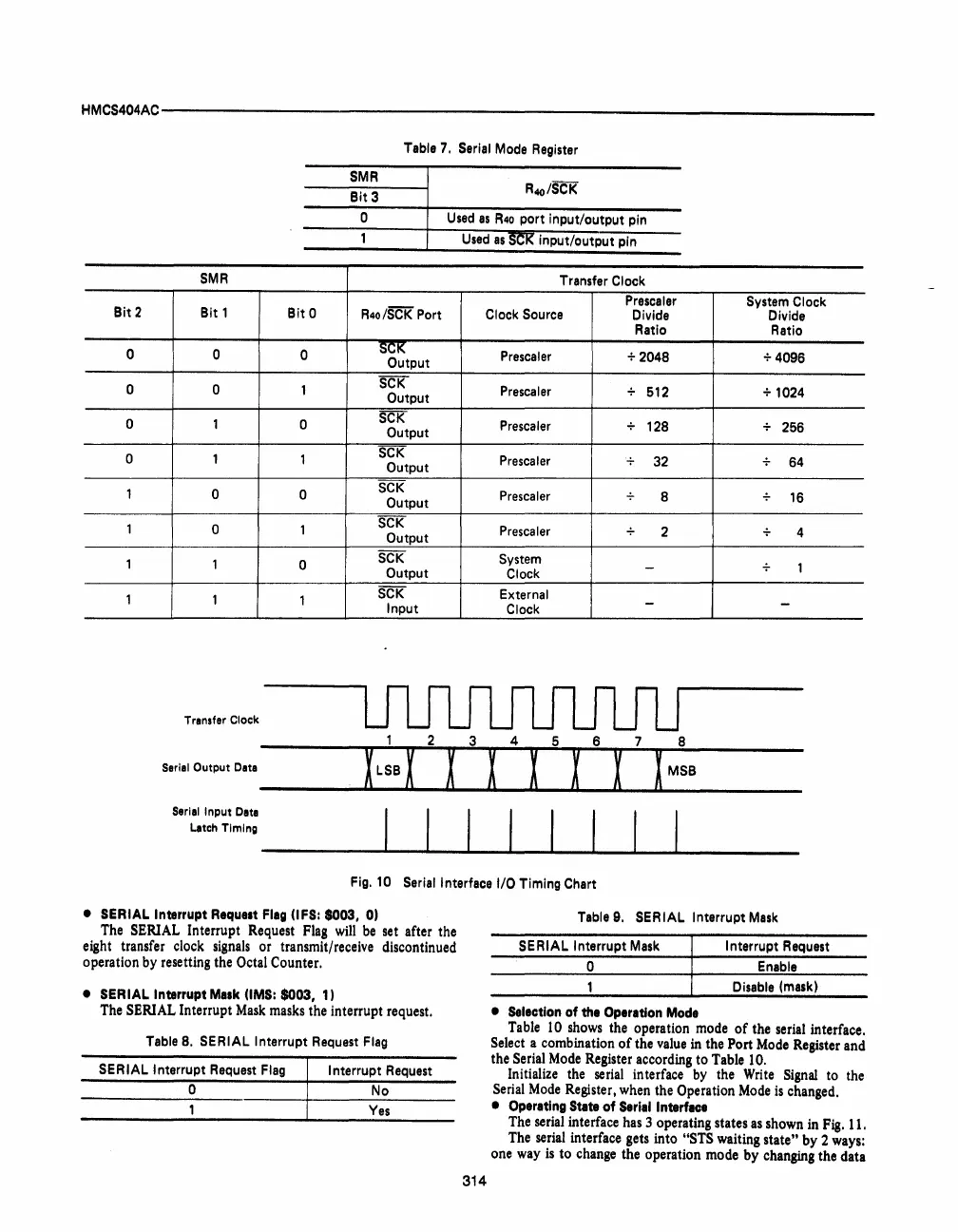
Table 7. Serial Mode Register
SMR
Bit 3
o
Used
as
R40
port
input/output
pin
Used
as
SOl<
input/output
pin
SMR
Transfer Clock
Presealer
System Clock
Bit 2
Bit 1
Bit 0
R4o/SCK Port Clock Source
Divide
Divide
Ratio
Ratio
0
0
0
SCI{
Presealer
+2048
+4096
Output
0 0
1
SCK
Presealer
512
+ 1024
Output
0
1
0
SCK
Prescaler
128
256
Output
0 1
1
SCK
Prescaler
32
64
Output
1
0
0
SCK
Prescaler
8
16
Output
1
0
1
SCK
Prescaler
2
4
Output
1
1
0
SCK
System
-
1
Output
Clock
1
1
1
SCK
External
-
-
Input
Clock
Transfer Clock
Seriel
Output
Data
Serial
Input
Data
LatCh
Timing
I I I I I I I I
Fig.10
Serial Interface I/O Timing Chart
• SERIAL Interrupt
Requllt
Fleg (lFS:
$003,
0)
The
SERIAL
Interrupt
Request
Flag
will
be
set
after
the
eight
transfer
clock
signals
or
transmit/receive
discontinued
operation
by
resetting
the
Octal
Counter.
• SERIAL Interrupt Malk (lMS:
$003,
1)
The
SERIAL
Interrupt
Mask
masks
the
interrupt
request.
Table 8. SERIAL Interrupt Request Flag
SERIAL Interrupt Request Flag
I nterrupt Request
o
No
Yes
314
Table 9. SERIAL Interrupt
Mask
SERIAL Interrupt
Mask
Interrupt Request
o Enable
Disable
(mask)
• Selection
of
the Operation Mode
Table
10
shows
the
operation
mode
of
the
serial
interface.
Select
a
combination
of
the
value
in
the
Port
Mode
Register
and
the
Serial
Mode
Register
according
to
Table
10.
Initialize
the
serial
interface
by
the
Write
Signal
to
the
Serial
Mode
Register,
when
the
Operation
Mode
is
changed.
• Operating State
of
Serial Interface
The
serial
interface
has
3
operating
states
as
shown
in
Fig.
11.
The
serial
interface
gets
into
"STS
waiting
state"
by
2
ways:
one
way
is
to
change
the
operation
mode
by
changing
the
data



 To Next Page