EasyManua.ls Logo

Hitachi D-3300M - Page 9

Hitachi D-3300M
34 pages
Print Icon
To Next Page IconTo Next Page
To Previous Page IconTo Previous Page
Loading...
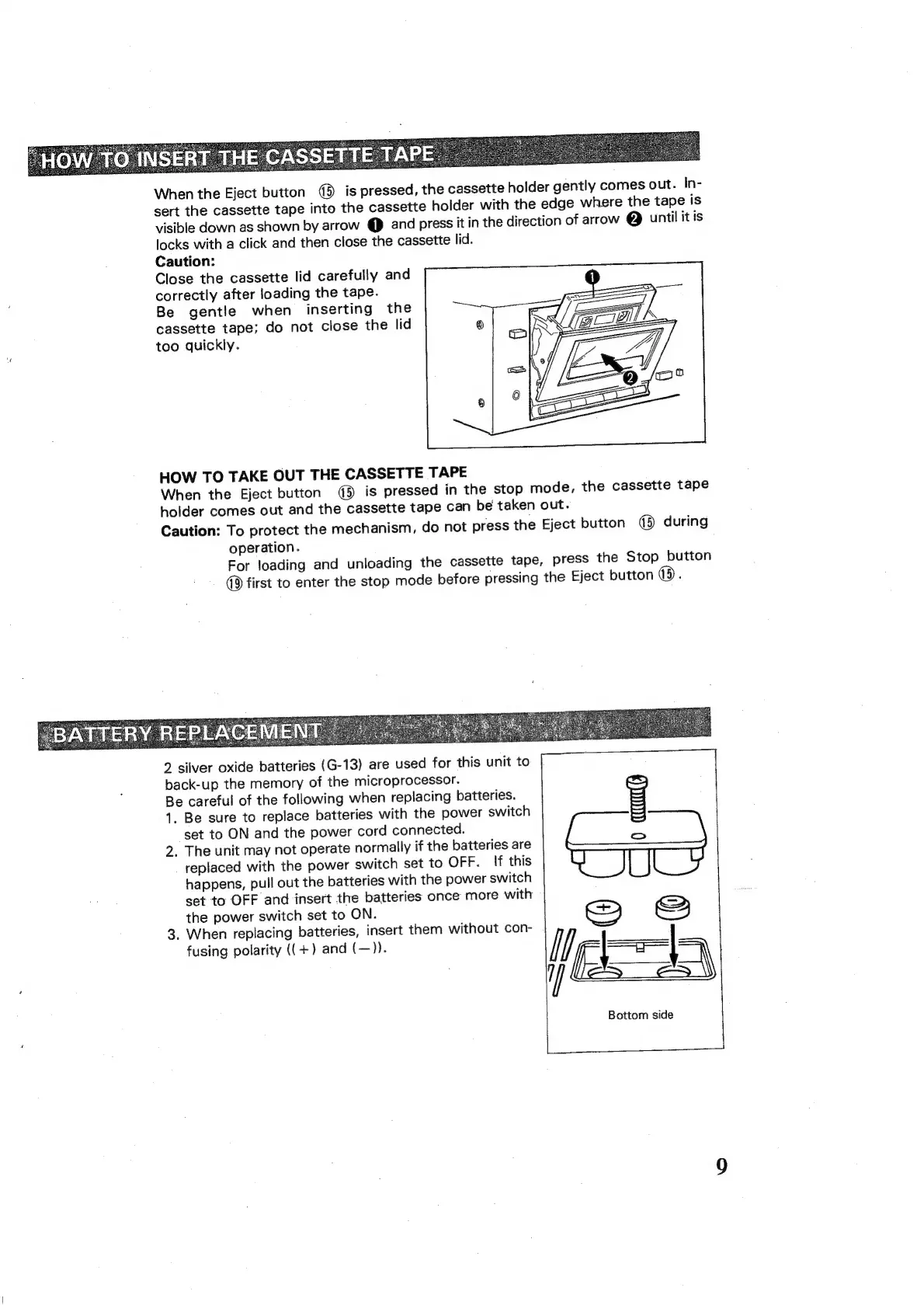
When
the
Eject
button
45
is
pressed,
the
cassette
holder
gently
comes
out.
In-
sert
the
cassette
tape
into
the
cassette
holder
with
the
edge
where
the
tape
is
visible
down
as
shown
by
arrow
@
and
press
it
in
the
direction
of
arrow
@
until
it
is
locks
with
a
click
and
then
close
the
cassette
lid.
Caution:
Close
the
cassette
lid
carefully
and
correctly
after
loading
the
tape.
Be
gentle
when
inserting
the
cassette
tape;
do
not
close
the
lid
too
quickly.
HOW
TO
TAKE
OUT
THE
CASSETTE
TAPE
When
the
Eject
button
@
is
pressed
in
the
stop
mode,
the
cassette
tape
holder
comes
out
and
the
cassette
tape
can
be
taken
out.
Caution:
To
protect
the
mechanism,
do
not
press
the
Eject
button
qd)
during
operation.
For
loading
and
unloading
the
cassette
tape,
press
the
Stop
button
first
to
enter
the
stop
mode
before
pressing
the
Eject
button
(5)
.
2
silver
oxide
batteries
(G-13)
are
used
for
this
unit
to
back-up
the
memory
of
the
microprocessor.
Be
careful
of
the
following
when
replacing
batteries.
1.
Be
sure
to
replace
batteries
with
the
power
switch
set
to
ON
and
the
power
cord
connected.
2.
The
unit
may
not
operate
normally
if
the
batteries
are
replaced
with
the
power
switch
set
to
OFF.
lf
this
happens,
pull
out
the
batteries
with
the
power
switch
set
to
OFF
and
insert
the
batteries
once
more
with
the
power
switch
set
to
ON.
3.
When
replacing
batteries,
insert
them
without
con-
fusing
polarity
((+)
and
(—)).
S
&
ee
Bottom
side