EasyManua.ls Logo

Hitachi DA-1000 - Page 7

Hitachi DA-1000
39 pages
Print Icon
To Next Page IconTo Next Page
To Previous Page IconTo Previous Page
Loading...
\
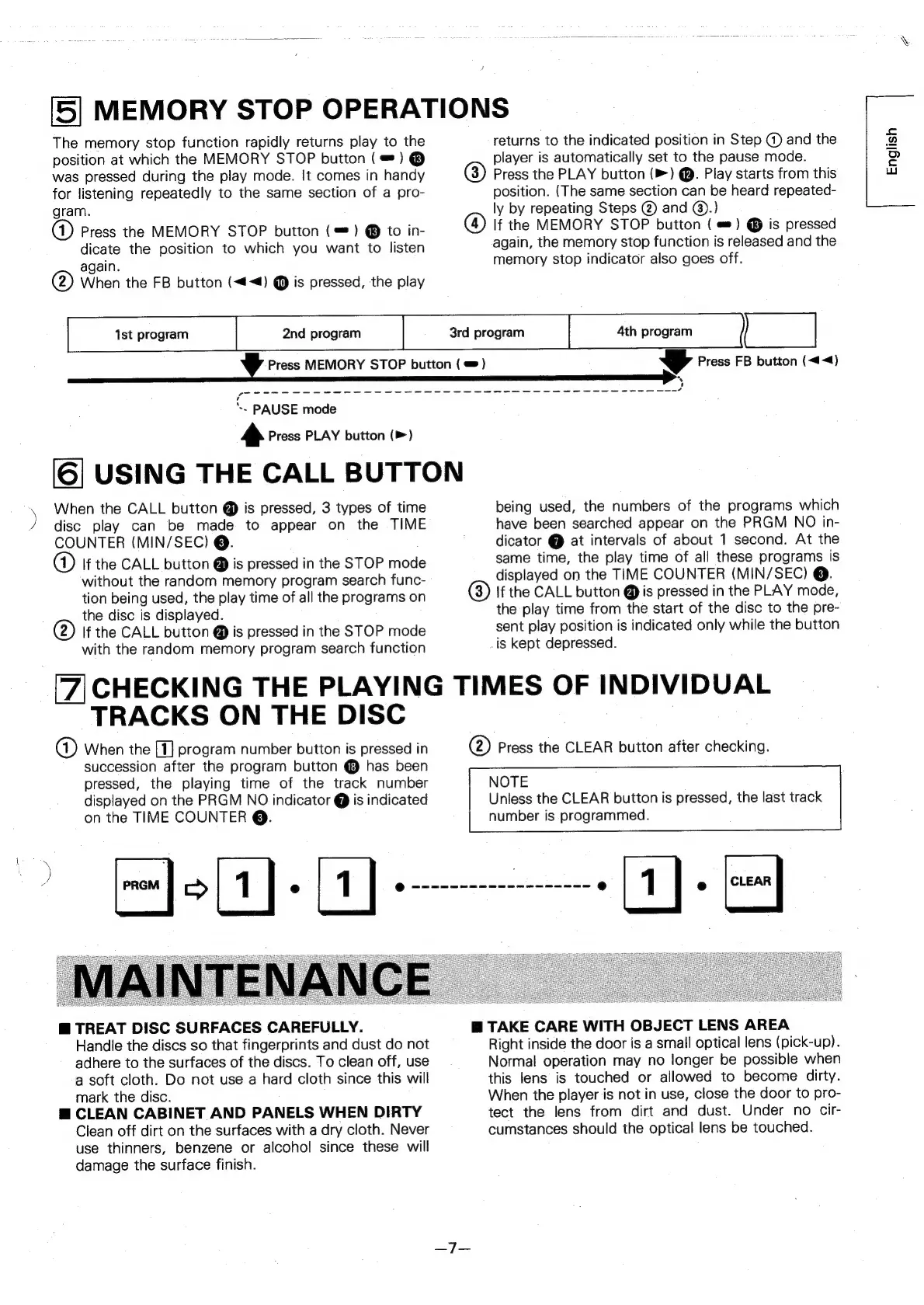
5
MEMORY
STOP
OPERATIONS
The
memory
stop
function
rapidly
returns
play
to
the
returns
to
the
indicated
position
in
Step
@
and
the
position
at
which
the
MEMORY
STOP
button
(#)
®
player
is
automatically
set
to
the
pause
mode.
was
pressed
during
the
play
mode.
It
comes
in
handy
@)
Press
the
PLAY
button
(>)
@.
Play
starts
from
this
for
listening
repeatedly
to
the
same
section
of
a
pro-
position.
(The
same
section
can
be
heard
repeated-
gram.
ly
by
repeating
Steps
@
and
@).)
(4)
Press
the
MEMORY
STOP
button
(=)
@
to
in-
@
If
the
MEMORY
STOP
button
(
=)
@
is
pressed
dicate
the
position
to
which
you
want
to
listen
again,
the
memory
stop
function
is
released
and
the
again.
memory
stop
indicator
also
goes
off.
@)
When
the
FB
button
(<<)
@
is
pressed,
the
play
1st
program
2nd
program
3rd
program
4th
program
)
|
Vv
Press
MEMORY
STOP
button
(=)
yy
Press
FB
button
(<<)
’
vA
“.
PAUSE
mode
»
Press
PLAY
button
(>)
[6]
USING
THE
CALL
BUTTON
When
the
CALL
button
@
is
pressed,
3
types
of
time
being
used,
the
numbers
of
the
programs
which
disc
play
can
be
made
to
appear
on
the
TIME
have
been
searched
appear
on
the
PRGM
NO
in-
COUNTER
(MIN/SEC)
@.
dicator
@
at
intervals
of
about
1
second.
At
the
(A)
If
the
CALL
button
@
is
pressed
in
the
STOP
mode
same
time,
the
play
time
of
all
these
programs
is
without
the
random
memory
program
search
func-
displayed
on
the
TIME
COUNTER
(MIN/SEC)
@.
tion
being
used,
the
play
time
of
all
the
programs
on
()
If
the
CALL
button
@
is
pressed
in
the
PLAY
mode,
the
disc
is
displayed.
the
play
time
from
the
start
of
the
disc
to
the
pre-
@)
lf
the
CALL
button
@
is
pressed
in
the
STOP
mode
sent
play
position
is
indicated
only
while
the
button
with
the
random
memory
program
search
function
-is
kept
depressed.
[7]
CHECKING
THE
PLAYING
TIMES
OF
INDIVIDUAL
TRACKS
ON
THE
DISC
qa)
When
the
[1]
program
number
button
is
pressed
in
@)
Press
the
CLEAR
button
after
checking.
succession
after
the
program
button
@
has
been
pressed,
the
playing
time
of
the
track
number
NOTE
displayed
on
the
PRGM
NO
indicator
@
is
indicated
Unless
the
CLEAR
button
is
pressed,
the
last
track
on
the
TIME
COUNTER
@.
number
is
programmed.
@
TREAT
DISC
SURFACES
CAREFULLY.
@
TAKE
CARE
WITH
OBJECT
LENS
AREA
Handle
the
discs
so
that
fingerprints
and
dust
do
not
Right
inside
the
door
is
a
small
optical
lens
(pick-up).
adhere
to
the
surfaces
of
the
discs.
To
clean
off,
use
Normal
operation
may
no
longer
be
possible
when
a
soft
cloth.
Do
not
use
a
hard
cloth
since
this
will
this
lens
is
touched
or
allowed
to
become
dirty.
mark
the
disc.
When
the
player
is
not
in
use,
close
the
door
to
pro-
@
CLEAN
CABINET
AND
PANELS
WHEN
DIRTY
tect
the
lens
from
dirt
and
dust.
Under
no
cir-
Clean
off
dirt
on
the
surfaces
with
a
dry
cloth.
Never
cumstances
should
the
optical
lens
be
touched.
use
thinners,
benzene
or
alcohol
since
these
will
damage
the
surface
finish.
English