English
14
●
The battery life is finished if it can only be used
for short periods even when fully charged.
Purchase a new battery. Continuing to use a
depleted battery may cause the charger to
malfunction.
<UC18YGL2>
1. Insert the plug of battery charger into the
receptacle.
When the plug of battery charger has been inserted
into the receptacle, pilot lamp will blink in red. (At
1-second intervals)
WARNING:
Do not use the electrical cord if
damaged. Have it repaired
immediately.
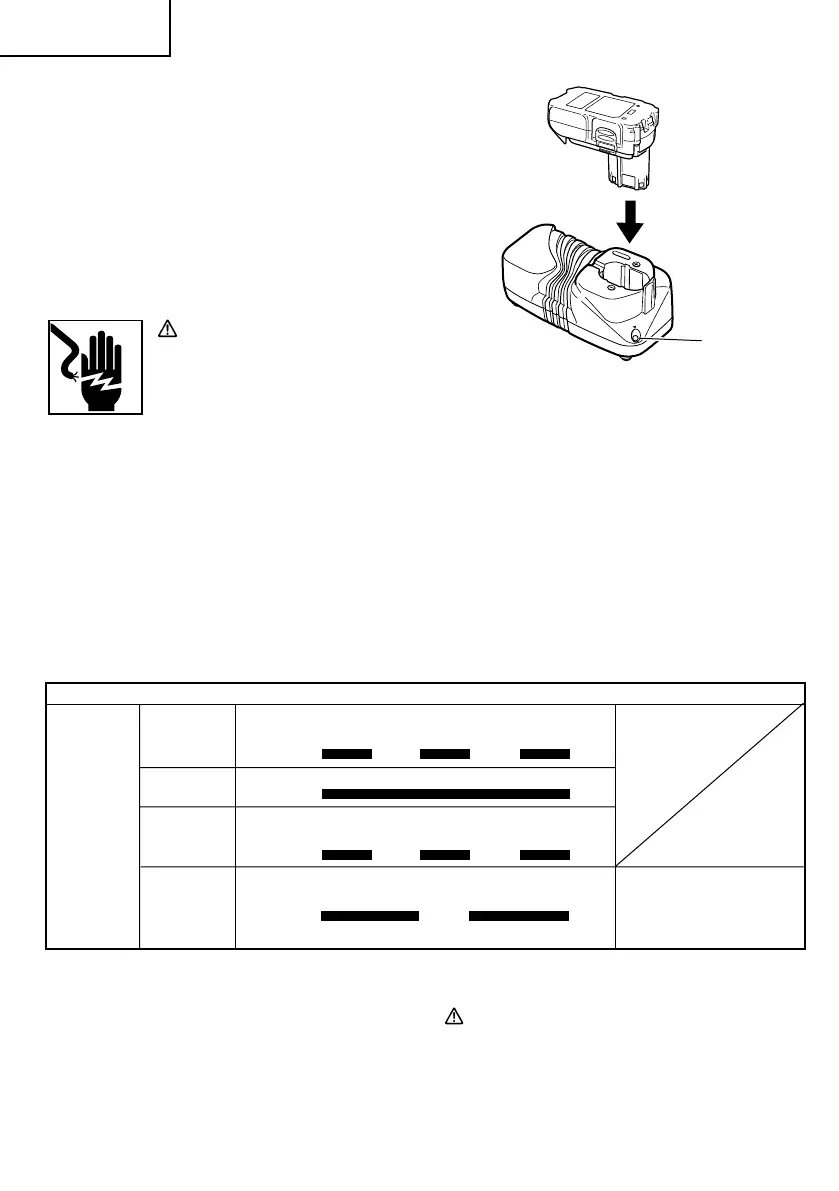
2. Insert the battery to the battery charger.
Insert the battery into the battery charger as shown
in Fig. 6. Make sure it contacts the bottom of the
battery charger.
3. Charging
䡬
When the battery is connected to the battery
charger, charging will commence and the pilot
lamp will light in red. (See Table 4)
NOTE:
If the pilot lamp does not light or blink in red, pull
out the plug from the receptacle and check if the
battery is properly mounted.
䡬
When the battery is fully charged, the pilot lamp
will blink in red slowly. (At 1-second intervals) (See
Table 4)
Fig. 6
Pilot lamp
Before
charging
While
charging
Charging
complete
Overheat
standby
Battery overheated.
Unable to charge.
(Charging will commence
when battery cools)
Table 4
Indications of the pilot lamp
Blinks
Lights
Blinks
Blinks
Lights for 0.5 seconds. Does not light
for 0.5 seconds. (off for 0.5 seconds)
Lights continuously
Lights for 0.5 seconds. Does not light
for 0.5 seconds. (off for 0.5 seconds)
Lights for 1 seconds. Does not light for
0.5 seconds. (off for 0.5 seconds)
Pilot lamp
(red)
䡬
Regarding the temperature of the rechargeable
battery.
The temperatures for rechargeable batteries are
as shown in Table 3, and batteries that have
become hot should be cooled for a while before
being recharged.
4. Disconnect battery charger from the receptacle.
CAUTION:
Do not pull the plug out of the receptacle by pulling
on the cord.
Make sure to grasp the plug when removing from
receptacle to avoid damaging cord.
01Eng_DS14DFL_US 7/30/09, 14:2514



 To Next Page