English
9
HOW TO USE
How to make the batteries perform longer.
○ Recharge the batteries before they become completely
exhausted.
When you feel that the power of the tool becomes
weaker, stop using the tool and recharge its battery. If
you continue to use the tool and exhaust the electric
current, the battery may be damaged and its life will
become shorter.
1. Confi rm the clutch dial position (See Fig. 4)
The tightening torque of this unit can be adjusted
according to the clutch dial position, at which the clutch
dial is set.
(1) When using this unit as a screwdriver, line up the one of
the numbers “1, 5, 9 ... 21” on the clutch dial, or the dots,
with the triangle mark on the outer body.
(2) When using this unit as a drill, align the clutch dial drill
mark “
” with the triangle mark on the outer body.
CAUTION
○ The clutch dial cannot be set between the numerals “1, 5,
9 ... 21” or the dots.
○ Do not use with the clutch dial numeral between “21”
and the line at the middle of the drill mark. Doing so may
cause damage (See Fig. 5).
2. Tightening torque adjustment
(1) Tightening torque
Tightening torque should correspond in its intensity to
the screw diameter. When too strong torque is used,
the screw head may be broken or be injured. Be sure
to adjust the clutch dial position according to the screw
diameter.
(2) Tightening torque indication
The tightening torque diff ers depending on the type of
screw and the material being tightened.
The unit indicates the tightening torque with the numbers
“1, 5, 9 ... 21” on the clutch dial, and a dots. The tightening
toque at position “1” is the weakest and the torque is
strongest at the highest number (See Fig. 4).
(3) Adjusting the tightening torque
Rotate the clutch dial and line up the numbers “1, 5, 9 ...
21” on the clutch dial, or the dots, with the triangle mark
on the outer body. Adjust the clutch dial in the weak or the
strong torque direction according to the torque you need.
CAUTION
○ The motor rotation may be locked to cease while the unit
is used as drill. While operating the driver drill, take care
not to lock the motor.
○ Too long hammering may cause the screw broken due to
excessive tightening.
3. Change rotation speed
Operate the shift knob to change the rotational speed.
Move the shift knob in the direction of the arrow (See
Figs. 8 and 9).
When the shift knob is set to “LOW”, the drill rotates at a
low speed. When set to “HIGH”, the drill rotates at a high
speed.
CAUTION
○ When changing the rotational speed with the shift knob,
confi rm that the switch is off .
Changing the speed while the motor is rotating will
damage the gears.
○ When setting the shift knob to “HIGH” (high speed)
and the position of the clutch dial is “17” or “21”, it may
happen that the clutch does not engaged and that the
motor is locked. In such a case, please set the shift knob
to “LOW” (low speed).
○ If the motor is locked, immediately turn the power off . If
the motor is locked for a while, the motor or battery may
be burnt.
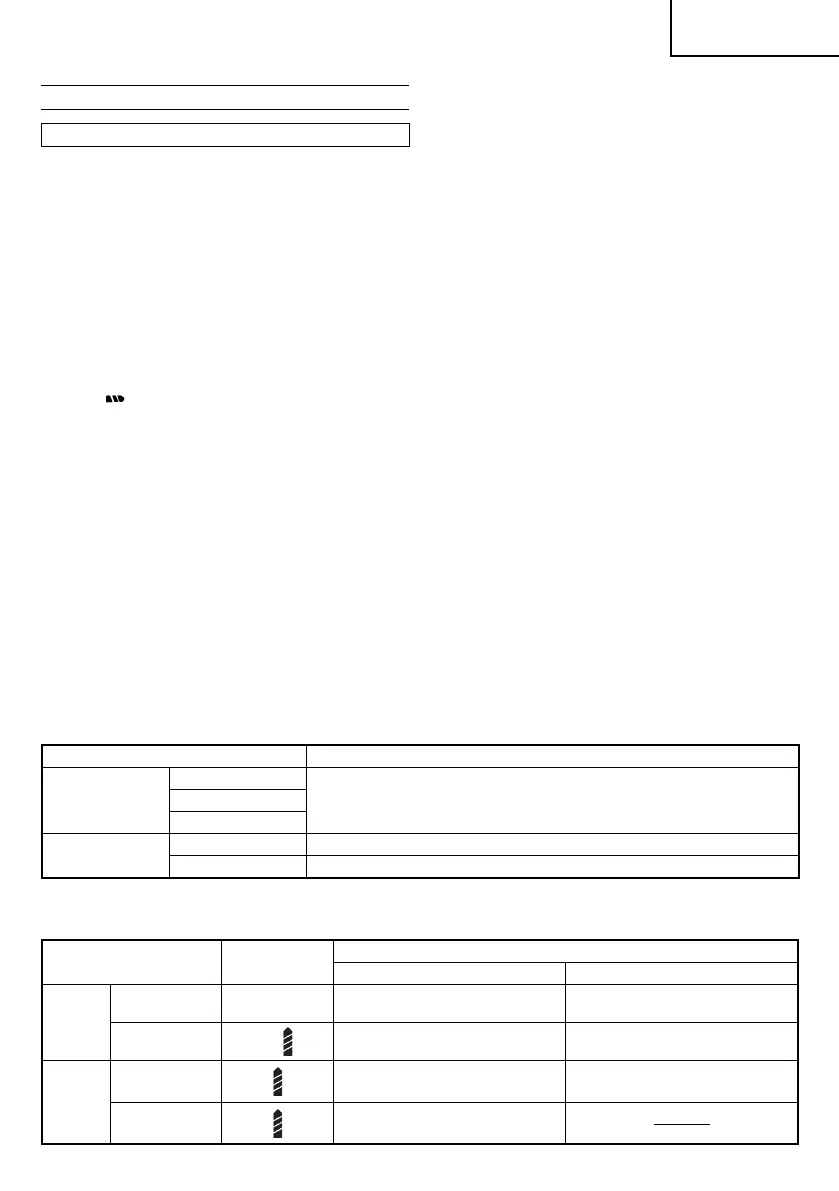
4. The scope and suggestions for uses
The usable scope for various types of work based on the
mechanical structure of this unit is shown in Table 2.
Table 2
Work Suggestions
Drilling
Wood
Use for drilling purpose.Steel
Aluminum
Driving
Machine screw Use the bit or socket matching the screw diameter.
Wood screw Use after drilling a pilot hole.
5. How to select tightening torque and rotational speed
Table 3
Use
Clutch Dial
Position
Rotating speed selection (Position of the shift knob)
LOW (Low speed) HIGH (High speed)
Driving
Machine screw 1 – 21
For 4 mm or smaller diameter
screws.
For 6 mm or smaller diameter
screws.
Wood screw
1 –
For 5.8 mm or smaller nominal
diameter screws.
For 3.8 mm or smaller nominal
diameter screws.
Drilling
Wood
For 21 mm or smaller diameters. For 12 mm or smaller diameters.
Metal
For drilling with a metal working
drill bit.
000BookDS10DFLAra.indb9000BookDS10DFLAra.indb9 2012/07/189:02:252012/07/189:02:25


 To Next Page
 Loading...