English
8
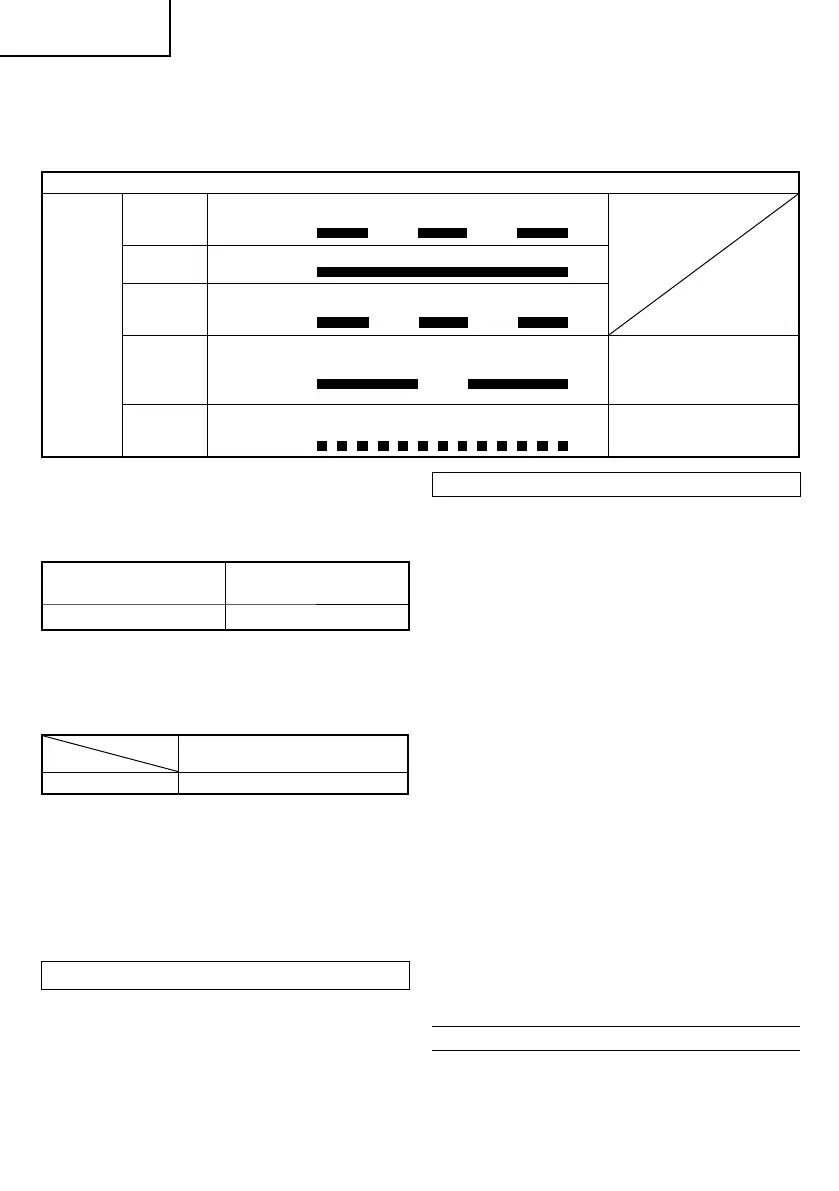
(1) Pilot lamp indication
The indications of the pilot lamp will be as shown in
Table 1, according to the condition of the charger or the
rechargeable battery.
Table 1
Indications of the pilot lamp
Pilot lamp
(red)
Before
charging
Blinks
Lights for 0.5 seconds. Does not light for 0.5
seconds. (off for 0.5 seconds)
While
charging
Lights
Lights continuously
Charging
complete
Blinks
Lights for 0.5 seconds. Does not light for 0.5
seconds. (off for 0.5 seconds)
Overheat
standby
Blinks
Lights for 1 second. Does not light for 0.5
seconds. (off for 0.5 seconds)
Battery overheated.
Unable to charge
(Charging will commence
when battery cools).
Charging
impossible
Flickers
Lights for 0.1 second. Does not light for 0.1
seconds. (off for 0.1 seconds)
Malfunction in the battery or
the charger.
(2) Regarding the temperatures of the rechargeable battery
The temperatures for rechargeable batteries are as
shown in the Table 2, and batteries that have become
hot should be cooled for a while before being recharged.
Table 2 Recharging ranges of batteries
Rechargeable batteries
Temperatures at which the
battery can be recharged
BCL1015 0°C – 50°C
3) Regarding recharging time
Depending on the combination of the charger and
batteries, the charging time will become as shown in
Table 3
Table 3 Charging time (At 20°C)
Charger
Battery
UC10SFL
BCL1015 Approx. 40 min.
NOTE
The charging time may vary according to temperature
and power source voltage.
4. Disconnect the charger’s power cord from the
receptacle.
5. Hold the charger fi rmly and pull out the battery.
NOTE
Be sure to pull out the battery from the charger after use,
and then keep it.
Regarding electric discharge in case of new batteries, etc.
As the internal chemical substance of new batteries and
batteries that have not been used for an extended period
is not activated, the electric discharge might be low when
using them the fi rst and second time. This is a temporary
phenomenon, and normal time required for recharging
will be restored by recharging the batteries 2 – 3 times.
How to make the batteries perform longer
(1) Recharge the batteries before they become completely
exhausted.
When you feel that the power of the tool becomes
weaker, stop using the tool and recharge its battery. If
you continue to use the tool and exhaust the electric
current, the battery may be damaged and its life will
become shorter.
(2) Avoid recharging at high temperatures.
A rechargeable battery will be hot immediately after use.
If such a battery is recharged immediately after use, its
internal chemical substance will deteriorate, and the
battery life will be shortened. Leave the battery and
recharge it after it has cooled for a while.
CAUTION
○ If the battery is charged while it is heated because it has
been left for a long time in a location subject to direct
sunlight or because the battery has just been used, the
pilot lamp of the charger lights for 1 second, does not
light for 0.5 seconds (off for 0.5 seconds).
In such a case, fi rst let the battery cool, then start
charging.
○ When the pilot lamp fl ikers (at 0.2-second intervals),
check for and take out any foreign objects in the charger’s
battery connector. If there are no foreign objects, it is
probable that the battery or charger is malfunctioning.
Take it to your authorized Service Center.
○ Since the built-in micro computer takes about 3 seconds
to confi rm that the battery being charged with UC10SFL
is taken out, wait for a minimum of 3 seconds before
reinserting it to continue charging. If the battery is
reinserted within 3 seconds, the battery may not be
properly charged.
PRIOR TO OPERATION
1. Setting up and checking the work environment
Check if the work environment is suitable by following the
precautions.
000BookDS10DFLAra.indb8000BookDS10DFLAra.indb8 2012/07/189:02:252012/07/189:02:25


 To Next Page
 Loading...