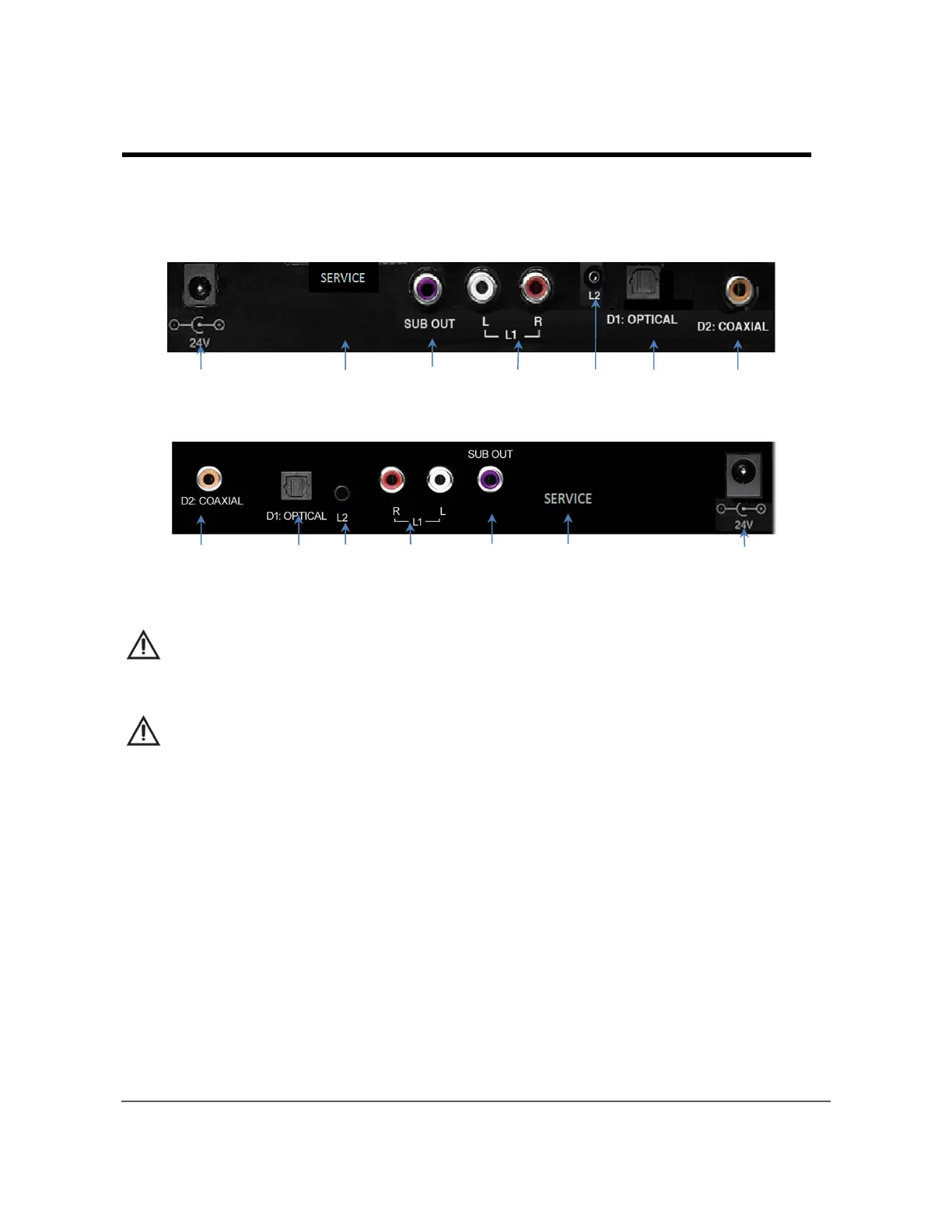
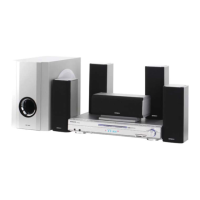
Rear Panel Input / Output Jacks:
HSB40B16
① 24V DC input:
Insert the DC plug of Hitachi provided external AC Adapter here.
Caution: Use only provided AC adapter and AC power cord with the Sound Bar.
Use of any other adapter may damage the Sound Bar or create a shock hazard.
② SERVICE:
The service connection is for service personnel only. Do not remove the cover.
Tampering with the Service connection may void your warranty.
③ SUB OUT:
Connect an external subwoofer (not supplied) to this variable output. Adjust the
subwoofer volume using the remote control SUB+ and SUB- buttons.
④ L1:
Connect your TV or other accessory device to the Line 1 input.
⑤ L2:
Connect the headphone output of your TV or mobile device to the 1/8” (3.5mm)
Line 2 input.
⑥ D1: OPTICAL Input:
Connect your TV Optical Digital Output to this digital input.
⑦ D2: COAXIAL Input:
Connect your TV Coaxial Digital Output to this digital input.
9
Chapter 3 – Quick Connect Guide
①
②
③
④ ⑤ ⑥ ⑦
①②③④⑤⑥⑦
HSB32B26


 To Next Page