EasyManua.ls Logo

Hitachi VIP2000 - Page 4

Hitachi VIP2000
6 pages
Print Icon
To Next Page IconTo Next Page
To Previous Page IconTo Previous Page
Loading...
RETURN
si
Push
to
cancel
any
mode
and
return
to
standby
mode.
ee
ies
FORWARD
SEARCH(3
MODES)
While
pressing,
fast
forward
playback
can
be
performed
to
search
for
picture
content.
#
NORMAL
(
pp
)
:
Fast
forward
playback
at
approximately
16
times
regular
playing
speed.
FAST
(
bb}
)
:
Fastest
forward
playback
of
Disc
in
approximately
half
minute
per
side.
*
NORMAL
(
p>
)
&
:
Fast
forward
playback
at
approximately
4
times
regular
FAST
(
PDP
)
playing
speed.
NOTE:
Perfect
pictures
cannot
be
expected
during
the
use
of
SEARCH
MODES.
A
certain
amount
of
noise
will
be
seen
in
the
TV
screen.
It
is
advisable
to
release
the
search
buttons
at
least
once
every
10
seconds.
Otherwise
the
picture
may
be
lost
or
the
Player
may
return
to
the
standby
mode.
(Hold-
ing
the
button
longer
than
10
seconds
will
not
damage
the
Player.)
n
(This
is
not
the
fault
of
either
Your
Player
or
Disc)
PAUSE/PLAY
|
|
Push
to
stop
playing
Disc
REPEAT.
.
i
i
R
L(
>
d
PLAYTIME
INDICATOR
will
While
pressing
FORWARD
NORMAL
(
>>
jan
flash
on
and
off
while
the
Player
REVERSE
NORMAL
(
44
)
same
time,
four
is
į
icture
f
REPEAT
playback
be
obtained.
is
in
PAUSE
MODE,
picture
trame
Playback
can
be
obtain
Puch
3
bat
Also,
this
repeated
picture
content
can
be
advanc-
usn
again
to
resume
playback.
ed
or
retreated
by
tapping
either
of
the
buttons.
REVERSE
SEARCH
(3MODES)
l-
=
While
pressing,
fast
reverse
playback
can
be
performed
to
search
for
picture
content.
#
NORMAL
(
dd
)
:
Fast
reverse
playback
at
approximately
16
times
regular
playing
speed.
w
FAST
(
444
)
:
Fastest
reverse
playing
of
Disc
in
approximately
half
minute
per
side.
*
NORMAL
(
44
)
&
:
Fast
reverse
playback
at
approximately
4
times
regular
FAST
{
444
)
playing
speed.
REMOTE
CONTROL
SOCKET
To
be
connected
with
optionally
available
Remote
Control
Unit.
(MODEL
No.
CWV600)
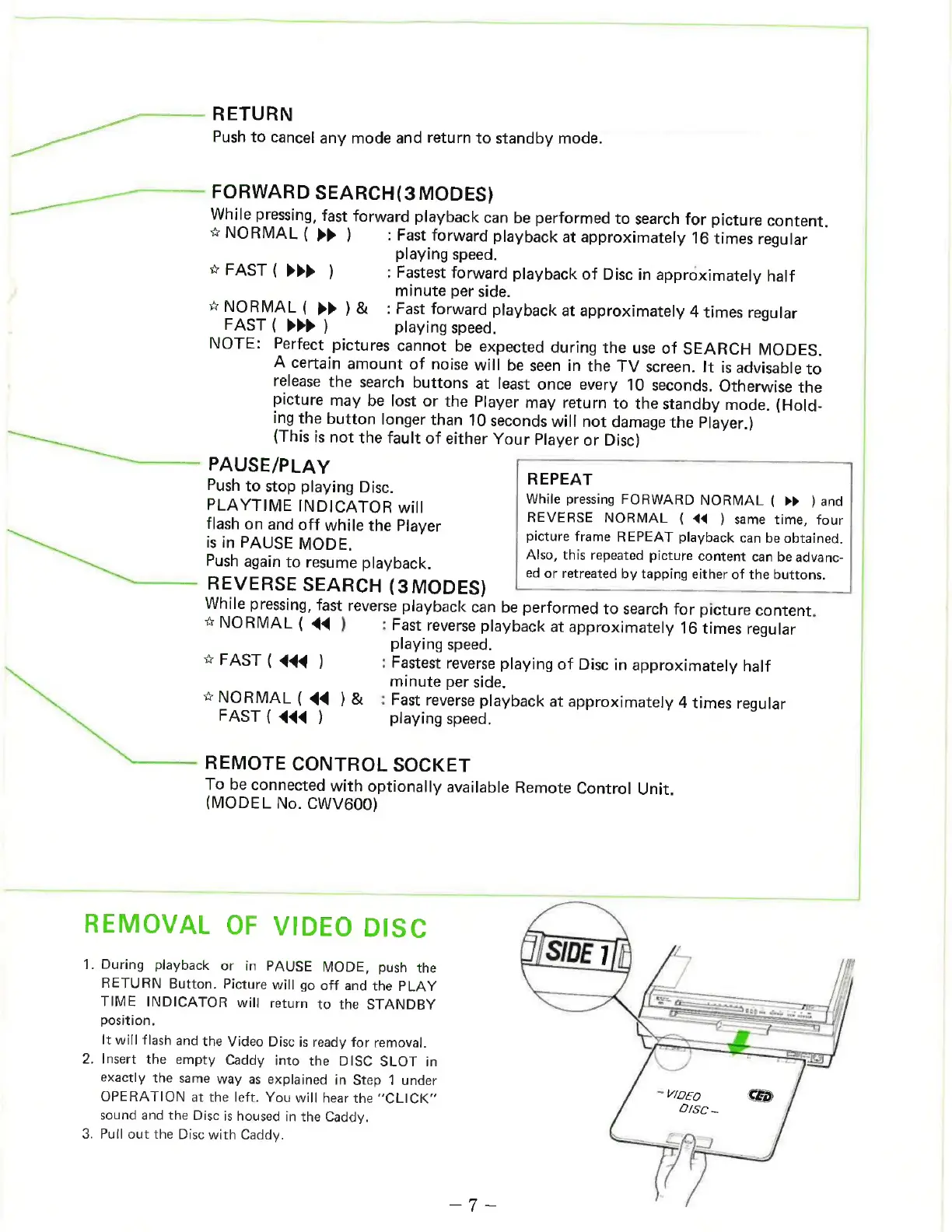
REMOVAL
OF
VIDEO
DISC
1.
During
playback
or
in
PAUSE
MODE,
push
the
RETURN
Button.
Picture
will
go
off
and
the
PLAY
TIME
INDICATOR
will
return
to
the
STANDBY
position.
It
will
flash
and
the
Video
Disc
is
ready
for
removal.
2.
Insert
the
empty
Caddy
into
the
DISC
SLOT
in
exactly
the
same
way
as
explained
in
Step
1
under
OPERATION
at
the
left.
You
will
hear
the
“CLICK”
sound
and
the
Disc
is
housed
in
the
Caddy.
3.
Pull
out
the
Disc
with
Caddy.

Related product manuals