Need help?
Do you have a question about the HiWatch DS-N208-8P and is the answer not in the manual?
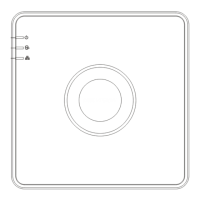
Details the front panel indicators and their functions for the NVR.
Describes the various ports and interfaces on the rear panel of the NVR.
Provides guidance on installing the Network Video Recorder, including rack mounting and environmental considerations.
Step-by-step instructions for installing a hard disk drive (HDD) into the NVR.
A chart estimating storage space usage per channel based on different bit rates.
Overview of the NVR's menu hierarchy and available options.
Instructions for properly starting up and shutting down the NVR device.
Steps required to activate the NVR for the first time, including setting an admin password.
Procedures for logging into and out of the NVR system.
Method for quickly adding IP cameras to the NVR during initial setup.
Guidance on using the setup wizard for initial configuration of the device.
Configuration steps for network settings to enable NVR operation over a network.
Detailed steps for adding network cameras to the NVR's connection list.
Explanation of icons and status indicators within the NVR's live view interface.
Information on configuring recording types and settings for the NVR.
Instructions for accessing and playing back recorded video files from the NVR.
Configures the administrator password for initial NVR access via a web browser.
 General
| Model | DS-N208-8P |
|---|---|
| Working Humidity | 10% to 90% |
| Ports | 8 |
| PoE Ports | 8 × RJ-45 Ports |
| Video Input | 8-ch |
| Video Output | 1 × HDMI, 1 × VGA |
| VGA Output Resolution | 1920 × 1080/60Hz, 1280 × 1024/60Hz, 1280 × 720/60Hz, 1024 × 768/60Hz |
| Decoding Format | H.265/H.264 |
| Audio Output | 1-channel RCA |
| Two-Way Audio | Yes |
| Capacity | Up to 6TB per HDD |
| Network Interface | 1x RJ45 10/100/1000Mbps |
| PoE Interface | 8, RJ45 10/100 Mbps self-adaptive Ethernet interface |
| USB Interface | 2 × USB 2.0 |
| Power Consumption | ≤ 10 W (without HDD) |
| Working Temperature | -10°C to +55°C |


 To Next Page