9 10
Wearing Mode Operation
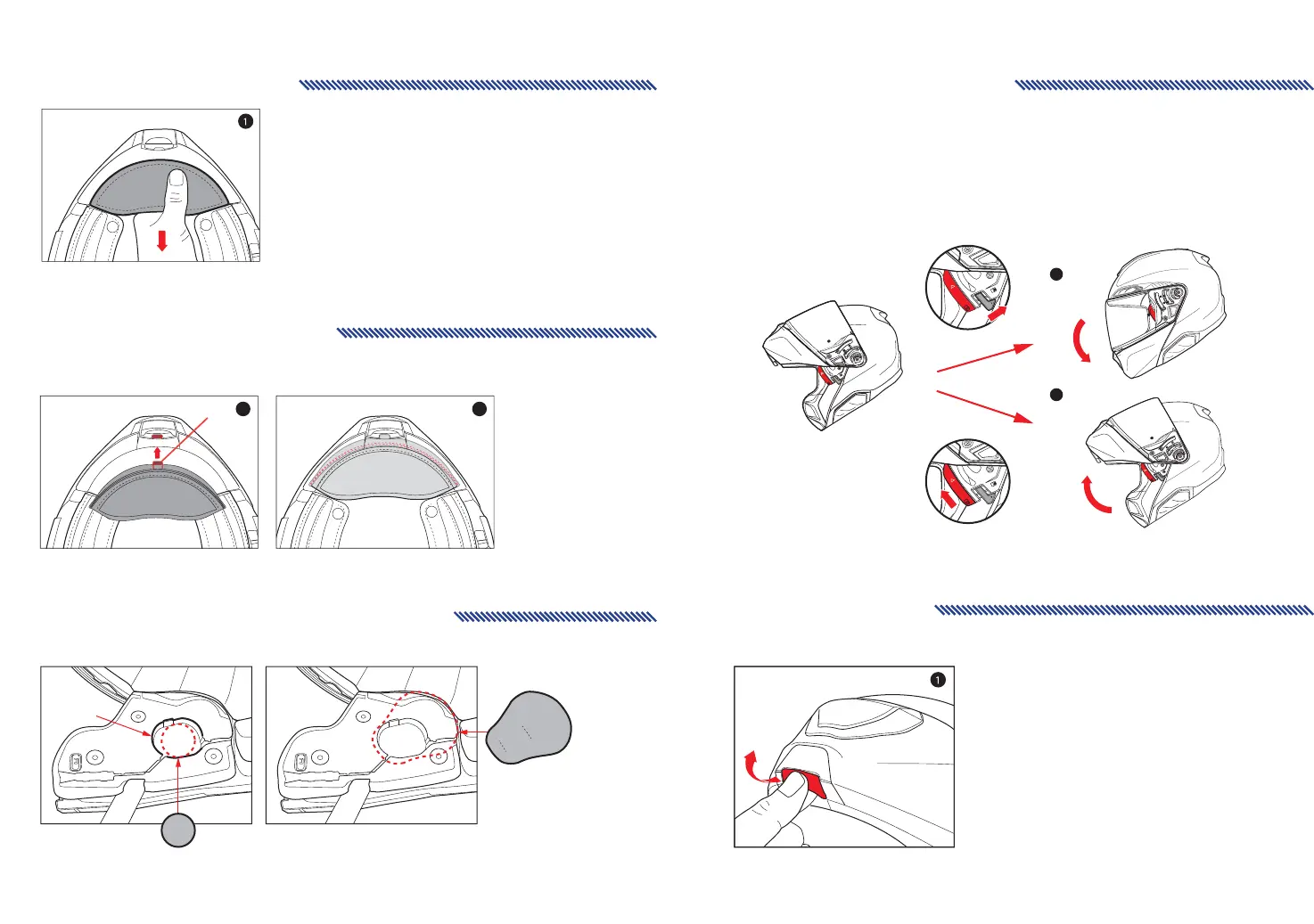
Chin Curtain Removal
1. Grasp the chin curtain fabric at the bottom corners
and gently pull the sleeve down and away
from the chin bar.
Chin Curtain Installation
1. Push and insert the A part of the Chin curtain into the Chin bar groove.
2. Align the chin curtain groove with the protrusion of the chin curtain and press it in.
A
1 2
If you install communication system speakers, please do not use the speaker pocket cover.
How to install speaker pocket cover
※Helmet can be put on and removed easily when both chin bar and visor(shield) are in the open position.
1. When operating the chinbar in the direction of the arrow in the wearing mode, it becomes P mode
(chin Bar close state).
2. When operating the chinbar visor(shield) in the direction of the arrow in the wearing mode, it becomes
the J mode (Chin bar open state).
Wearing Mode
J Mode
P
Mode
1
2
P
J
P
J
1. To open the chin bar, simply pull the lever forward and push the entire bar upward.
Speaker Pocket
Speaker
Speaker Pocket Cover
Opening Chin Bar



 To Next Page