EasyManua.ls Logo

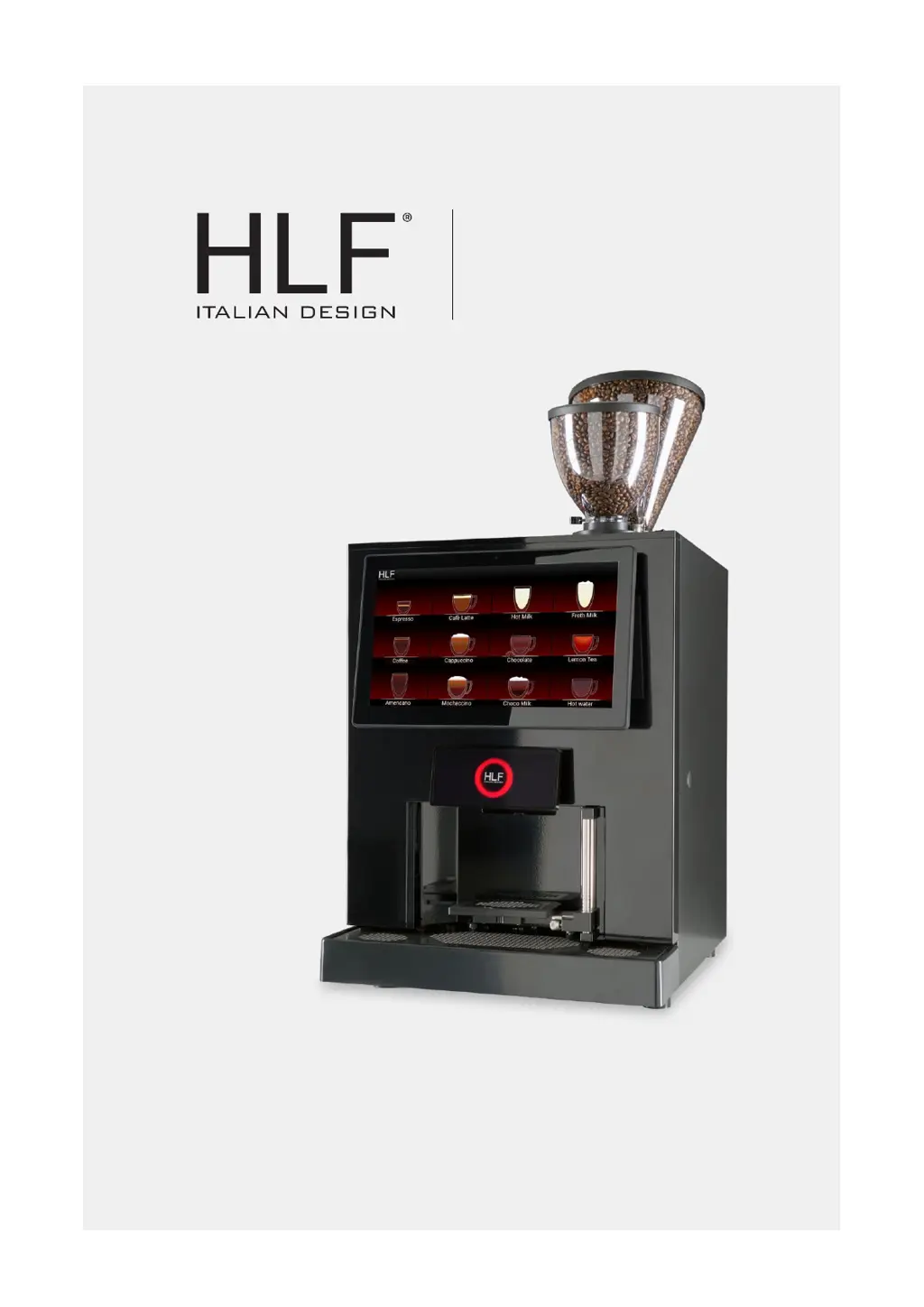
HLF 5700 - User Manual

HLF 5700
215 pages
Print Icon
To Next Page IconTo Next Page
Loading...
5700
INSTRUCTION MANUAL
Part Code: 9BME57G07

Table of Contents

Other manuals for HLF 5700

Questions and Answers

  • J
    Jared CarterAug 2, 2025
    What to do if HLF 5700 Coffee Maker shows 'E11-DRIP TRAY FULL'?
    • M
      Manuel BradyAug 2, 2025
      If your HLF Coffee Maker displays the error 'E11-DRIP TRAY FULL', it means the drip tray is full. Empty the drip tray. If the problem persists, it may indicate damage to the drip tray microswitch, requiring service and support.
  • D
    Dawn NewmanAug 6, 2025
    What to do if HLF 5700 Coffee Maker displays 'E12-PLACE YOUR CUP'?
    • B
      bill57Aug 6, 2025
      If your HLF Coffee Maker shows 'E12-PLACE YOUR CUP', it means there is no cup on the cup station. Place the cup on the cup station. If the issue continues, the cup sensor might be malfunctioning, and you should contact service and support.
  • E
    Erica Davis MDAug 10, 2025
    What to do if HLF 5700 shows 'E15-COFFEE GROUP OUT'?
    • K
      klinelauraAug 11, 2025
      If your HLF Coffee Maker displays 'E15-COFFEE GROUP OUT', it indicates that the coffee group is not inserted correctly. Check the correct positioning of the coffee group. If the error persists, the coffee group presence microswitch may be damaged, requiring service and support.
  • M
    Madeline GilbertAug 15, 2025
    What to do if HLF 5700 Coffee Maker displays 'E16-CHECK WATER'?
    • S
      Shawna FrederickAug 15, 2025
      If your HLF Coffee Maker shows 'E16-CHECK WATER', it means the water level is insufficient. Ensure the water line power is operative and running. Then, push the message to delete it. If the problem continues, it may indicate a malfunction of the water line loading system, requiring service and support.
  • R
    Ruben LewisAug 19, 2025
    Why does my HLF 5700 display 'E17-HEATING'?
    • B
      bsmithAug 20, 2025
      The 'E17-HEATING' message on your HLF Coffee Maker indicates that the machine is warming up after being turned on. Wait for the machine to be ready. However, if the message remains on the display for more than 30 minutes, it could indicate an issue requiring service and support.
  • C
    Cheryl Torres DDSAug 25, 2025
    How to run a cleaning cycle on HLF Coffee Maker when it displays 'E18-CLEANING CYCLE REQUIRED'?
    • R
      Robert TaylorAug 25, 2025
      If your HLF Coffee Maker displays 'E18-CLEANING CYCLE REQUIRED', it means the whipper cleaning is required. Press on the message to access the cleaning section and run a Whipper Cleaning.
  • T
    Tabitha RothAug 28, 2025
    What does 'E13-FLOW METER KO' mean on my HLF 5700 Coffee Maker?
    • L
      Lisa LeonardAug 28, 2025
      The 'E13-FLOW METER KO' message appears during coffee delivery, indicating a possible malfunction of the water circuit. Contact the Service and Support.

Summary

Description Overview

Design Details

Details the machine's external and internal components, including touch screen and bean hopper.

Introduction to HLF 5700

Provides a general overview and capabilities of the HLF 5700 coffee maker.

Technical Specifications

Outlines dimensions, weight, and electrical requirements for the coffee maker.

Environmental Requirements

Specifies operating temperature, humidity, and necessary space for the machine.

Safety Instructions

Warning Symbols and Information

Explains warning symbols used on the equipment and levels of safety information.

Proper Use and Hazard Avoidance

Covers safe operation, potential risks, and user responsibilities for the coffee maker.

Installation Guide

Transport and Receiving

Instructions for handling, unpacking, and initial inspection of the coffee machine.

Installation Procedure

Details minimum requirements, water, and electrical connections for setup.

Start Up and Operation

Covers loading products, initial heating, and grinder adjustment steps.

Cleaning Guide

Cleaning Warnings

Important precautions for using cleaning agents and methods on the machine.

Cleaning Schedules

Tables outlining daily, weekly, and monthly cleaning tasks for different machine types.

Coffee Aspirator Cleaning

Step-by-step instructions for cleaning the coffee aspirator assembly.

Accessing Automatic Cleaning Cycles

Guide on how to navigate to the automatic cleaning routines via the software.

Fresh Milk System Cleaning

Procedures for daily and weekly cleaning of the fresh milk circuit.

Operating the Computer Software

Cleaning Cycle Operations

How to initiate and manage cleaning cycles via the software interface.

Screen Management

Procedures for cleaning the touch screen interface of the machine.

Main Menu Navigation

Overview of the main menu structure and available functions.

Layout and Drink Settings

Configuring drink display layouts and drink key settings.

Selection Keys Management

Options for managing recipes, copying, and swapping drink settings.

Media and Content Management

Adding and managing videos, images, and web pages for display.

Counters and Data Logging

Accessing drink, cleaning, and technical data logs.

Email Configuration

Setting up Email Addresses and Messages

Configuring recipient addresses, subject, and message content for emails.

Auto-Send and Server Settings

Setting up automated email sending schedules and server details.

System Settings

Generic Settings

Adjusting LED indicators, beep times, and sensor configurations.

Technician Options

Advanced settings requiring careful adjustment, like milk and detergent levels.

File Management

Importing and exporting machine configuration files via USB or memory.

Temperature and Fridge Settings

Adjusting boiler, fridge, and recovery temperatures for optimal performance.

Message Options Configuration

Customizing machine alerts for grounds, cleaning, and detergent levels.

Drink Pricing and Happy Hour

Setting drink prices and configuring promotional happy hour discounts.

Advanced Settings and Updates

Wi-Fi and Network Configuration

Connecting the machine to Wi-Fi networks and setting up RCS accounts.

Advanced Machine Options

Customizing machine modes, display settings, language, and software updates.

QR Code Functionality

Configuring QR code scanning for drinks, printer modes, and user management.

System Conversions and Security

Conversion Parameters

Setting conversion parameters for various products and performing tests.

Grinder Blade Settings

Adjusting the grinding time limit for the coffee grinder.

Security and Access Control

Managing passwords for different user levels and system functions.

System Information and Manuals

Machine and Software Information

Displaying details about the machine and its software version.

Interface Reboot

Option to restart the touchscreen interface without affecting the whole machine.

Accessing the Instruction Manual

Viewing the instruction manual directly on the touch screen.

Operational Procedures

Alarm Reset

Procedure to clear active alarm notifications on the machine.

Ingredient Refill Management

Guiding the process of refilling product containers and resetting counters.

Daily Maintenance

Daily Check List

A summary of daily tasks to maintain the machine in operational readiness.

Inactivity Procedures

Preventive Operations for Long Inactivity

Steps to take when the machine will be inactive for an extended period.

Disposal Information

Equipment Disposal Requirements

Guidelines for safely and legally disposing of the machine and its components.

Guarantee and Ordering

Guarantee Terms and Conditions

Details the warranty period, covered defects, and exclusions.

Consumables and Spare Parts

Ordering Procedure for Parts

Information required when ordering consumable materials or spare parts.

Troubleshooting Guide

Fault Diagnosis and Resolution

A table listing common messages, their causes, and recommended actions.

HLF 5700 Specifications

General IconGeneral
BrandHLF
Model5700
CategoryCoffee Maker
LanguageEnglish

Related product manuals