EasyManua.ls Logo

HM Digital DM-2 - User Manual

HM Digital DM-2
2 pages
Print Icon
To Next Page IconTo Next Page
Loading...
COMMERCIAL DUAL INLINE
TDS MONITOR
Measure the TDS levels of two different water lines, such as
the tap water and filtered water, at any time.
The DM-2 is an ideal monitor to know if a filter cartridge, resin
cartridge or membrane is functioning effectively. Install the
DM-2 so you’ll always know how a water filtration or purifica-
tion system is performing.
®
PARTS
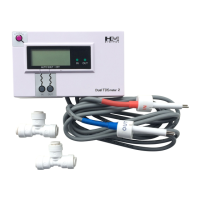
DM-2: Base Unit (LCD Display)
2 x 1/4” T-fittings (standard)
2 x AA Batteries (pre-installed)
2 x SP-3 Shielded Sensors (connected)
Warranty
This product is warranted to the purchaser against material and workmanship for one
(1) year from the date of purchase.
What is covered: Repair, parts and labor, or replacement at the Company's option.
Transportation charges for repaired or new product to be returned to the purchaser.
What is not covered: Transportation charges for the defective product to be sent to
the Company. Any consequential damages, incidental damages, or incidental
expenses, including damages to property. This includes damages from abuse or
improper maintenance such as tampering, wear and tear, water damage, or any other
physical damage. This product is not waterproof and should not be fully submerged in
water. Products with any evidence of such damage will not be repaired nor replaced.
How to obtain warranty performance: Include with the product, your name,
address, phone number, description of problem, and proof of date of purchase and
return to:
HM Digital, Inc.
ATTN: Returns
5819 Uplander Way
Culver City, CA 90230
U.S.A.
Implied Warranties: Any implied warranties, including implied warranties of
merchantability and fitness for a particular purpose, are limited in duration to five years
from date of purchase. Some states do not allow limitations on how long an implied
warranty lasts, so the above limitation may not apply to you. To the extent any
provision of this warranty is prohibited by federal and state law and cannot be
preempted, it shall not be applicable. This warranty gives you specific legal rights, and
you may also have other rights, which vary from state to state.
NOTE: Warranties are product-specific. Third-party products and products deemed by
HM Digital as "accessories" are not covered under warranty. Third-party products
include, but are not limited to, batteries, fittings and adhesives.
Designed in USA and Korea
Made in China
www.hmdigital.com
info@hmdigital.com
Please contact the manufacturer of your water
system for recommended TDS levels.
An ISO-9001 Certified Company
model DM-2
USER’S GUIDE
What is TDS?
Total Dissolved Solids (TDS) are the total amount of inorganic elements, including
minerals, salts or metals dissolved in water, other than the pure water molecules
(H
2
O) and suspended solids. A TDS meter works by measuring the total amount of
mobile charged ions dissolved in a given volume of water, expressed in total quantity
as parts per million (ppm), or in weight as mg/liter. TDS is directly related to the purity
of water and the quality of water purification systems. TDS affects everything that
consumes, lives in, or uses water, whether organic or inorganic, for better or for
worse. For people, a lower TDS level in drinking water is typically preferred.
The U.S. EPA’s Secondary Regulations for drinking water advise a maximum
contamination level of 500 ppm for TDS.
Reverse Osmosis (RO) systems work by filtering the tap water and rejecting the
waste water. You can determine your system’s effectiveness by calculating the
HOW TO CALCULATE PERCENT REJECTION
((Tap TDS - RO TDS) ÷ (Tap TDS)) x 100 = Percent Rejection
Example: Tap TDS = 352 ppm and RO TDS = 18 ppm. Percent rejection = 94.9%.
Contact the manufacturer of your system to determine minimum percent rejection
levels and when to change the filter or membrane.
Useful links for more information
More information on TDS:
http://www.tdsmeter.com/what-is
RO Percent Rejection Calculator:
http://www.tdsmeter.com/what-is?id=0003
DM-2 page:
http://www.tdsmeter.com/products/dm2.html
rev. 03/2012
www.tools.in.th
www.neonics.co.th

Question and Answer IconNeed help?

Do you have a question about the HM Digital DM-2 and is the answer not in the manual?

Summary

Understanding Total Dissolved Solids (TDS)

TDS Information and RO Systems

Provides links for further TDS information, a rejection calculator, and explains RO system operation.

Product Warranty Details

Warranty Coverage and Claims

Outlines what the warranty covers, exclusions, implied warranties, and how to obtain service.

DM-2 TDS Monitor Overview

Monitor Function and Components

Describes the DM-2's purpose in measuring water TDS and lists its included parts.

DM-2 Technical Specifications

Device Parameters and Indicators

Details technical specifications, screen indicators, and operational ranges for the DM-2.

DM-2 Operation and Setup

Installation, Usage, and Calibration

Provides step-by-step instructions for installing, using, and calibrating the DM-2 TDS monitor.

DM-2 Maintenance and Support

Care, FAQs, and Troubleshooting

Covers essential maintenance, answers common questions, and offers solutions for operational issues.

Summary

Understanding Total Dissolved Solids (TDS)

TDS Information and RO Systems

Provides links for further TDS information, a rejection calculator, and explains RO system operation.

Product Warranty Details

Warranty Coverage and Claims

Outlines what the warranty covers, exclusions, implied warranties, and how to obtain service.

DM-2 TDS Monitor Overview

Monitor Function and Components

Describes the DM-2's purpose in measuring water TDS and lists its included parts.

DM-2 Technical Specifications

Device Parameters and Indicators

Details technical specifications, screen indicators, and operational ranges for the DM-2.

DM-2 Operation and Setup

Installation, Usage, and Calibration

Provides step-by-step instructions for installing, using, and calibrating the DM-2 TDS monitor.

DM-2 Maintenance and Support

Care, FAQs, and Troubleshooting

Covers essential maintenance, answers common questions, and offers solutions for operational issues.

Overview

The HM Digital DM-2 is a Commercial Dual Inline TDS Monitor designed to measure the TDS levels of two different water streams, such as tap water and filtered water, at any time.

Function Description

The DM-2 can be configured in various ways. Typically, the IN line (line 1) is connected to the source (tap) water, and the OUT line (line 2) is connected to the product (filtered) water. It can also be used with multiple systems, such as an RO/DI combination. The device provides real-time monitoring of TDS levels, helping users determine filter effectiveness and water quality.

Important Technical Specifications

  • TDS Range: 0-9990 ppm
  • Resolution:
    • 0-999 ppm: 1 ppm
    • 1000-9990 ppm: 10 ppm (indicated by a blinking 'x10' icon, meaning the reading should be multiplied by 10)
  • Accuracy: +/-2% (of the reading)
  • Conversion Factor: NaCl (average of 0.5)
  • Factory Calibration: 342 ppm NaCl (digital calibration)
  • Sensor Cable Length: 46 inches (116.8 cm), including the sensor
  • Power Source: 2 x AA batteries
  • Auto Shut-Off: After 3 minutes of inactivity
  • Battery Life: Approximately 2 years
  • Base Unit Dimensions: 4.6 x 2.6 x 0.7 inches (11.6 x 6.8 x 1.8 cm)
  • Base Unit Weight: 7.9 oz (224.3 g), including batteries

Usage Features

Installation:

  1. Insert the white sensors fully into the bottom of the T-fittings.
  2. Orient the sensor pins perpendicularly to the direction of the T, ensuring water flows over both pins equally.
  3. Disconnect the water source.
  4. Snip the source (tap) water tube and insert both ends into the top of the IN line sensor's T-fitting.
  5. Snip the product (filtered) water tube and insert both ends into the top of the OUT line sensor's T-fitting.
  6. Attach the DM-2 monitor anywhere on or near the water system using the mounting bracket (secured by screws or adhesive tape).
  7. Reconnect the water source.

Operation:

  1. Press the "POWER" button to turn on the device.
  2. Press the "IN" button to display the TDS level of the feed (tap) water.
  3. Press the "OUT" button to display the TDS level of the product (filtered) water.
  4. The displayed TDS will be most accurate after approximately 10 seconds.
  5. To determine filter effectiveness, compare the IN water TDS levels with the OUT water TDS.
  6. If the "x10" icon appears, multiply the displayed reading by 10 for the actual TDS level.
  7. The unit will automatically shut off after 3 minutes to conserve battery power.

Calibration: The monitor is factory calibrated to 342 ppm (NaCl) and is ready for use out of the box for most tap water/filtered water applications. However, recalibration may be necessary.

  1. Obtain a certified NaCl calibration solution (HM Digital's 342 ppm NaCl solution is recommended).
  2. Disconnect both T-fittings from their tubes, ensuring the sensor orientation is correct.
  3. For better accuracy, calibrate to a flowing solution; if not possible, calibrate to a still solution (calibrate to 3% above the level of the calibration solution for still solutions).
  4. Turn on the monitor and place each T-fitting (with sensors) into the calibration solution, ensuring the fitting is completely filled with solution and there are no air bubbles.
  5. If the reading on the monitor does not match the solution, select the line to calibrate by clicking "IN" or "OUT".
  6. Press and hold the "IN" or "OUT" button for 2 seconds until "CAL" flashes and the corresponding green light blinks.
  7. Adjust the reading using the "IN" (up) or "OUT" (down) button until it matches the value of your calibration solution.
  8. Once the reading is correct, press the "POWER" button once. "End" will appear, and the sensor will be calibrated. Each sensor needs to be calibrated separately.
  9. To cancel calibration, press "POWER" twice.

Maintenance Features

  • Sensor Care: Never touch the sensor pins, as skin oils may adversely affect TDS measurement. To clean the sensor pins, use rubbing alcohol and let them air dry.
  • Fittings: Avoid removing the fittings from the sensors, as this can strip the plastic off the sensor and potentially cause a leak. Excessive removal and insertion of fittings could ultimately scratch the sensor and potentially cause leakage.
  • Battery Replacement: If the batteries are low, "bat" will appear on the display for 3 seconds when the unit is turned on.
    1. Unscrew the four metal screws on the rear of the unit and remove the back panel.
    2. Remove the old batteries.
    3. Replace both batteries with two fresh AA batteries, ensuring correct polarity.
    4. Close the back panel and replace the screws. Recalibration is not needed after battery replacement.

Troubleshooting:

  • "ECC" display (error): The sensor cable may be unplugged. Open the back panel and connect the cable securely.
  • "OOC" display (out of range): The water is out of the monitor's TDS range.
  • Incorrect readings: Re-calibrate the monitor or change the batteries.
  • "bat" display (low batteries): Change the batteries.
  • "OUT" reading is higher than "IN" reading: Check connections; the sensors may be reversed.

HM Digital DM-2 Specifications

General IconGeneral
BrandHM Digital
ModelDM-2
CategoryMonitor
LanguageEnglish