6. Set your exercising DISTANCE by pressing UP▲/DOWN▼ from 0.00~99.50 km
7. Set your exercising CALORIES by pressing UP▲/DOWN▼ from 0~990
8. Set your target PULSE ( HEART RATE) by pressing UP▲/DOWN▼ from P~30~240.
9. Press MODE to confirm each value setting.
H.R.C HEART RATE CONTROL- Select your own target Heart Rate of choose one of the preset
programs 55%, 75%,or 90%. Please enter your age into the User Data to ensure that your target heart rate is set
correctly. The PULSE display will flash when you have reached your
target heart rate according to the Program you have chosen.
i. 55% -- DIET PROGRAM
ii. 75% -- HEALTH PROGRAM
iii. 90% -- SPORTS PROGRAM
iv. TARGET—USER SET TARGET HEART RATE
Operating process
1. Set your own target HEART RATE of choose one of the preset programs 55%,75%, 90% or
Target.
2. Set your target Heart Rate in the LCD window 30-240.
3. Set your exercising TIME by pressing UP▲/DOWN▼ from 0:00 to 99:00.
4. Set your exercising DISTANCE by pressing UP▲/DOWN▼ from 0.00~99.50 km.
5. Set your exercising CALORIES by pressing UP▲/DOWN▼ from 0~990.
RANDOM PORGRAM A randomly selected program by the computer that will automatically generate its graph.
s
1. There are total 16 bars : Every random will result load value of bar.
3. After START, user can press UP▲ / DOWN▼ to adjust the load values of whole bar.
RECOVERY
When you have finished your workout, press RECOVERY. For RECOVERY to function correctly, it
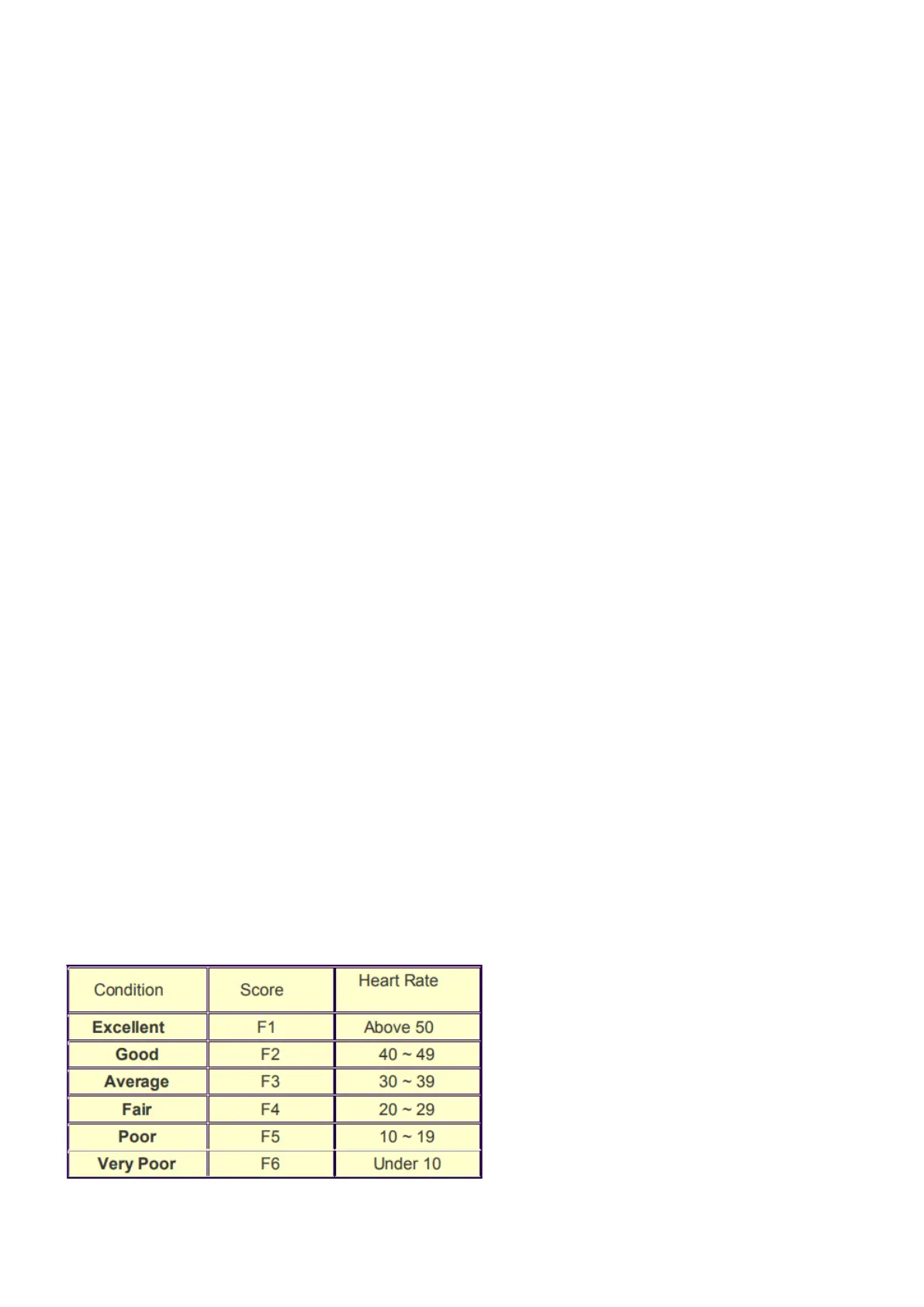
needs your Heart Rate input. TIME will count down from 1 minute and then your fitness level from
F1 to F6 will be displayed.
NOTE: during RECOVERY, no other displays will operate.
F 1 ~ F6 = RECOVERY HEART RATE LEVEL
USER DATA : U0~U4 are user’s Personal Programs (refer Personal). Users should enter their gender, age,
height and weight. Only data for U1 to U4 will be saved.


 To Next Page