6
Dohse Aquaristik GmbH & Co. KG · Otto-Hahn-Str. 9 · 53501 Gelsdorf · Germany · www.dohse-terraristik.com
3. Alarm setting for temperature
4. Alarm setting for relative humidity
5. Defining a restricted temperature range
6. Resetting the day counter / Reset to factory setting
7. Useful hints/Incubation table
8. Cleaning and care of the Easy Breeder
9. Problems and solutions
10. Safety instructions and technical data
11. Declaration of conformity
12. Warranty
1. Starting up:
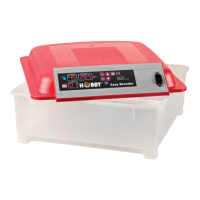
1.1 First connect the power cable to the Easy Breeder and then plug the connector into the mains socket.
1.2 Now press the ON / OFF - key to switch on the Easy Breeder
1.3 An alarm signal sounds. You can clear alarms at any time by pressing the arrow keys.
1.4 Open the Easy Breeder fill the 7 water channels using the included bottle. These are located underneath the deposition grid. Each channel has a
capacity for 1 full bottle (approx. 200 ml) of water.
1.5 Set the temperature to the desired value. Different temperatures are required for different reptiles (see incubation table.
2. Setting the temperature:
2.1 Press the menu - key control panel once.
2.2 Press the up arrow - or down arrow - key to set the desired temperature.
2.3 Press the menu - key again to complete this process.
The temperature indicator in the control panel always shows the current temperature. The status light will show when the Easy Breeder is
activated. The setting range is 20.0 – 39.5° C. Adjustable in 0.1° C increments.
3. Alarm setting for temperature: The factory setting for the temperature alarm is programmed at 1° C above or below the defined desired
temperature. When this value is exceeded an alarm signal sounded. If you wish to change this setting, proceed as follows:
3.1 Setting the low temperature alarm (AL):
3.1.1 Hold the menu - key for approx. 3 seconds.
3.1.2 Press the up arrow - or down arrow - key until the display reads (AL).
3.1.3 Press the menu - key again to confirm.
3.1.4 Use the arrow keys to set the lower alarm limit. The setting range is 0.0 – 15.0° C. Can be set in 0.1° C steps.
3.1.5 Press the menu - key again to complete the process.
3.2 Setting the high temperature alarm (AH):
3.2.1 Hold the menu - key for approx. 3 seconds.
3.2.2 Press the up arrow - or down arrow - key until the display shows (AH).
3.2.3 Press the menu - key again to confirm.
3.2.4 Use the arrow keys to set the lower alarm limit. The setting range is 0.0 – 15.0° C. Can be set in 0.1° C steps.
3.2.5 Press the menu - key again to complete the process.
4. Alarm setting for relative humidity (AS): The factory setting for the relative humidity alarm is set to 45 %. When the humidity falls below this
value, an alarm signal sounded. If you wish to change this setting, proceed as follows:
4.1 Hold the menu - key for approx. 3 seconds.
4.2 Press the up arrow - or down arrow - key until the display shows (AS).
4.3 Press the menu - key again to confirm.
4.4 Use the
arrow keys
to set the desired alarm limit. The setting range is 1 – 99 % relative humidity. Can be set in steps of 1 %.
4.5 Press the menu - key again to complete the process.
5. Defining a restricted temperature range: This function prevents that the temperature accidentally exceeds or drops below the defined
desired temperature. The factory setting has no defined limit. If you wish to change this setting, proceed as follows:
5.1 Setting the upper temperature limit (HS):
5.1.1 Hold the menu - key for approx. 3 seconds.
5.1.2 Press the up arrow - or down arrow - key until the display shows (HS).
5.1.3 Press the menu - key again to confirm.
5.1.4 Use the arrow keys to set the desired upper limit. The setting range is 20 - 50° C. Can be set in 0.1° C steps.
5.1.5 Press the menu - key again to complete the process.
5.2 Setting the lower temperature limit (LS):
5.2.1 Hold the menu - key for approx. 3 seconds.


 To Next Page