•
p11
TE70XP and TE77XP
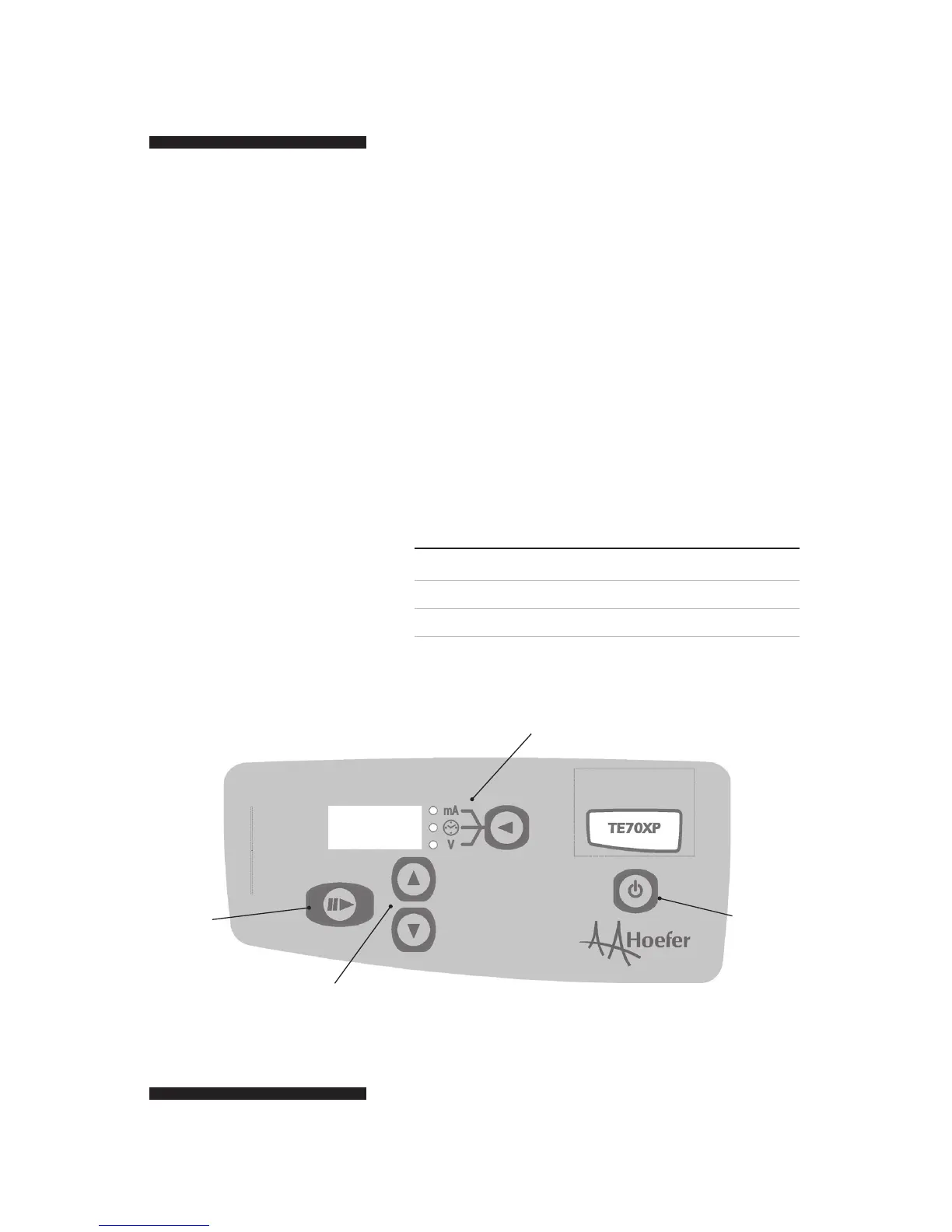
Turn the instrument on using the POWER
button on the front keypad.
The instrument works by setting the current and
time, and then starting the transfer. During the
transfer, the voltage can be displayed. The trans
-
fer can not be set to run at constant voltage.
The DISPLAY MODE BUTTON toggles
between the current (mA), time (hour:minutes)
and the voltage (V).
The UP and DOWN arrows to change the value
for the current and time.
Press the START/STOP button to start the transfer.
Variable Units Range Increment
Current milliamps 1– 500 1 mA
Time hours:minutes 5 min – 4:00 hours 5 min
Voltage volts 0 – 30 (read only) 1 volt
Note: While setting the time,
there is an extra setting labelled
“on” above the 4:00 upper
limit. This will disable the
timer, allowing the transfer to
run continuously until manually
turned off by the user.
transfer
start/stop
up/down arrows
adjust value
display mode
cycles LED display
power
ON/OFF
Fig 6. TE70XP keypad.


 To Next Page