5
Adres producenta/ Adresse des Herstellers/ Manufacturer’s Address/ Адрес производителя
GTV Poland Sp. z o.o. Sp. k., ul. Przejazdowa 21, 05-800 Pruszków
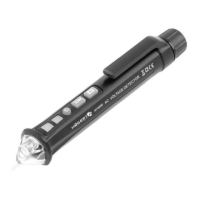
DEVICE DESCRIPTION
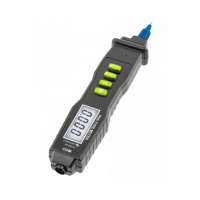
1. Probe (NCV induction head)
2. Flashlight
3. Inductive voltage signal indicator
4. Signal intensity indicator - High (red light on), medium (green light on) and low (green light fl ashing)
5. On/Off button with power indicator
6. Flashlight on/off button
7. Switching button for AC voltage detection range (S) with detection range indicator
8. Battery cover
1. 2. 3. 4. 5. 6. 7. 8.
USER’S MANUAL
1. Turn the tester on/off
Turn on the tester: press the power on/off button and the button indicator fl ashes simultaneously and the power indicator lights up
normally.
Turn off the tester: When the tester is on, press the On/Off button, the power indicator will turn off.
2. Turn the fl ashlight on/off
Turn on the fl ashlight: When the tester is on, press the fl ashlight on/off button to turn on the fl ashlight.
Turn off the fl ashlight: When the fl ashlight is on, press the fl ashlight on/off button to turn the fl ashlight off.
If the fl ashlight is not switched off, it will automatically switch off after about 5 minutes.
3. AC voltage detection
Insert the probe of the tester into an electrical outlet or approach a live cable when the tester detects voltage, the induced voltage
signal indicator fl ashes and the tester activates the corresponding signal strength indicator (high, medium and low) according to the
detected signal strength, while the buzzer produces alarming sounds at different frequencies. When AC voltage signal is detected,
the green signal strength indicator (low) fl ashes; when a higher voltage signal is detected, the green signal strength indicator (me-
dium) lights up; when the highest AC voltage signal is detected, the red signal strength indicator (high) lights up.
4. Evaluation of neutral line / live wire.
Separate the two wires to be tested, if possible, and then use the probe of the tester to approach the wires, in the socket, insert the
probe into the socket, and the one with a strong induced signal detected by the tester is a live wire, while the one with a weak induced
signal or without an induced signal is a neutral wire.
5. Choice of AC voltage detection range
Initial default detection range of the tester AC voltage: about 48 ~ 1000 V.
Press the Voltage Detection Range Switching Button (S), the Detection Range Indicator lights up, and the detectable voltage range of
the tester is approximately 12 ~ 1000 V.
Press the voltage detection range switch button (S) again, the detection range indicator goes out, and the detectable voltage range of
the tester is approximately 48 ~ 1000 V.
6. Automatic shutdown function
If the tester does not operate and does not detect a voltage signal within 5 minutes, it will turn off automatically.
7. Indication of too low a battery voltage
When the battery voltage is lower than approximately 2.6V, the power indicator fl ashes 3 times and the buzzer sounds and then turns
off. Replace the battery on time.
TECHNICAL DATA
AC voltage range 12 ~1000V (S button on) 48 ~1000V (S button on)
Frequency 50 Hz /60Hz
Warning Audible and visual
Flashlight LED
Automatic shutdown √
Battery charge indicator √
Marking of neutral/voltage cable according to signal intensity, and the one with the strong signal is the live cable.


 To Next Page