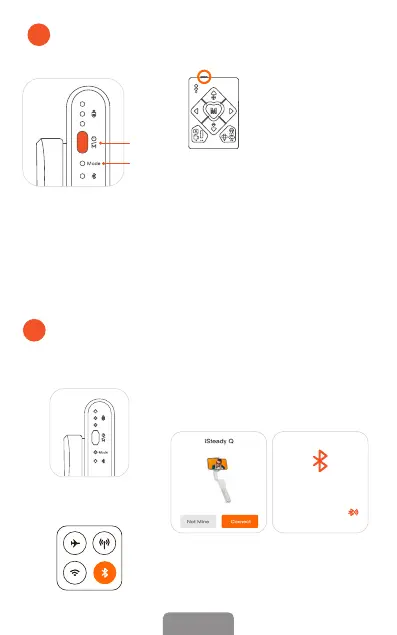
If the remote control is not working properly, please follow the steps
to pair the device again:
① Turn on the iSteady Q rst. Press the power button 7 times to enter the
pairing mode, and the working mode indicator light ashes alternately in
yellow and green.
② Then turn on the remote control. Pairing is complete in about 1 second,
and the iSteady Q's mode light stays on green.
*The remote control will
connect to the iSteady
Q automatically after
turning on.
Powering On:
Long press the power button for 3s
4
Turn On Remote Control
Turn the power button
on.
Power
Button
Working Mode
Indicator Light
Connect iSteady Q with Phone
Bluetooth in the App
5
③ Follow the prompts at the top of
Hohem Joy app homepage and click
'Connect'. Then connect the device with
an 'iSQ-' prex name in Hohem Joy app.
*Press iSteady Q power button 9 times
to cancel the Bluetooth pairing.
① Turn on iSteady Q
② Enable Phone Bluetooth
(Don't need to search device)
Choose the device
to connect
iSQ-xxxxxx
3EN













 To Next Page